Twitter Smurfing or Amplified Twitter Spamming

Last night, @mubix pointed out a certain phrase that would result in a re-tweet of the attached content on Twitter. The interesting thing that got me going on this was that the folks in question had established an application to watch the Twitter stream and forward any content that mentioned the phrase to their followers.

Tweet-bots are not new, and I have written about code that could be adapted for this purpose in the past. Bots exist on Twitter for a variety of actions, but thus far, seem to have been relegated to auto-following folks or sending simple data streams to the service.

However, this new type of bot (which there may be others, some even older, of which I was unaware) opens Twitter and its users to a new type of spam. The obvious issue is that you could bait spam content with bot-friendly phrases and get your message sent to a MUCH BROADER coverage of followers than your own. Malicious and rowdy behavior could follow and lot of harassment and criminal activity could be shared by all. Sure, as @mubix said, “this is the open relay of Web 2.0”. I agree, it is just a matter of moments before this is a widely used abuse pattern made all the more powerful by the underlying architecture of trust that is Twitter.

But, while new forms of spam mildly interesting to me, what was interesting was that as I toyed with the bot, I would get MULTIPLE COPIES OF MY MESSAGE RETWEETED. That’s right, sometimes it would take my single message and retweet it multiple times. I could not determine if this was a bug in their implementation or a desired behavior, but it happened. That led me to the idea that you could use these bots as amplifiers. You could, essentially, identify a list of retweeting bots and cascade them to create the modern day version of the smurf attack!

Scanning the Twitter stream for these bots could be pretty easy. You could quickly script and API-enabled tool to tweet dictionary terms or brute force character groups into you found a catalog of retweet terms, then cascade them to cause a “retweet storm” of some sort. Some controls over the process are implicit due to the 140 character max for tweets, but it is likely an interesting experiment. Properly tuned, it might also be a denial of service style attack or a way to spread very small spam messages far and wide.

It should be noted that much of this is theoretical. I did not, nor do I intend, to engage in this type behavior. But, to me, it certainly seems possible. I can see it being used as a platform for spam and social engineering. I also don’t see a lot of controls that could be put in place to stop it.

Let me know your thoughts on this possibility and feel free to leave a comment and disagree or explain why I am wrong. I think there will be some interesting and dangerous times ahead for all social networks and I don’t think Twitter will be an exception.

Thanks to @mubix of Hak5 for the pointer and discussion!

Operation Anaconda: Putting the Squeeze on the Insider Threat

Organizations today are facing increased pressure to combat the “insider threat”. More and more compromises are occurring from “inside the secure perimeter”. The financial crisis, exploding use of mobile technologies, surges in bot-net infections and capabilities plus a myriad of other conditions are only making the problem more urgent. This condition exists across market verticals and it doesn’t matter whether you are charged with protecting national secrets, bank account information, credit card data or whatever, the insider is still the most dangerous threat of all.

At MicroSolved, we know that this is the most serious issue facing organizations today. We know that the threat is real, that budgets are tightening and that all of us will have to do more with less. We also know that as the economy worsens, data thieves, bot-herders and industrial espionage attacks will become more common.

Today, we have begun a special project – called Operation Anaconda. The purpose of this project is to study the problem of insider threats, identify rational approaches to reducing the risk of insider attacks and develop additional products, services, knowledge-based documents, methodologies and public information to help all of us better protect our businesses, data and assets from threats that originate inside our organizations. We don’t claim to have all of the answers, and we know that the risk can never reach zero, but we dedicate ourselves to finding better solutions to the problem than those that are common today.

“Normally, these kinds of press releases and articles are done in conjunction with new products or service offerings,” said Brent Huston, Security Evangelist (and CEO) of MicroSolved, Inc. “but we wanted to let customers and organizations know that we have heard them when they told us what was hurting them. We heard them and we are committed to doing our part to making that pain go away!”

“Over the next several months, you will see a plethora of articles, tools, techniques, products, services and approaches targeted at solving this problem. Our company will lead the way in identifying what works, what doesn’t and how to reduce the insider risk AND the security budget at the same time. Solutions have to be out there, and together, we will find them.” vowed Huston.

MicroSolved is currently building a project plan and forming study groups around facets of the problem. If you or your team would like to participate in one of the public study groups or discussions, please feel free to contact us. We will make more logistics known as the groups firm up their agendas. Stay tuned to http://www.stateofsecurity.com for more information and please feel free to comment on Operation Anaconda or responses to the insider threat. Thanks for reading and feel free to spread the word!

The New Version of HPPE OR Whoop, Here It Is!

MSI is very proud to announce the release of HoneyPoint Personal Edition 2.00!

This update to the favorite product of many users, comes with all kinds of new power and flexibility, plus a greatly simplified and user friendly interface. Plus, it now supports Linux and Mac OS X in addition to Windows.

If you are new to the functions and capabilities of HoneyPoint Personal Edition, it basically serves up “fake” services on systems. These services then lie in wait for attackers and malware to probe them. When someone, or something, does interact with the service, all transactions are recorded, including their source IP address and timeline. Users are then alerted to the activity and can take defensive actions as needed. For more insight into how HPPE works, download the PDF we have designed for the product from here.

The new version includes many new features, including:

HornetPoints to leverage “defensive fuzzing” as an automated form of defense against hacker tools and malware

Plugins (just like HoneyPoint Security Server) to automate responses and allow user-designed/custom alerts, etc.

You can download the product from the link above for FREE and give it a try, then purchase a license when you are ready from the online store. Per seat licenses start at only $29.95!

Users with valid licenses of HPPE 1.XX can upgrade to the newest version and receive a new license key for the special upgrade price of $9.95 per seat by using the checkout coupon code “upgrade351” in the Digital River software store on the bottom of the page linked above.

Check out HoneyPoint Personal Edition for insight into just how fake applications can increase your security and help your users make better security decisions. If you would like a more enterprise-centric version or capability, we offer that and much more through HoneyPoint Security Server. Give us a call or drop us a line to learn more about it anytime.

Prepping for Release of HoneyPoint Personal Edition 2.00

Great news!

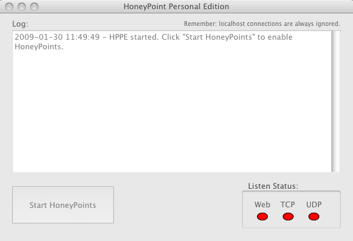
We are currently prepping for the public release of HoneyPoint Personal Edition 2.00 on Monday. The product has been through two closed Beta’s and a great period of pre-release testing. Thanks to all who helped with the testing and for all who contributed to our cause with product feedback. A special thanks to “DA” from a local organization who really held my feet to the fire on changes and interface updates. Hopefully, everyone will be pleased with the interface and features! (BTW – D – we kept the “lights”…<grin>)

Here is a screen shot of the new main interface on the Mac.

Snapz Pro X001.png

New features include:

HornetPoint defensive fuzzing (patent pending)

Plugins capability from HPSS

Public support for Linux and OS X in addition to Windows

and a few other goodies….

Also, this represents the beginning of the new line for HPPE. Development will remain ongoing on it and we have few more tricks up our sleeves. We are also working on HPSS 3.00 and will begin alpha testing of that new architecture very soon.

Stay tuned for the launch and for more details as they become public!

3 Links for Securing USB Drives

This project caught my eye. It is includes crypto and ease of use. It is called geek.menu and is based from the portableapps project. Installed and configured right, it makes an encrypted file system to protect your data if you lose the drive. It also allows you to easily configure some pretty powerful options around the apps you install. Check it out if you are a big thumb drive user.

This article is a great overview of risks from thumb drives. It should be a basic requirement for any user in the organization that gets provisioned one.

Lastly, for those of you want to make the most of security through obscurity to protect your precious USB thumb drive from discovery, check this article out about hiding your drive in the wall.

If you are both a thumb drive (USB drive) and a Windows user, you should probably read about the Conflicker malware. It is currently spreading wildly and can transit itself on USB drives. (Oooops, that was 4….)

Application Fuzzing Can Be Fun

One of the things my mother always said I was good at was breaking things. Apparently, as a young Evangelist, I chose to be an agent of entropy. I guess I always have been a huge fan of how things are continually breaking down and according to my mother at least, I did a lot to help them along the way. My mother just loves to tell stories about me taking things apart (clocks, radios, tv sets, lamps, my sister….) but I will save you from those, unless you choose to have coffee with my mother some day… 🙂

Today though, breaking software applications and studying how they fail has become a huge part of my work. I study how they fail, what causes the underlying issues, how those bad decisions could be exploited and what makes applications, devices and other things, tick. I am truly a student and professor of entropy.

You too can participate in these exercises. Tons of new tools are available to fuzz a variety of things, or you could choose to write your own fuzzers (this was a very worthwhile thing for me and led me to create “Defensive Fuzzing” which is the core of the HornetPoint defensive tools). (Patent Pending)

Here is a quick list of some books, papers and tools that you might want to explore if you are interested in playing with and learning from these techniques:

Fuzz testing – Wikipedia, the free encyclopedia

Ethical Hacking and Penetration Testing: Fuzzers – The ultimate list

Fuzzing – OWASP

Amazon.com: Fuzzing: Brute Force Vulnerability Discovery: Michael …

22C3: Fuzzing

Wfuzz – A Tool for Bruteforcing/Fuzzing Web Applications | Darknet …

These links should give you plenty of materials and links to tools. I would highly encourage any security folks to set up a small lab, try the tools and just learn a bit about breaking applications. You will be surprised at how easy it is and how much insight it will give you into information security. Give it a shot and let me know how it goes!

Toata Moves On To Additional Targets

The Toata bot army has moved on to scanning for additional web-applications to target/catalog. Medium levels of scanning began last night and continue today. The new targets are:

/mantisbt/login_page.php

/tracker/login_page.php

/bugtracker/login_page.php

/bugtrack/login_page.php

/support/login_page.php

/bug/login_page.php

/bugs/login_page.php

/login_page.php

/statistics

/bin/statistics

/twiki/bin/statistics

/wiki/bin/statistics

/wikis/bin/statistics

/cgi-bin/twiki/bin/statistics

/cgi-bin/wiki/bin/statistics

/cgi-bin/wikis/bin/statistics

Check your systems to see if you have these files, if so, check with the responsible projects for updates. Consider additional monitoring and/or removal from service. Investigations should be performed, exploitation timelines and goals are unknown. It appears that Mantis Bugtracker and Twiki are the likely targets. Exploit vectors have not been researched at this time, though Mantis has had known XSS in the login page previously.

Our HoneyPoint Internet Threat Monitoring Environment (HITME) is tracking the scans, sources and payload evolutions. SANS and other groups have been notified.

Win7, Linux and the Future of the Desktop OS

First of all, I think one of the major reasons that Windows 7 will not “kill Linux on the Desktop” is cost. Quite honestly, unless they are going to make Windows 7 free, it might be popular enough to stall the spread of Linux on desktops in the developed world, but the rest of the world (the parts of the world where the next IT explosion will originate from because it is not already saturated) can not afford to purchase the licenses and will continue to grow Linux as their leading OS. How important is Linux in the emerging world? Google for Linux news in Brazil, India, the Middle East and find out. Linux has become BOTH the server AND desktop OS of choice in many of those areas. In addition, schools are teaching Linux as part of the curriculum, so that means additional armies of Linux users will eventually come to bear on the market over the next decade. That is likely a force that can not be derailed.

Second, I believe in open source. While the majority of users could care less about source and will never tweak their code, there are a core group of code geeks who will tweak stuff and play with things. These geeks will create improvement in the Linux desktop experience. The experience has been slowly and steadily improving over time. Don’t take my word for it, go back and download a VM of an early Ubuntu release and compare it to today. Ubuntu and the other open source Linux-based OS projects CONTINUALLY release new enhancements and upgrades that impact user experience. What releases have there been since Windows 98? XP, Vista and now Windows 7. How many releases of Ubuntu and other desktop environments have there been since the release of Windows 98? Basically, ALL OF THEM. Not to mention the fact that Ubuntu and the Linux movement isn’t dead. Just as they incorporated and learned from the powerful features of OS X, they will learn from, emulate and advance the experience in the future based on Windows 7 too. They will likely release a lot of changes over the next couple of years, even as Windows 7 reaches its mass market plateau. Likely, as they learn from and advance beyond, the “stall” will end and Ubuntu and the Linux desktop “movement” will experience further growth. Face it, the model is just more efficient.
Third, the idea that users choose desktop OS solely by features is ludicrous. The majority make their choice based on a combination of ease of use, brand familiarity, stability and PRICE. In the developed world, price might have less to do with it, and it is likely that ease of use and branding “what I use at work and already know” is more likely the top considerations. Followed by stability and price. But even in those decisions, Linux has made a huge improvement and at such a rapid pace THAT IF IT CONTINUES AT THAT PACE, it will easily surpass Windows in terms of everything but branding by the time Windows 7 hits its plateau of saturation. Business adoption is the key here. The more businesses that put Linux on the desktop, the more people get familiar and begin to use it at home. Add to that equation the coming army of global young people that have been using Linux as their base of education and you see a rising tide. I think of Windows 7, not as death for Linux, but as the last Microsoft desktop OS that will enjoy HUGE MARKET OWNERSHIP. I see a continued splintering of the desktop into Windows/Linux and OS X, with easier sharing, integration and cross platform collaboration in the future. Far from death, I see a market splinter where we reach some form of mutual equity, give or take small evangelic groups of BSD/Other/Netware+/Blah blah blah that ebb and flow. To demonstrate my point – I am sure Guy Kawasaki has no plans to switch from OS X to Windows 7 (nor do I) and I am sure Theo de Raadt is NOT going to dump OpenBSD anytime soon to become a Windows 7 user. Hardcore zealots will likely remain, but the majority of folks in the new “global economy” are likely to keep non-Windows OSs alive for a long long time.
Next is the subject of netbooks. A lot seems to be riding on them in these OS wars. The problem is, I am just not convinced that netbooks will remain a dominant force in the market place. They are kind of on a “computing land bridge” between the hand held devices that will evolve from smartphones and the real functionality and usability factors of a notebook/laptop. Given the reviews I have read about netbooks, it seems plausible that they may get swallowed into the sea as both sides of the land bridge exert pressure on them. Most folks say that they are just too physically small and lack core power to be true notebook replacements, and as the smartphone evolution occurs, I just don’t see how this remains a viable long term form factor, even in the emerging world. Thus anything that bets on netbooks in the Windows/Linux wars seems like an unsafe long term bet to me. (Note, I just bought a Linux-based EEEPC to try, but have not used it yet.)
So as not to leave security out of this, a lot depends on how well Microsoft did with security in Windows 7. (I have not yet used it myself, so only speculation and review based opinions here.) They made significant improvements in Vista and additional improvements are likely here too. Linux continues to have security issues as well, though, they too seem to be improving (without any real metrics research on my part). All operating systems though, face high levels of additional risks from all of the add-on apps and software users use on desktops. Part of what I think will be important in the future of security of desktop systems is how they minimize the damages that a user level compromise can do. How do they prevent escalation? How compartmentalized do they keep data? What detective and responsive controls do they build in to help compensate for bad user decisions? These are key elements in the future of desktop operating system selection. We all know, no matter how many posters we hang and meetings we hold, users continue to choose the dancing gnome or hamster bowling over security. They will click on bad links, visit naughty sites and make incredibly bad decisions. We just have to be ready for them and identify ways to minimize the risk those bad decisions pose to our information assets. What OS platforms would seem more capable of rapid evolution here? It seems to me that the myriad mindset and crowd-source is much more likely to create improvements here in the short term, but you decide for yourself. Bottom line, the future of the desktop operating system is in “compromise tolerance”. You can quote me on that one.
So, there you go, my opinions on the future of Windows 7 as Linux desktop killer. Maybe you agree, maybe you disagree. Let me know. Maybe I am totally wrong and I will be completely surprised 10 years from now. I don’t think so, but it has happened before. As always, your mileage and paranoia may vary.

Three Things You Can Do To Improve Home PC Security “Beyond the Basics”

Just about everyone knows that home networks and machines need a firewall. Most home PC users also know they need to run anti-virus and anti-spyware tools. Heck, most systems come with these things pre-installed these days. Saavy users even know how to enable the Windows or Linux auto-update feature and go a long way towards to making their machines more protected against attacks.

But, I wanted to remind home users of three “Beyond the Basics” they could do to really help improve home system security. Ready? Here is the list:

1. Install a software update tool like Personal Software Inspector from Secunia. This tool checks your system for various software packages that you may have installed. Have an old version of Java runtime or an out of date version of Flash Player? If so, this tool will not only find it and alert you to it, but in most cases, give you a direct download link to the update. Since many of today’s exploits are against ancillary software packages, this step will help take you well beyond the basic security of most users!

2. Make sure that your home wireless network is secure. If you can, make sure you are using something more than WEP for wireless encryption. If our router or access point doesn’t support more than WEP, or worse yet, doesn’t have any wireless security enabled at all, then you have a serious problem. Take a few minutes and check out this site for more steps on securing your home wireless network.

3. Change from IE to a different browser. Internet Explorer (IE) if a MAJOR TARGET and a source for a myriad of compromises. You can help protect yourself by switching to Chrome, Opera, Firefox, Safari or some other alternative browser. While each of these browsers may also have their share of security issues, none of them represent as a wide and large of a target as IE. Google “alternative browser” for a plethora of browsers for your operating system.

There you have it. 3 fairly easy ways for home users to go “Beyond the Basics” to increase the security of their computing environments. There are a ton more ways to tune the user experience and reduce risk. A bit of Google searching and staying current on various security topics is a great way to start. Be safe out there!

Correction: Twitter API Does Have SSL Support!

Previously, I wrote about the supposed lack of SSL/HTTPS support in the Twitter API. However, thanks to Tony for pointing me in the right direction. I DID find support for HTTPS in the API and I have since updated my own tool (released by me as freeware and not associated with MSI) to use it.

For those of you who are interested, you can find the new release of TweetCLI 1.10 that supports updates via HTTPS here:

Windows, Linux, OS X versions.

Thanks to everyone that uses it and feel free to let me know your thoughts and feelings on twitter @lbhuston.

The new version should work as a simple replacement in the previously released HPSS plugin.

You can also subscribe to a “bad touches” feed from some of our Internet exposed HoneyPoints around the world. We are publishing source IP and destination ports only currently, as we work on ways to publish the payloads we get in some manner as well. More on that in the future. The current “bad touches” feed is @honeypoint.

Apologies to twitter for the SSL issue. Additions to the API documentation to show HTTPS examples as the default would be much appreciated.

Hope everyone is having a wonderful holiday season. Thanks for reading and we look forward to more infosec news and research in the future.