MicroSolved, Inc. Announces the Immediate Release of NED Alpha

That’s right! No longer do you have to spend days and nights worrying about the state of your network. No more fretting about your partners, security or other traditional concerns.

Today is the dawn of a new day for network engineers around the globe!

Want to know how your network is? ASK YOUR PACKETS!!!!!

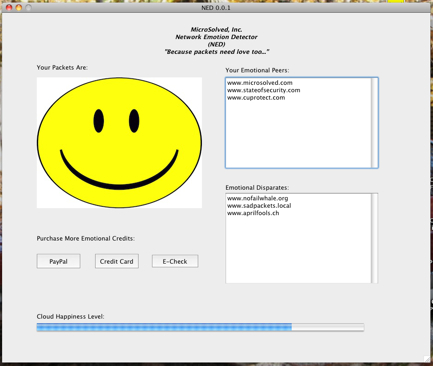
MicroSolved’s revolutionary new product, code named, NED or Network Emotion Detector, will continually update you on the emotional health of your packets. If there’s a network problem, a security breach or if you happen to fall out of compliance with the Pennsylvania Concrete Institute’s (PCI) standards, your NED will immediately alert your team to the lack of happiness being experienced by your packets as they traverse the various public and private networks!

wpid-NEDShot.82HVMJmrrSV4.jpg

Even more powerful than the executive dashboard, the GUI can be operated near the data center hallway window, so passing executives can quickly identify the happiness quotient (TM) of your network. When they see NED smiling, they will know you are doing your job well. When NED is unhappy and your packets begin to show signs of sadness, they can quickly and easily purchase additional “emotional credits” through the handy interface. These emotional credits (ie: money) make your packets happy and joyous as they traverse the Intertubes.

If that were all NED did, it would still be the most powerful network emotional monitoring tool on the market, but we even take it one step further! Using NED’s soon to be copylefted capabilities, we create emotional tunnels for your packets to move back and forth with your peers. These “Virtual Private Hugs” (VPH) allow you and your business partners to mutually enjoy all the power of NED and emotional credits together. You can easily monitor the happiness of your partner’s packets and those that show emotional disparity, making VPH even more important for those folks. Lastly, NED features a peer-to-peer network monitoring mechanism that allows you to closely monitor the overall happiness level around the Cloud. That’s right, MSI is the first in the world to create Happiness as a Service (HaaS)(TM)!

Act now and you can get your own copy of NED for Windows FREE for a limited time. Download from here and start enjoying the ease and joy of NED from MSI. We hope you enjoy NED, “because packets need love too…”

Happy April Fools Day from your security partners at MicroSolved, Inc. We hope it made you smile. BTW – The download really runs. Windows only, for now…. :p

Mind Map Your Way to Information Security

In order to know what your organization needs for security, you first need to define what you have. Many times, this task of defining and organizing can be intimidating, especially if it has been a long time since someone did it. However, with a mind mapping tool, such as Inspiration or the free tool, XMind – pulling together your assets will come together quickly.

It is important to define a “Who, What, Where” when assessing your environment. Who has access? What programs are running and on which machines are they running? Where does the data reside that could be compromised? How is the environment secured?

Creating a map will allow you to easily follow relationships so you will then be able to assign tasks accordingly. Also, when you create a map, it will visibly reveal relationships that previously were unseen or unnoticed.

As the various network relationships are mapped out, it will be easier to see what would be affected in your enterprise should a data breach occur.

If Server A is compromised, incident responders can quickly assess what other components may have been affected by reviewing its trust relationships. Having a clear depiction of component dependencies eases the re-architecture process allowing for faster, more efficient upgrades. Creating a physical map in accordance with data flow and trust relationships ensures that components are not forgotten.

Finally, categorizing system functions eases the enslaving process. So mind map your way to security and reach your destination of a safer enterprise.

PCI Scope Reduction — Why not?

Bill Mathews, our Guest Blogger, is co-founder and CTO of Hurricane Labs (www.hurricanelabs.com), an information security services firm.

Limiting your PCI compliance scope can be beneficial in several ways. First it minimizes the amount of assets where PCI is applicable, but primarily it limits the number of places you can find credit card data on your network. The latter is the most important. PCI isn’t some huge, scary thing you should run away from and scope reduction won’t solve all your problems – but it can get you to a point where you understand what is really happening on your network. There are a few caveats and “gotchas” you will encounter along the way but the journey is worth it.

In order to reduce your PCI scope you must first classify your assets. This is much harder than it sounds for most organizations. You have to figure out what data goes where and how it flows. This mapping is crucial for proper scope reduction.  This type of awareness not only helps you with reducing your PCI scope but also helps you with general troubleshooting. Ultimately it will improve your process, It’s a win-win. If you don’t know where the data is then the bad guys will help you find it.

After you’ve happily mapped out your data flow and understand where things are and why; then you can move  to segmentation. Segmentation essentially allows you to split up your network into smaller chunks. This splitting up of your network makes implementing our next goal that much easier. Our next goal is implementing the principle of least privilege which essentially says, “if you don’t need access, you don’t get access.” I’ve often argued that proper implementation of least privilege will not only solve nearly all your compliance issues but goes a long way in solving all your security woes as well. Notice I said “proper implementation.” Many implementations of it are flawed. Following up this segmentation with a good access control test is very important, it’s one thing to have controls. It’s quite another to have them properly implemented.

By no means are these the only things you should do; but in my opinion they are crucial for reducing your risk. Accomplish these few things and you’ll be well on your way to both reducing your PCI scope and having a well-balanced security posture on your network. Overall it is worth the effort it takes.


Updated PHP RFI Slides with Code Examples

Thanks to the folks who joined us for this afternoon’s PHP security talk about modern RFI attacks, how they work and what attackers are up to. If you are interested in the new slide deck, you can find them here: http://bit.ly/bT2TF7

If you would like to attend a virtual presentation or book one of our engineers to give the talk for your development team (either virtually or face to face), drop me a line and let me know. The talk is very strong and lends itself well to understanding how PHP RFI has become one of the most common attack vectors in use to spread malware, bots and other illicit activity.

MSI Says: Know Yourself – Unlock a DoS by Asking: Who Has Access?

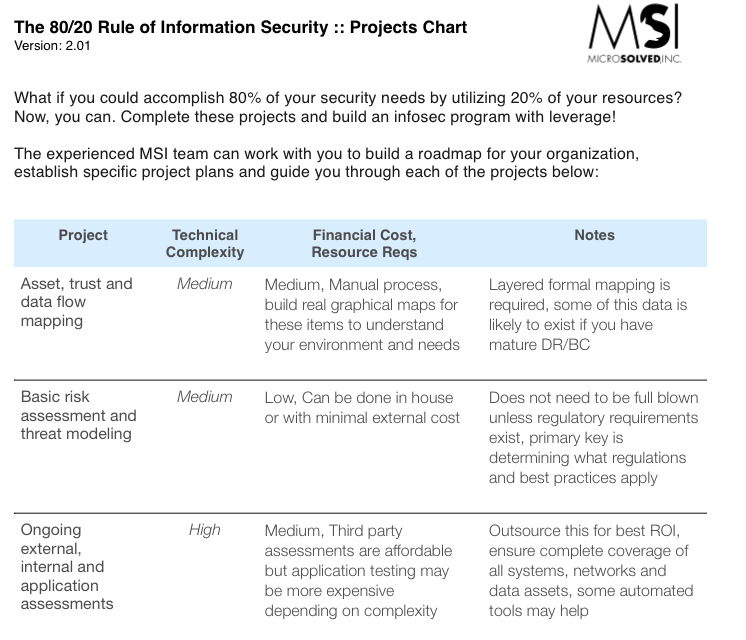
Recently, a client was experiencing interesting issues during a scheduled assessment of their internal networks around the world. It appeared as if the assessment was causing a Denial of Service and affecting a specific location due to automation controllers within their environment. An interesting anomaly, considering these controllers are deployed at other locations. However, only one specific location seemed to be having issues. The DoS was even more intersting from our perspective because it was literally locking the doors to the facility in question! We weren’t testing for this vulnerability; but found it was a side effect of an internal assessment we completed to provide metrics and action plans according to our 80/20 guidelines. These are exactly the type of issues that help our clients understand the value of these ongoing assessments.

So what’s the big deal? Let’s say an employee just got nagged about their three 15 minute smoke breaks every hour. Let’s also say he has knowledge of the environment and/or experience with a vulnerability scanner. Technically, he could lock the facility down while searching out possible ways to retaliate and his employer wouldn’t even know it. Worse yet, those who know this flaw exists could exploit it at will with a few keystrokes from their workstation. Not a good thing!

Controllers and sensors of similar types are used in businesses around the globe. This case study provides another point for enclaving in any environment. The overall threat could have been reduced significantly simply by segregating traffic. There are few reasons these specific hosts should be accessed by most workstations. Fortunately, the issues didn’t last long. After some communication with the manufacturer, a firmware update was released that appears to have resolved the issues previously experienced.

So the bottom line is know your environment. It is the foundation for our 80/20 Rule for Security (link) and can lay the groundwork for discovering where vulnerabilities may lurk. Forewarned is forearmed.

Another Close Up with Anti-Virus Tools

In the last few days, the folks that make sub7, a pretty common and well known Windows back door/remote access tool, released a new version. You can find more about the capabilities of this application here.

Since I have been doing a bit of research lately that has included anti-virus and their often abysmal detection rates, I decided to test this new version of Sub7 against the VirusTotal scanning base. You can find the results here.

As you can see, the detection rates for this “remote access tool” is just under 55%. This time, all three of the major enterprise vendor products catch the malware nature, but the most common free tool, AVG, misses it entirely. As such, organizations are likely protected, but a vast many home user and consumer machines will be unable to detect the install of this very common attacker tool.

As with many of the posts about this in the past, I simply point this out to folks to help them come to an understanding of the true levels of protection that AV offers. Many people see it as a panacea, but clearly, it is not. AV is a needed part of defense in depth, but additional controls and security tools are required to create effective detection for malware infections.

Catching PHP RFI Infected Hosts with Log Greps

I posted details here along with a current list of PHP RFI drop hosts that are being used to compromise web servers with vulnerable code.

You can use the list along with grep/regex to scan your outbound web/firewall/proxy logs for web servers that are likely infected with bot code from the scanners using these sites.

The link to the list and such is here: http://hurl.ws/cf5s

This data was entirely generated using captured events from the last several weeks by the Honeypoint Internet Threat Monitoring Environment (#HITME). You can find more information about HoneyPoint here.

If you would like to learn more about PHP RFI attacks, please feel free to drop me a line, check out @lbhuston on Twitter and/or give my RFI presentation slides a look here. If you would like to schedule a presentation or webinar for your group on PHP RFI, HoneyPoint or PHP/web application security testing, please give us a call at 614-351-1237 x206.

As always, we appreciate your reading State of Security and we hope you make powerful use of the information here.

AV Versus Old and New Bot Code

Today, in my research work on the data from the HoneyPoint Internet Threat Monitoring Environment (HITME), I uncovered an old (2008) piece of PERL code embedded inside a PHP bot-net infector client that I discovered from the HITME logs. This perl code was included in the PHP bot as a base64 string, which is quite common. The PHP code unencodes the perl script and drops it on your hard disk when the PHP bot herder wants to have a reverse shell to execute commands on your system.

In this case, the placement of the PHP bot was via PHP Remote File Injection, so the malware would be placed on your victimized web server. For enterprises, that means that if your web server got hacked in this way, then you would expect your anti-virus to be the last line of defense for protecting you against this malware.

Here’s where it gets weird. AV detection was absolutely horrible for both of these pieces of code. For the perl backdoor, the detection rate at VirusTotal was just 55% and that code has been known for years. For the PHP bot, in its entirety, the total was even worse with detection rates of just 46%.

Even worse to me than the percentages are the vendors that caught vs missed these simple scripts. Check the list for your AV vendor, because I was shocked to see that some of the big name, enterprise class products missed these forms of malware entirely. Some of the small freeware vendors we might expect to miss some of the malware targeted at servers, but I would think we should expect more from the enterprise AV vendors, especially if you read the hype of their marketing.

Now, a lot of folks are going to say, of course AV misses stuff. There’s polymorphic code out there, Brent, and a lot of the bad guys have really spent a ton of resources to obfuscate and modify their code on the fly. I agree with this. But, in this case, we are not talking about custom designed binary code with trapdoors, memory injection, polymorphism or anything of the like. These are simple script files, in plain text. Neither of them is obfuscated. You can see the PERL back door code for your self. I just published it on my Posterous blog for supporting materials. I think after you check that out, you can see that the “complex malware code” argument, just doesn’t hold water in this scenario.

The bottom line is this, your AV software and other mechanisms that are heuristics based are likely not doing the job of protecting you that you might imagine. Just something to keep in mind when you do your next risk assessment, threat model or the like.

Thanks for reading!

What Helps You with PCI?

Yesterday, at RSA much press attention was paid to a metric that 41% of all organizations tested needed temporary compensating controls to meet even the minimum security provided by PCI DSS compliance.

This led us to this discussion. If so many organizations need temporary controls to do the minimum, then what controls, in your experience, are the most worthwhile for those struggling to meet PCI?

Please leave a comment and tell us what controls you find most useful, easiest to leverage and worth the investment for PCI compliance.

As always, thanks for reading and we look forward to your input.