Remote Access Challenges in Pandemic Planning

One of the tools that organizations are leaning on for pandemic responses is remote access to computing systems. Technologies such as VPNs, Citrix servers, terminal servers and other forms of remote access are widely appearing in the plans we are reviewing and are among the most discussed items in the planning sessions we have been holding with clients.

However, there are some issues that are emerging around many of these tools. To start, they can introduce a great deal of risk to the IT infrastructure and security posture if they are not deployed and managed properly. For example, blindly exposing terminal services, SSH and other remote access technologies to the Internet is a common path to compromise. Attackers are very good at finding these services and exploiting them, either with technical exploits or through credential discovery via social engineering, browser attacks and/or brute force. These exposures are often present in the major data breaches and serve as a danger point for organizations.

Blindly exposing remote access mechanisms such as these is usually a pretty bad approach. A better approach is to leverage a stronger access method such as VPN. VPN technologies are typically built around stronger security platforms and with greater security in place to protect the users and the organizations they serve. They will require a bit more “care and feeding” than blind port forwarding deployments, but they are a much safer solution for remote access to your environment.

VPN technologies also do not need to be expensive. Projects like OpenVPN and other open source approaches have reduced the costs to deploy VPN access to the lowest of levels. Basically, the cost of hardware and the human resources to install and support the system are the only costs involved. Many tools exist in this family and more are emerging every day.

Another significant issue to consider when looking at the remote access capability of your pandemic plan is capacity. More than likely, your solutions were implemented, as are most, with the idea that a somewhat limited subset of your entire employees would be using the access tools at any given time. That may not be the case in the event of a pandemic. The number of employees accessing the system may exceed your current designs and testing, so be sure you think through how you can expand that capacity, rotate shifts or use other techniques to plan for the impact from the surge in demand.

Lastly, be sure and test these mechanisms before you need them. Things in life often don’t work as planned the first time around, so practice for pandemics before one arrives. Have dedicated work from home days, plan for teams or lines of business to practice their plans and create lessons learned feedback loops to capture issues and work on minimizing them.

Preparation will likely pay off, both in the continued operation and bottom line of your business and in the reduction of panic should a pandemic every rear its ugly head. Thanks for reading, and let us know if we can assist you in planning or testing with pandemics in mind. Please, stay tuned to the blog for more information on the possible H1N1 pandemic, pandemic planning and other security issues that might emerge. At MSI, we are dedicated to helping you establish the means and mechanisms to keep your business, your business…

Official Press Release: MicroSolved Releases HoneyPoint Security Server Console 3.00

COLUMBUS, Ohio August 19, 2009 – MicroSolved, Inc. is pleased to announce their latest HoneyPoint Security Server Console 3.00 is available for organizations, offering faster performance and more detailed reporting.

HoneyPoint Security Server Console 3.00 provides cleaner performance and stability,superior memory handling, optimized database, and faster, more enhanced reporting. HoneyPoint Security Server Agent will also experience an upgrade and version 3.00 will be available in the Fall. Current users can upgrade via the FTP site or call support for assistance.

“The 3.00 release continues the tradition of evolution for the HoneyPoint family,” said Brent Huston, CEO and Security Visionary for MicroSolved. “It clearly reinforces the value and capability of applying bleeding-edge thinking to the information security problem.”

Huston developed HoneyPoint Security Server three years ago, motivated by a keen desire to break the attacker cycle. Huston concludes, “Attackers like to scan for security holes. HoneyPoint lies in wait and traps the attacker in the act!”

If youʼd like more information about this topic, or would like to schedule an interview Brent Huston, please email Mary Rose Maguire at mmaguire@microsolved.com

HoneyPoint Security Server Console 3.00 Released

This is an informal notice to the readers of the blog and the Twitter feed that we have made the 3.00 console release available on the FTP site. You can get the latest version using the credentials shipped with your original purchase.

Installation and upgrade is through the normal processes. Please let us know if you have any questions. A formal announcement and press release will be forthcoming tomorrow, but we wanted to give our readers a chance to grab the code before the onslaught begins. 🙂

Thanks to everyone who participated in the 3.00 testing and we are very happy to make this available. The next release will likely be the 3.00 version of the newly consolidated HoneyPoint Agent and Configuration Utility. More on that in the near future!

ABC News Reports Shortage of H1N1 Vaccine

ABC news is reporting that a shortage of the vaccine for H1N1 is looming. This is mostly due to the virus being slower to reproduce in the chicken egg medium used to grow the viral load for the injections.

Health care workers and children will receive the bulk of the available vaccine when it is available, likely beginning in October.

Since most of the work force are not children or health care workers, this leaves quite a large population that should be planned for absences from work. Many people will become ill from the virus or be required to miss work taking care of others who are ill from the virus if the current trends continue.

While not ill, your organization should provide these workers a mechanism for working remotely, if possible. This not only allows you to continue your business operations, but also allows those with exposures to the virus to “work from home” limiting their contact with the rest of your team and the public in general.

This is the basis for the pandemic planning that is required and that we have been discussing in previous blog postings.

All businesses are urged to consider pandemic planning a priority and to consider creating, testing and revising their current plans.

Pandemic Planning Coverage

Over the next few weeks, we will be presenting some blog coverage and a couple of public talks about pandemic planning. Given the current information on the H1N1 virus and the outlook from the CDC & WHO, we feel this to be prudent. I wanted to publish this post to draw your attention to the situation and to reinforce the idea that pandemic planning is the exact process to avoid PANIC.

Planning for situations is a responsible, mature act. Panic is a dangerous, and often disastrous response to a problem. Our goal, over the next few weeks is to get you thinking about pandemic planning. While the H1N1 threat may or may not immediately emerge as a significant issue, planning for such events is, in our opinion, a wise investment.

As we move forward in discussing pandemic plans, it will be in the flavor of disaster recovery and business continuity. Hopefully, you already have a basic plan, and this will serve as more of thought points for evaluation and consideration. If you do not yet have a plan, then please use this coverage as a basis for developing one.

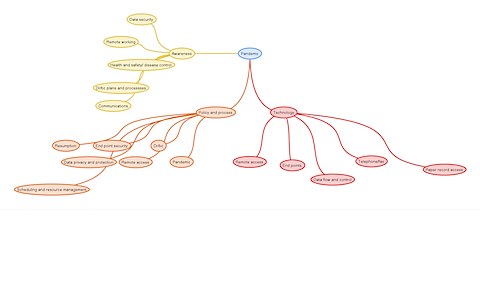
Our framework will be around the primary 3 areas: Technology, Policy and Process and Awareness.

Here is a quick and dirty mind map of the topics we will be covering.

PandemicRough.png

Keep your eyes on the blog for events around pandemic planning and related topics. As always, feel free to let us know your thoughts and comments, as well as any helpful tips you would like to share with others.

Updated Note: Thanks to WordPress for making the above graphic unusable, even when saved. You can download the png image at full (readable) size from here.

On Black Tuesday, RDP Shines

Microsoft patched two privately reported vulnerabilities for RDP today. Yes, RDP. No, not the server, the client. One of the most widely used tools by Windows system administrators is vulnerable to remote code execution. Not good. There is good here though, in order to exploit this vulnerability the user of an RDP client must be tricked or social engineered to connect to a malicious RDP server or a specially crafted website. Also, Microsoft is not aware of an exploit for this vulnerability at the time of this writing. It shouldn’t be long though, as we all know the more popular the software, the more likely there will be an exploit for an existing vulnerability.

Users currently employing automatic updates should see this issue resolved during their next update. For those of us who cannot have automatic updates enabled, we’d recommend getting this patch in during the next maintenance window.

Book Review: VMware vSphere and Virtual Infrastructure Security

VMwarevSphereandVirtualInfrastructureSecurity
VMware vSphere and Virtual In!astructure Security: Securing the Virtual Environment (Prentice Hall) is written by Edward L. Haletky with the assistance of our friend, Tim Pierson. Another friend, Christofer Hoff, wrote the Forward. Pierson is currently working with us to integrate the power of HPSS in his security courses. (Very cool!) Hoff is a forward thinking security professional who is respected among his peers. The book immediately confronts the security issue with VMware. Chapter 2 presents the “anatomy of an attack.” Attack perspectives are from a Pentester, a hacker, a script kiddie, and a disgruntled employee.

Chapters 6, 7, and 8 focus on deployment, management, operations and virtual machine security. Some common operational issues are discussed to protect and audit your environment. Chapter 9 is especially useful, posing real-world questions discussed on the VMware VMTN Communities forums. The latter part of the book features a patch for Linux, a security hardening script, and an assessment script output. A reading list and links are included in the final section. A great addition to your IT library from Amazon for $40.56.

Your Next Security Threat May Not Involve Attackers

I was astounded when I read this article that includes a 2 BILLION estimate on the number of H1N1 cases that the WHO is expecting. Even worse, at 30% of human population on the planet, many are calling that number conservative. Some members of the medical community say that 45-50% may be likely!

In either case, the good news is that SOME vaccine is likely to be available to those in the Northern Hemisphere before Autumn arrives. The bad news is that there will likely not be an abundance of it, and that means some will not have access.

This is where the DR/BC planning comes in. By now, you probably have heard a little bit about pandemic planning and hopefully have created processes for remote working, containing illness and ensuring that you can operate with reduced staff. If you haven’t done this yet, NOW IS THE TIME to get this started.

If you do already have a plan, now might be a good time to do some rudimentary testing. Maybe declare a couple of reduced staff days, test the load on the VPN and remote access servers and such. This testing effort will likely reveal a few holes in these plans, but it is much better to learn about them and mitigate them now than when the real thing is going on.

Clearly, from the evidence presented by the WHO, this is something we should be paying attention to. Those who lack the focus or resources to take it seriously may well find themselves in troubling times when the weather turns colder and folks in the office begin to sneeze….

Book About PERL for Problem Solving

One of the essential tech skills I am always on the prowl for is a way to use technology to solve a complicated problem. Of course, one of the most useful ways to do this is to learn and apply simple programming skills. PERL is one of those scripting languages that is easy to get on a basic level, but it offers so much additional capability and complexity that it would take a literal lifetime to truly “master”.

But, the wonderful thing about PERL is its amazing capability in simplicity. You can take a few basic PERL legos and really make some wonderful things to increase the ease of your life and work. This book, <a href=”http://www.secguru.com/books/wicked_cool_perl_scripts_useful_perl_scripts_solve_difficult_problems” target=”_blank”>Wicked Cool Perl Scripts</a>, is chocked full of examples of just how to apply some basic PERL to real world problems. Check it out if you are a fan of PERL and want to automate things from work, to your news and RSS feeds to your World of Warcraft gaming. PERL is not only easy and cool, but also fun!

Egress Filtering 101

Egress filtering is one of the most often underestimated defenses today. We continue to see organizations that have not yet deployed strong egress filtering, which is one of the most effective controls in defending against and detecting bot-nets. Without it, outbound connections are usually a mystery to the security team and identification and interception of malware outbound command and control channels are unlikely.

To add fuel to the fire, egress filtering is cheap (you probably already have a firewall or router that can do it) and easily managed once configured. Sure, establishing the political will to see it through it can be tough, but given the threat levels and attacker techniques in play today, it is a highly critical effort. You start by examining what outbound ports you allow today, then close all ports outbound and allow only the ones that have a true business case. Once you have choked down the traffic, consider implementing application proxies where possible to further strengthen the egress traffic and rules.

Once you have appropriate proxies in place, don’t allow any outbound web traffic or the like from any host but the proxies. No outbound DNS, chat protocols or the like from the desktop world to the Internet. The more you choke this down, the easier it is to protect the desktop world from simple issues.

Egress filtering is just too easy to ignore. The level of protection and the capability to monitor outbound attempts to break the rules once in place are powerful tools in identifying compromised internal hosts. Best practices today truly includes this requirement and those interested in truly securing information should embrace egress filtering as soon as possible.

If you want help with such a project or want to learn more about scoping egress filtering in your network, let us know. We would be happy to help you!