Speed Bumps and Information Security

On Twitter, Brent Huston (@lbhuston), CEO and Security Evangelist, posed this question: Does the introduction of speed bumps into a neighborhood reduce overall burglaries and  petty crime?

There was some speculation that it may not impact burglaries but could impact violent crime. An Oakland study showed that bumps decrease the casual traffic pattern by 33%. As it turns out, speed bumps decrease speeding by 85%. Less casual traffic means less scouting for break-ins. So, speed bumps make you more secure. A study done by the Portland Bureau of Transportation shows a full examination of the impact of speed bumps.

Although speed bumps may deter criminal traffic, there’s a good possibility that the criminals just head toward an area that doesn’t have speed bumps. The same can be true with hardening your home security. If you take precautions and make your home more difficult to enter, the burglar may instead target one of your neighbor’s homes.

Although there may be instances where criminal activity increased due to speed bumps, those are not common and serve as the exception rather than the rule. Still, logic dictates that with more controls comes a decrease in crime. (Less speeding, less petty crime.)

And if you do find yourself in a neighborhood with speed bumps, slow down. They can sometimes break the cars of speeders

This leads us to the next question: What do speed bumps tell us about information security?

Can minor annoyances to attackers increase our overall security? What kind of speed bumps can you think of that might help?
 
Of course, honeypots, especially those that do misdirection and black holing are good cyber speed bumps. Curious about using honeypots as your deterrent against attacks? Give us a call and we’ll show you how to put a few of these “speed bumps” into your network. We promise they won’t damage your alignment!


Know Who’s Out to Hack Your Credit Union


One of the biggest questions we get when we talk to Credit Unions is about threats. They often want to know who might be targeting Credit Unions and how they might get attacked. Based on these questions and how often we hear them, we have come up with a way for you to actually get some metrics and intelligence around your own threat postures.
 
I am proud to introduce a new short-term service for Credit Unions that leverages our patent-pending HoneyPoint technology in a useful, powerful, easy and affordable way.  The MSI Threat Posture Analysis is a new service that does just that. The service is comprised of the following phases:
 
1. Initial consultation – our teams work together to plan for a quick, safe and easy deployment of our HoneyPoint technology; this initial discussion helps us decide if we are going to leverage a HoneyPoint hardware, software or combined deployment and exactly what we want to emulate for metrics gathering; the length of the metrics gathering mission is also determined (usually 90 days).
 
2. Pricing and contracts – based on our work together, fixed bid pricing is provided for the analysis and monitoring.
 
3. Delivery of technology – our teams work together to deliver and install the technology; MSI monitors the deployment remotely back at our NOC.
 
4. Analysis – MSI performs analysis of the data gathered; generating a set of reports that details sources of attacks, general estimated capabilities, attack frequency and other metrics designed to feed real world threat data into the Credit Union’s information security program.
 
5. Decommission and return of the technology – our teams work together to uninstall the technology and return any hardware to MSI. 
 
6. Follow on Q&A – for 3 months, MSI will continue to be available to answer questions or discuss the data and metrics identified in the analysis.
 
It’s that easy. You can quickly, easily, safely and affordably, move from blunt estimations of threats to real world data and intelligence. If you would like that intelligence as an ongoing basis, give us a call and we can discuss our managed services with you as well. 
 
So, if you’re tired of doing risk assessments without real numbers to back up your data or if your team has hit the maturity point where they can use real world metrics and threat source data to create firewall rules, black holes and other dynamic defenses, this approach can give them the data they are hungry for.
 
If you would like to discuss the analysis or hear more about it, give your account executive a call or reach out to me on Twitter (@lbhuston). I look forward to talking with you about the successes we are seeing.
 
As always, thanks for reading and stay safe out there!

Quick Use Case for HoneyPoint Wasp

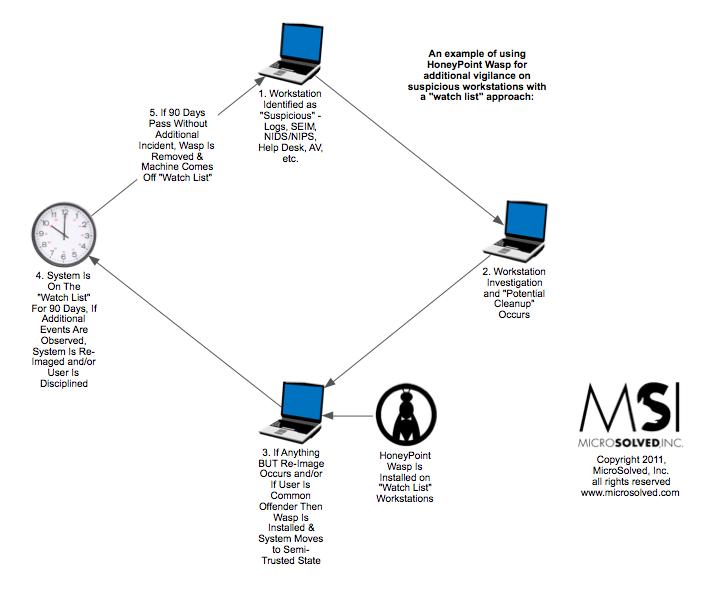
Several organizations have begun to deploy HoneyPoint Wasp as a support tool for malware “cleanup” and as a component of monitoring specific workstations and servers for suspicious activity. In many cases, where the help desk prefers “cleanup” to turn and burn/re-image approaches, this may help reduce risk and overall threat exposures by reducing the impact of compromised machines flowing back into normal use.

Here is a quick diagram that explains how the process is being used. (Click here for the PDF.)

If you would like to discuss this approach in more detail, feel free to give us a call to arrange a one on one session with an engineer. There are many ways that organizations are leveraging HoneyPoint technology as a platform for nuance detection. Most of them increase the effectiveness of the information security program and even reduce the resources needed to manage infosec across the enterprise!

MicroSolved’s HoneyPoint Wasp Nominated for TechColumbus Innovation Award

MSI is proud to announce their nomination in the annual Innovation Awards, sponsored by TechColumbus, which recognizes outstanding achievements in technology leadership and innovation. HoneyPoint Wasp has been nominated for Outstanding Product for companies with 250 employees or less. 

We’re thrilled to be nominated. We believe our HoneyPoint Wasp is an excellent product, helping our clients battle bots and malware on their desktops. For more information, please read our press release and visit our HoneyPoint webpage. We look forward to the Awards Dinner in February 2012. Good luck to everyone who has been nominated!

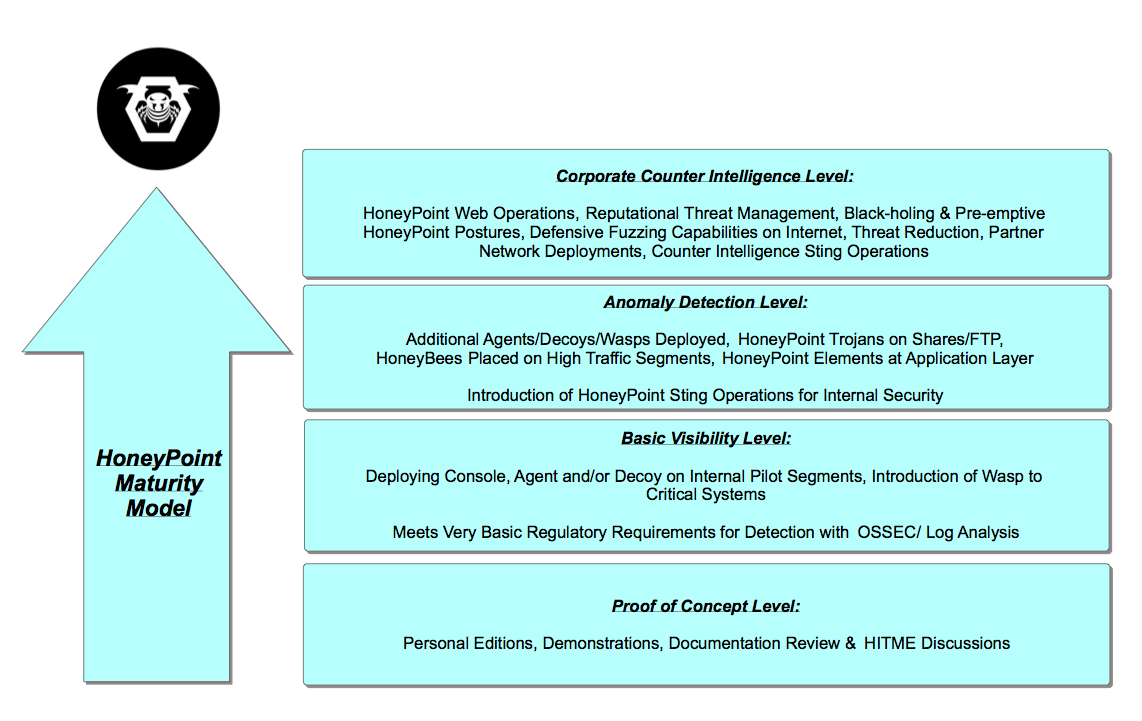
HoneyPoint Maturity Model

Many folks have asked for a quick review of the way HoneyPoint users progress as they grow their confidence in the product suite and in their capability to manage threat data. To help answer those questions and to give folks a quick way to check out how some folks use HoneyPoint beyond simple scan/probe detection, we put together this quick maturity model to act as a roadmap.
If you are interested in hearing more about a specific set of functions or capabilities, give us a call or drop us a line. We would be happy to walk you through the model or any of the specific items. HoneyPoint users, feel free to engage with support if some of this sparks a new idea for how your organization can deepen your own HoneyPoint use cases. Thanks for reading and stay safe out there!

MicroSolved Releases HoneyPoint Special Edition: Morto

We are pleased to announce the immediate availability of a special edition of HoneyPoint that is designed to help organizations identify hosts infected with the Morto worm that is currently circulating.

HPMorto works like this: It opens a TCP listener HoneyPoint on port 3389/TCP (check to make sure that port is NOT in use before running HPMorto). Once in place, the tool will report the source IP of any systems who attempt to connect to it. Identified sources should be investigated as possible infected hosts.

This version will only listen for 3389 connections and will only function through February 28, 2012.

Versions of HPMorto are available for FREE download for:
Windows 
Linux 
Mac OSX

Give it a try and we hope that this tool help folks manage the problems being caused by Morto around the world.

Audio Blog: Brent Huston – HoneyPoint Security Server Manifesto Part Two

We continue our interview with Brent Huston as he answers a few questions about HoneyPoint Security Server, and HoneyPoint Agents.

In this installment, you’ll learn:

  • What HoneyPoint Agent is and its role in the suite
  • How information techs are using HoneyPoint
  • How can people use Agent with DNS and blacklisting, and why it’s significant
  • What HoneyPoint Decoy is and how it is utilized in an environment
  • The three different “flavors” of HoneyPoint Decoy

Click the link to listen or right-click to download it.

MSI HoneyPoint Featured on Virtualization Security Podcast


Brent Huston, CEO and Security Evangelist of MicroSolved, Inc., was recently a guest for the popular podcast, “Virtualization Security Podcast.”

Brent talked about HoneyPoint Wasp and discussed with other panelists how honeypot technology can help an organization detect real attacks and also the legal ramifications of stealth monitoring.

The Virtualization Practice also featured HoneyPoint in their recent post, “New Virtualization Security Products Available.”

The podcast panelists include;

  • Edward L. Haletky, Author of VMware vSphere and Virtual Infrastructure Security: Securing the Virtual Environment and virtualization security analyst, as Moderator.
  • Michael Berman, CTO of Catbird Security
  • Iben Rodriguez, Independent Virtualization and Security Consultant and Maintainer of the ESX Hardening Guidance from CISecurity

Click on the player below to listen. To listen on iTunes or download the MP3, go here. Enjoy!

Horrible Ideas, Modeled & Profiled

Just a quick note this time about the HITME (HoneyPoint Internet Threat Monitoring Environment). One of the best uses for having the kind of global honeynet that we have deployed in the incarnation of the software is that you can create actual working models for a mistake or a horrible security idea.

Want to know what happens if you accidentally expose an internal system to the public Internet for 24 hours? We can quickly (in less than 30 mins) build an emulation for it and use a decoy dropped into place on your network to measure and model that risk over a period of time. You can get a real life set of metrics for how many probes it receives, from where and for what the attackers are looking. You can find out how long the average time is before the issue is identified by an attacker. You can even work up a profile of what sources, their locale and their capability to add to your risk assessments. These kinds of metrics, tied to a strong mathematical model (like FAIR) make for fantastic real world analysis.

You can do the same with web applications. Want to know what kind of attacks you can expect if you put in a new VPN portal at your managed hosting provider? No problem. We create an emulation and drop a decoy into their ESX(i) infrastrcuture, monitor it for 30 days and work up the data into a report for you. Now you can take that data and feed into a risk assessment, work out compensating controls and even get a budget idea for what it will take to secure such an infrastructure. We can also do this in multiple places and then work with the reporting you get from several vendors, using this mock up as a bake off data point to help you determine if your exposures and risks are higher from one hosting provider to another, what kinds of reporting you get from each, how effective their prevention and detection programs are, etc. We’ve even had a couple of organizations drop in temporary HoneyPoint decoys while being audited or undergoing penetration testing to get a third party view of how effective and capable their assessment and testing process has been.

The coolest thing to me about HoneyPoint is not the bleeding-edge attacks you can capture, nor the insights into attacker behavior it brings. Instead it’s the wide array of business problems that it can lend real world insight to inside the security world. It truly makes it easy to model and measure some of the most horrible ideas that an admin or developer can have. Wanna know more about the mistakes you make or might make in the future? Wanna measure attack interactions or generate metrics to feed a better risk assessment? Give us a call, we’ll be glad to discuss how you can take the next step in threat-centric information security with HoneyPoint!

From the Tweetstream: What HITME Caught: Ongoing Defacement Campaign

Recently, we noticed our @HoneyPoint account, (HoneyPoint Internet Threat Monitoring Environment or HITME) was getting pinged. What we found is explained below:


[blackbirdpie url=”http://twitter.com/#!/lbhuston/status/67954775886544896″]

[blackbirdpie url=”http://twitter.com/#!/lbhuston/status/67955056300920832″]

[blackbirdpie url=”http://twitter.com/#!/lbhuston/status/67955546187243520″]

[blackbirdpie url=”http://twitter.com/#!/lbhuston/status/67973785218859008″]

[blackbirdpie url=”http://twitter.com/#!/lbhuston/status/67974149250879489″]

[blackbirdpie url=”http://twitter.com/#!/lbhuston/status/67984136337498113″]

[blackbirdpie url=”http://twitter.com/#!/lbhuston/status/67985250583715840″]

[blackbirdpie url=”http://twitter.com/#!/lbhuston/status/67985707125325824″]

[blackbirdpie url=”http://twitter.com/#!/lbhuston/status/67990169353068544″]