Ask The Experts: Getting Started with Web App Security

Question from a  reader: What should I be paying attention to the most with regards to web applications? My organization has a number of Internet facing web applications, but I don’t even know where to start to understand what the risks and exposures might be.

Adam Hostetler responds:

The first thing I would do is to identify what the applications are. Are they in house developed applications, or are they something like WordPress or another framework? What kind of information do they store (email addresses, PII, etc)? If they are in house or vendor applications, have they been assessed before? With a little knowledge of the applications, you can start building an understanding of what the risks might be. A great resource for web application risks is the OWASP project. https://www.owasp.org

Phil Grimes adds:

When it comes to web applications, I always promote a philosophy that I was raised on and continue to pound into my kid’s heads today: Trust but verify. When an organization launches an internet facing application there is an immediate loss of control on some level. The organization doesn’t know that the users accessing the application are who they say they are, or that their intentions are “normal”. Sure, most people who encounter the app will either use it as intended or if they access the app inadvertently, they may just mosey on about their merry way. But when a user starts poking around the application, we have to rely on the development team to have secured the application. Making sure identity management is handled properly will help us ensure our users are who they say they are, and validating all data that a user might pass to the application becomes an integral part of security to ensure possible attacks are recognized and thwarted.

John Davis comments:

I would say that the most important thing is to ensure that your Internet facing web applications are coded securely. For some time now, exploiting coding weaknesses in web applications has been one of the leading attack vectors exploited by cyber criminals to compromise computer networks. For example, poor coding can allow attackers to perform code injection and cross site scripting attacks against your applications. The Open Web Application Security Project (OWASP), which is accessible on the Internet, is a good place to learn more about secure web application coding techniques. Their website contains lots of free tools and information that will help your organization in this process. There are also professional information security organizations (such as MicroSolved) that can also provide your organization with comprehensive application security assessments.

As always, thanks for reading and let us know if you have questions for the experts.

HoneyPoint HoneyBees Help Catch Sniffers

GlobalDisplay Orig

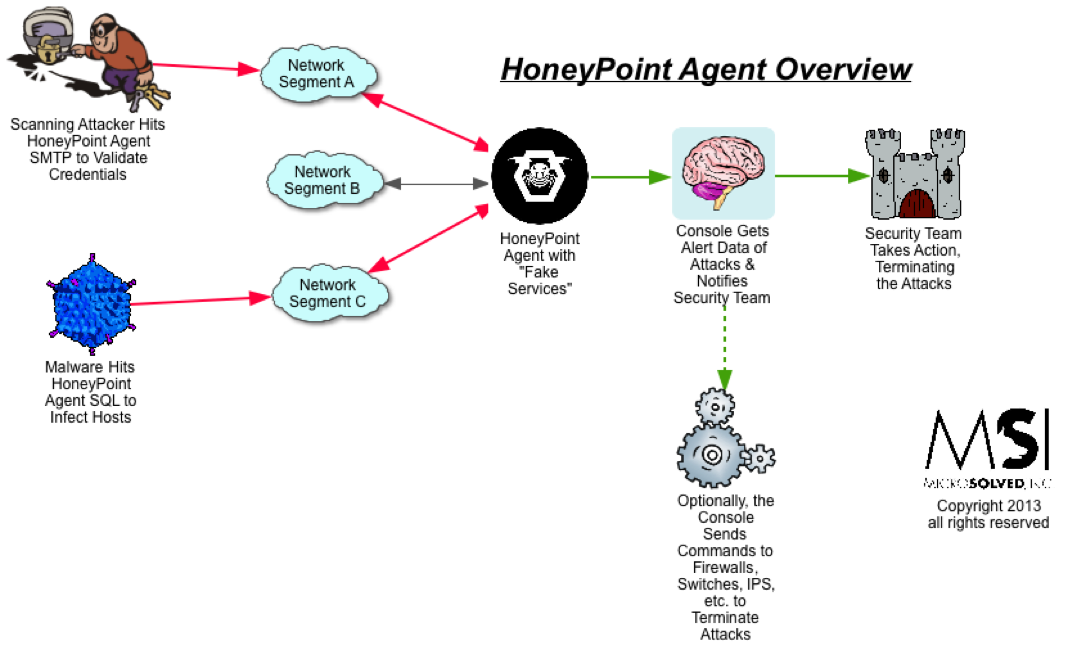
HoneyPoint has a component called a HoneyBee that can help organizations detect sniffing on their networks. The tool works like this:

  • HoneyBees are configured to talk to HoneyPoint Agents with a set of known credentials for an Agent emulated service
  • HoneyPoint Agent knows where the HoneyBees will be connecting from and those hosts are added to the local ignore list for that Agent
  • HoneyBees randomly create emulated “conversations” with HoneyPoint Agent in plain text, transmitting their credentials across the network for sniffers to pick up
  • The attacker or sniffing malware grabs the credentials through their sniffed traffic
  • The attacker or malware attempts to use those same credentials to authenticate to the HoneyPoint Agent
  • HoneyPoint Agent flags the authentication attempt as tampered traffic and alerts the security team to take action

By properly configuring the setup, this approach makes for a very effective tool to catch sniffing malware and attackers. Backing the credentials up with other detection mechanisms, such as in web applications and on AD forests can extend the approach even further. Our team has helped organizations stand up these kinds of nuance detection schemes across a variety of platforms. 

Even though the approach seems quite simple, it has proven to be quite adept at catching a variety of attacks. Customers continue to tell us that HoneyBees working with HoneyPoint Agent have been key indicators of compromise that have led them to otherwise undetected compromises.

HoneyBees are just another example of some of the ways that people are using the incredible flexibility of HoneyPoint to do nuance detection more easily than ever before. Gaining vision where they never had it has paid off, and HoneyPoints ability to turn vision into intelligence has proven itself over and over again.

To discuss HoneyPoint, HoneyBees or other forms of nuance detection, get in touch with MicroSolved. We would be happy to discuss how we can help your organization get more vision all around your enterprise.

Reminder: Today is #CMHSecLunch

Reminder – It’s TODAY 11:30 to 1pm.

We wanted to take a moment and send out a special announcement to our Columbus, Ohio area readers. Brent Huston is pulling together a monthly casual event for IT and InfoSec focused folks in our area. He posted this a few days ago to Twitter (@lbhuston):

#CMHSecLunch 1st attempt – Monday, Nov 12, 11:30 -1pm at Tuttle Mall food court. Informal lunch gathering of infosec geeks. Be There!

We invite all of our local readers to attend. Just have a casual lunch with infosec friends and great conversations. No sign up, no membership fees, no hassle, no fuss. If you can make it, cool, if not, also cool. So, if you have time, drop in and break bread. We hope to see you there.

Let us know on Twitter or in the comments if you have feedback. 

Tool Review: Synalyze It! Pro for OS X

Rounding out this week with another tool review for the Mac under OS X. Earlier this week, we reviewed our favorite disassembler, Hopper for OS X. Synalyze It! Pro is another invaluable tool that we depend on. This tool is a hex editor with some very very useful features in the GUI. Namely, it lets you “lasso” different bits of text and highlight them in different colors. While this might sound basic, it is amazingly useful for performing reverse engineering of protocols and other deep-level analysis tasks of textual data.

Recently, we have been doing quite a bit of protocol testing in the lab and this tool has proven itself again and again as invaluable. My favorite feature of the tool is available by highlighting some piece of data and right clicking to bring up a menu, then selecting “compare code pages”. This brings up a window in which the highlighted data is run through a bunch of encoding/decoding schemes and presented to you both as ASCII and as hex. This makes reversing simple encoding on text as easy pie and as quick as swatting a fly. In my recent protocol work, this was a feature I used over and over again to identify various components of the data stream and figure out how each was encoded as a part of a bigger puzzle.

Another feature we have come to love is the “Show Checksums” feature. This feature displays a wide variety of checksums for the data that is highlighted and updates the checksums in realtime. This makes it pretty easy to figure out if different fields are included in the protocol’s checksum activities and leads to faster, cleaner reversing. However, I do have a couple of things I would like to see as future features for this capability. For one, I would like to see additional checksum mechanisms added and perhaps even an interface for creating your checksum scripts or equations. Additionally, I would really like it if you could get realtime updates, but with a mechanism for selecting multiple data elements and not just single strings. I really thought this would work, but could not seem to selections to “stick” so that I could add multiples. 

The real power of the tool is in the creation of the “grammar files”. This is an easy to use, intuitive and powerful mechanism for reversing. I still need to practice a bit more with the grammar definition mechanisms, but I can see where this will grow the product’s usefulness rapidly. The grammar definition could lend itself to a better toolbox in the GUI. It might be easier for beginners to learn to master this capability if an set of quick and easy tools were easily available without a bunch of menu navigation. However, the feature is still excellent and the tool remains a very powerful addition to our toolbox. 

The link to the App Store has a variety of screenshots of the product if you want to check it out. The product retails for $25 in the App Store and a non-Pro version is available for $5 – however, note that it lacks many features of the Pro version that make it such a useful tool. 

PS – MSI has no affiliation or relationship with the product and/or the developers. 

CMHSecLunch Announcement

We wanted to take a moment and send out a special announcement to our Columbus, Ohio area readers. Brent Huston is pulling together a monthly casual event for IT and InfoSec focused folks in our area. He posted this a few days ago to Twitter (@lbhuston):

#CMHSecLunch 1st attempt – Monday, Nov 12, 11:30 -1pm at Tuttle Mall food court. Informal lunch gathering of infosec geeks. Be There!

We invite all of our local readers to attend. Just have a casual lunch with infosec friends and great conversations. No sign up, no membership fees, no hassle, no fuss. If you can make it, cool, if not, also cool. So, if you have time, drop in and break bread. We hope to see you there.

Let us know on Twitter or in the comments if you have feedback. 

Thanks to NEOISF & Ohio State Office of the CIO

J0289893

Last week we had a great time in Cleveland speaking at the North East Ohio Information Security Summit. Thanks to the folks who came out to hear us speak and to the great staff of NEOISF for making the event such an amazing thing for all who attend. We look forward to next year!

Thanks, as well, to the Ohio State University office of the CIO. We were pleased to participate in the Information Security Day sponsored by the university and Battelle. Thanks to all who attended that event with the threat of Hurricane Sandy looming large. It was a fantastic interaction with some of the next generation of infosec folks and some of the awesome members of the CMH InfoSec community. Thanks for having us participate and especially for asking us to keynote. 

The slide decks for both of these talks are available by request. If you would like to have a copy or set up a time to discuss them, have them presented to your team or engage with us about the content either drop us a line in the comments, reach out on Twitter (@lbhuston) or give your account executive a call at (614) 351-1237 ext 215.

Some pictures from the events are available here:

2012 10oct 25 dsc 0065 smaller


NEO Summit – Picture courtesy of Greg Feezel (Thanks Greg!!!)

Ohio State Information Security Day

ICS/SCADA Security Symposium Reminder

COLUMBUS, Ohio October 9, 2012 – The second annual ICS/SCADA Security Symposium, to be held November 1 2012 in Columbus, is designed to serve as a level set for teams and organizations who are actively managing production ICS/SCADA environments. Once again, this full day session will include best practices advice, incident response, detection techniques and a current threat briefing focused on ICS/SCADA providers. Presenters will cover a variety of topics about what is working, what is not working so well in terms of information security, network protection and trust management. To learn more about the event and to see if you qualify to attend, please contact us via email (info<at sign>microsolved(<dot>)com) or via phone by calling 614.351.1237 ext 215. Chris Lay (@getinfosechere) is handling the invitee list for the event and will be happy to discuss the event with you in more detail. Attendance is free of charge, meals will be provided and a limited number of seats are still available if you qualify.

Surface Mapping Pays Off

You have heard us talk about surface mapping applications during an assessment before. You have likely even seen some of our talks about surface mapping networks as a part of the 80/20 Rule of InfoSec. But, we wanted to discuss how that same technique extends into the physical world as well. 

In the last few months, we have done a couple of engagements where the customer really wanted a clear and concise way to discuss physical security issues, possible controls and communicate that information to upper management. We immediately suggested a mind-map style approach with photos where possible for the icons and a heat map approach for expressing the levels of attack and compromise.

In one case, we surface mapped a utility substation. We showed pictures of the controls, pictures of the tools and techniques used to compromise them and even shot some video that demonstrated how easily some of the controls were overcome. The entire presentation was explained as a story and the points came across very very well. The management team was engaged, piqued their interest in the video and even took their turn at attempting to pick a couple of simple locks we had brought along. (Thanks to @sempf for the suggestion!) In my 20+ years of information security consulting, I have never seen a group folks as engaged as this group. It was amazing and very well received.

Another way we applied similar mapping techniques was while assessing an appliance we had in the lab recently. We photographed the various ports, inputs and pinouts. We shot video of connecting to the device and the brought some headers and tools to the meetings with us to discuss while they passed them around. We used screen shots as slides to show what the engineers saw and did at each stage. We gave high level overviews of the “why” we did this and the other thing. The briefing went well again and the customer was engaged and interested throughout our time together. In this case, we didn’t get to combine a demo in, but they loved it nonetheless. Their favorite part were the surface maps.

Mapping has proven its worth, over and over again to our teams and our clients. We love doing them and they love reading them. This is exactly how product designers, coders and makers should be engaged. We are very happy that they chose MSI and our lab services to engage with and look forward to many years of a great relationship!

Thanks for reading and reach out on Twitter (@lbhuston) or in the comments if you have any questions or insights to share.

NE Ohio Security Summit – Come Out & See Us!

The NE Ohio Security Summit kicks off tomorrow and runs through Friday evening. Chris Lay (@getinfosechere) and myself (@lbhuston) will be in attendance. I will be speaking on Thursday afternoon about Detection in Depth and some other models for doing nuance detection around the enterprise. 

While you are there, check out the booth of Managed HoneyPoint partner Hurricane Labs, and hit Chris up for a cup of coffee and a friendly discussion about our services, partnerships and engagements.

We look forward to a great event and give much thanks to the folks who put this amazing Summit together. They are an awesome team, with a ton of great help and a can-do attitude. Their hard work and dedication is what makes this one of the best Summit events of the year. Stop them in the hall and give them a big thanks for all they do!

As always, thanks for reading. If you mention you read the post and use the code word “snazzy” when you come up to chat, I just might have a little special treat for you. 🙂

PS – My talk is in Bordeaux B at 2:30 PM Eastern. See ya there! 

Ask The Security Experts: Mobile Policy

This time around, the experts offer insights on this question:

Q: “Dear Experts, what are the key things I need to keep in mind when I write my company’s mobile security policy?” — MK

John Davis starts us off with:

I would say the most important thing is to actually write your own policy; don’t just copy a generic mobile security policy from the Internet and adopt it as your own. For a mobile security policy to be effective, it needs to be tailored to meet your organizations particular information security requirements and also needs to reflect the reality of mobile device use at your organization. It won’t do you much good to forbid using mobile devices for business purposes if you have no mechanisms in place to prevent or detect such uses. Effective information security policy, like effective statute law, is both practical and enforceable.

Adam Hostetler added:

Keep in mind what kind of current security policies you have, and try to apply that to the mobile sphere. Users need to understand that they are connecting an additional computer to the network, and not just a “phone”. Keep in mind also what kind of deployment you are using. Is it bring your own device, or is it company provided? There will be different policies and procedures for each method and possible user backlash depending on how you are doing this.

As always, thanks to the experts for weighing in, and to the readers for the questions. Keep them coming!