Hooray! An Open-Source Password Analyzer Tool!


I’m one of the resident “Password Hawks” in our office. Our techs consistently tell people to create stronger passwords because it is still one of the most common ways a hacker is able to infiltrate a network.

However, we live in an age where it’s not just hackers who are trying to steal an organization’s data. There are also a variety of malcontents who simply want to hack into someone’s account in order to embarrass them, confirm something negative about them, or be a nuisance by sending spam.

This is why it is important to create a strong password; one that will not be easily cracked.

Enter password analyzer tools. Sophos’ “Naked Security” blog posted a great article today about the often misleading security policies of popular online social sites. Developer Cameron Morris discovered that if he followed one social site’s policy, he actually created a more easily “crackable” password than the one they deemed weak.

About three years ago, developer Cameron Morris had a personal epiphany about passwords, he recently told ZDNet’s John Fontana: The time it takes to crack a password is the only true measure of its worth.

Read the rest of the article here.

There is a free analyzer you can use and I strongly suggest you test the strength of your passwords with it.

Passfault Analyzer

Also, Morris created a tool for administrators that would allow them to configure a password policy based on the time to crack, the possible technology that an attacker might be using (from an everyday computer on up to a $180,000 password attacker), and the password protection technology in use (from Microsoft Windows System security on up to 100,000 rounds of the cryptographic hash function SHA-1/).

OWASP Password Creation Slide-Tool

This is one of the best articles I’ve read on password security, plus it has tools for both the end-user and the administrator. Test them out yourself to see if you have a password that can resist a hacker! 

As for me, I think I need to do a little more strengthening…

Have a great Memorial Day weekend (for our U.S. readers) and stay safe out there!

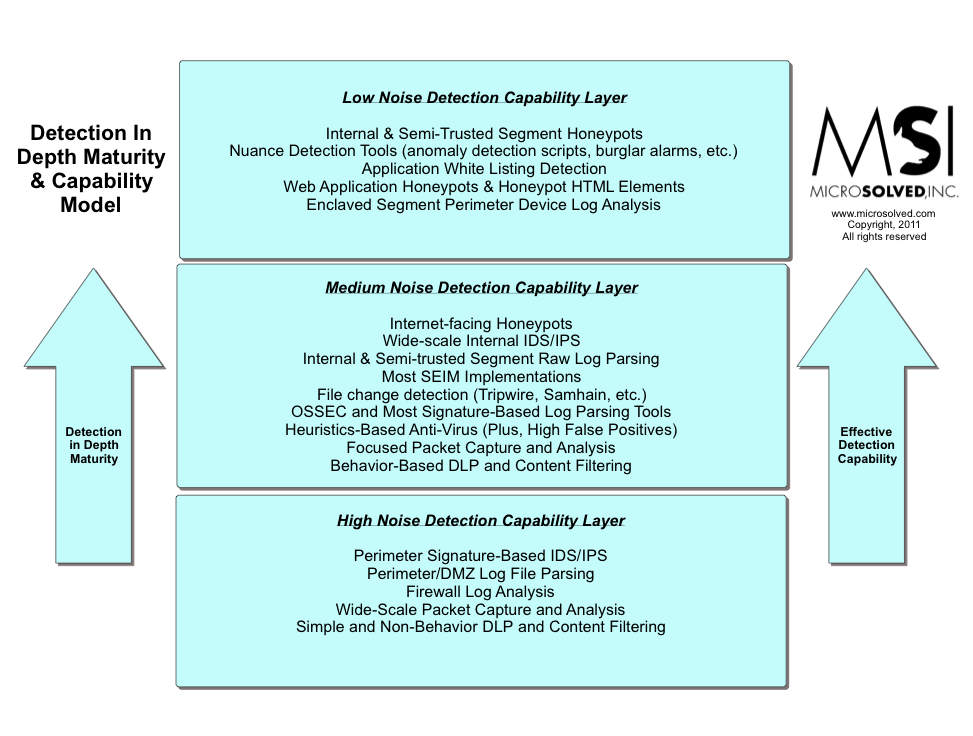
Audio Blog Post: Moving Toward Detection in Depth

Brent Huston, CEO and Security Evangelist for MicroSolved, Inc., explains how organizations need to move from a focus on prevention to detection.

Joined by MSI’s Account Executive Chris Lay and Marketing Communication Specialist Mary Rose Maguire, Brent maps out how an organization can get detective controls closer to the data and shows that IT departments can have a “payoff” if they pursue nuanced detection.

Click here to listen to the audio post!

13 Tips to Secure Your Virtual Machine Environment

Virtual environments are becoming more popular, providing advantages such as enabling multiple OS environments to co-exist and providing disaster recovery solutions.

Virtual machines easily tests scenarios, consolidate servers, and can move disk files and some configuration files between physical machines.

Safeguarding your virtual server environment is vital, even though it doesn’t have the same issues as a physical environment. Here are a few tips to keep things running smoothly:

  1. Install only what you need on the host machine. Keep your OS and applications current for both virtual and host machines.
     
  2. Isolate each virtual machine you have by installing a firewall. Only allow approved protocols to be deployed.
     
  3. Ensure that antivirus programs are installed on the virtual machines and kept current with updates. Virtual machines, like physical machines are at risk for viruses and worms.
     
  4. Utilize strong encryption between the host and virtual machines.
     
  5. Avoid internet surfing from the host computer. Spyware and malware could easily infiltrate through the the host computer and spread to the virtual machines.
     
  6. Prevent unauthorized access by securing accounts on the host machine.
     
  7. Only use what you need. If you’re not utilizing a virtual machine, shut it down.
     
  8. If a virtual machine does not need to connect with each other, isolate it. Use a separate network card on a different network range.
     
  9. Monitor the event log and security events on both the host machine and on the virtual machine. These logs need to be stored in your log vault for security and for auditing purposes at a later date.
     
  10. Ensure that any hardware you use is designed for VM usage.
     
  11. Strictly manage remote access to virtual machines and especially to the host machine, this will make exposure less likely.
     
  12. Remember, the host machine represents a single point of failure. Technologies like replication and continuity help with reducing this risk.
     
  13. Avoid sharing IP addresses. Again this is typical of sharing a resource and will attract problems and vulnerabilities.

Using these tips will help you make the most of your physical and virtual environments so if anything interrupts your business, you are prepared.

Are You Attending the 2012 Central Ohio InfoSec Summit?


We’re excited to be a part of this year’s 5th Annual 2012 Central Ohio InfoSec Summit! Each year it keeps getting better and better, and this year is no different.

MicroSolved’s CEO and founder, Brent Huston will be presenting “Detection in Depth: Changing the PDR Focus.” Phil Grimes will also present “Attacking Mobile Devices” in the Advanced Technical Track.

There are other great speakers lined up. Included are:

  • Bill Hagestad, author of 21st Century Chinese Cyber Warfare
  • Jay Jacobs, a Principal with Verizon’s RISK Intelligence team, will focus on cyber crime
  • Curtis Levinson, who has served two sitting Presidents of the United States, two Chairman of the Joint Chiefs of Staff and the Chief Justice of the United States, who will be presenting on a balanced approach for survivability and sustainability in the cyber realm

There are more great speakers, plus over thirty vendors who help businesses stay secure. We hope to see you at the event! It promises to be a great time re-connecting with old friends, making new connections, and learning new approaches toward a proactive information security strategy.

See you there!

Twitter Hack! 5 Ways to Avoid Being the Victim of a Phishing Attack

Twitter is downplaying a security breach that exposed tens of thousands of user emails and passwords.

The leaked information, comprising 58,978 username and password combinations, appeared Monday on Pastebin. While Twitter said that it’s investigating the breach, it’s also downplayed the supposed size and severity of the data dump.

“We are currently looking into the situation,” said spokeswoman Rachel Bremer via email. “It’s worth noting that, so far, we’ve discovered that the list of alleged accounts and passwords found on Pastebin consists of more than 20,000 duplicates, many spam accounts that have already been suspended, and many login credentials that do not appear to be linked (that is, the password and username are not actually associated with each other).”

Information Week Security article

Whenever you read about such breaches, it is always a good idea to change your password, especially if you’ve not changed it for some time.

The compromised Twitter accounts could have been the result of phishing attacks. A phishing attack is when an attacker acquires personal information by duping the user into revealing it through manipulating their emotions.

Remember how one of your wiser friends told you it’s never a good idea to make a big decision while you’re overly-emotional? The same stands true for avoiding phishing attacks.

Here are some ways to stay safe:

  1. Do not give out your financial information ever through an email appeal. I hope we all know now that you haven’t won the Nigerian lottery or that some prince or princess is willing to give you part of their inheritance if only you’ll keep their money in your bank account. Emails of this nature prey upon people who would love to “win” money or worse, may lose money in their account unless they give out their account information. Never give out your personal information. Instead, call your bank to verify that they need the information. You could also have some fun with the hackers like I did.
  2. Don’t call any phone number or visit a website that is linked in the email. There’s a good chance it will connect you directly to the attacker. Look at the URL associated with the link. Does it contain words, letters, or numbers that seem odd? It’s likely an attempt to masquerade as an organization’s true website address, so don’t click it. You can see the URL by hovering over it or highlighting it with your mouse. Again, if you think it may be a legitimate request for information, verify it by contacting your financial institution directly.
  3. Never fill out forms in an email that asks for personal information. Most organizations like PayPal notify their customers but do not ask for personal information to be placed into forms. Again, verify, verify, verify.
  4. Regularly check your online banking accounts. Don’t allow months to go by before checking in. By frequently monitoring your account, you’ll be able to immediately see suspicious activity.
  5. Patch it! When that annoying “Software Updates Available Now” window pops up, don’t ignore it. (I’m talking mainly to myself, now.) Click to install. Patches fix vulnerabilities and many attackers will jump on the opportunity to hit an un-patched machine. If you’re in doubt about whether your browser system is up-to-date, check by clicking your browser’s info link or your system’s and click “Software Update” or “Check for updates.” (In Firefox, it’s in the “Tools” section.)

Finally, you can report phishing attacks to the following organizations:

  • The Federal Trade Commission at spam@uce.gov.
  • Forward the email to the “abuse” email address to the company that is being spoofed (i.e. “abuse@XYZcompany.com” or “spam@XYZcompany.com”). Make sure to forward the complete email message with the original email header.
  • Notify the Internet Fraud Complaint Center of the FBI by filing a complaint on their website: http://www.ic3.gov/default.aspx There is an excellent selection of tips on the FBI site to help you avoid fraud, so make sure to check it out.

The key to avoid becoming a victim is to stay alert, stay suspicious, and stay on top of changing your passwords.

Stay safe!

Resources for Mobile Application Security

Mobile application security continues to be a hot topic within the information security community. With more and more employees expecting to use their own devices at their workplaces, IT departments are scrambling to develop the right approach for securing their data.

If you’re working on developing security policies or seeking ways to secure your mobile applications, you may find some of these resources helpful. Stay safe out there!

Quick Wireless Network Reminders

I recently tested a couple of Android network stumblers on a drive around the city and I found that not a lot has changed for consumer wireless networks since I last stumbled.

There are still a TON of unprotected networks, default SSIDs and WEP networks out there. It appears that WPA(x) and WPS have been slower to be adopted than I had expected. I don’t know if that is consumer apathy, ignorance or just a continued use of legacy hardware before the ease of push button WPS. Either way, it was quickly clear that we still have a long way to go to deprive criminals of consumer-based wireless network access.

The good news is that it appears from this non-comprehensive sample that the businesses in our area ARE taking WiFi security seriously. Most networks easily coordinated with a business were using modern security mechanisms, though we did not perform any penetration testing and can’t speak to their password policies or detection capabilities. But for the most part, their SSIDs made sense, they used effective crypto and in most cases were even paying attention to channel spread to maximize the reliability of the network. This is good news for most organizations and shows that much of the corporate awareness and focus on WiFi security by vendors seems to be working. It makes the business risk of these easy-to-deploy systems more acceptable.
 
I also noted that it was apparent on the consumer side that some folks deploying WiFi networks are paying attention. We saw SSIDs like “DontHackMe”, “DontLeechMeN3rds”,”Secured”, “StayOut”., etc. Sadly, we also saw plenty of SSIDs that were people’s names, addresses, children’s names and in one case “PasswordIsPassword1”. Clearly, some installers or consumers still haven’t seen the dangers of social engineering that some of these names can bring. So, while we have seen some improvement in SSID selection, there is still work to be done to educate folks that they need to pick non-identifiable information for broadcast.
 
That said, how can we better teach consumers about the basics of WiFi security? What additional things could we do as an industry to make their data safer at home?


How to Save Your Photos From a BYOD Security Policy

Many companies have adopted a BYOD policy regarding mobile devices. Realizing that it’s unrealistic to require employees to leave their iPhones or tablets at home, they’ve accepted mobile technology; albeit, with a few rules.

One of the more common rules is to enable the remote wipe and lock feature. This means that if your device was ever stolen or compromised, the IT department can remotely lock the device and then wipe any data from it. And yes, that would include all of your photos as well as other items.

One CEO recently experienced personal data loss as a result of his own company’s policy that he himself helped establish. (Ouch!) While on vacation, his five-year old daughter tried to use his smartphone. After several failed attempts of entering the passcode, the corporate-installed remote wipe was triggered and the CEO lost all of the photos he had taken during the first half of their vacation. (Double ouch!)

If you have an iPhone with the latest iOS 5, you can sign up for the free iCloud, which will sync your devices and store everything on Apple’s servers. But first, you have to enable it. After installing the iCloud feature, tap Settings/iCloud and then choose “On.” Click on the “Back Up Now” and you’re good to go. This way, if your device is wiped clean because of a security breach, you’ll still have your photos. 

Again, you’ll have to remember to do this frequently if you are using your smartphone to take vacation photos. It may be a good idea to back up your data during dinner or before you go to bed.

If you have an Android phone, make sure you have a Gmail address in order to take advantage of storing your data in the cloud. Titanium Backup and MyBackup Pro are also two apps that can back up your entire phone and transfer the data to your PC’s hard drive.

Whatever device you use, make sure you have a back up plan. Know well your company’s BYOD policy. It will give you peace of mind the next time you’re taking a bunch of photos at an event that will never happen again.

Stay safe and enjoy the ride!

Discuss Detection in Depth at CMH ISSA Summit


On May 18th, I will be presenting on detection in depth at the CMH ISSA Summit. I look forward to a good discussion of the ideals, organizational needs, and maturity models. Given all of the focus on re-allocating resources from “prevention only” strategies to an equal spread across the core values of prevention, detection and response, this is likely to be a useful discussion to many organizations.

Come ready with good questions. I will also be available throughout the Summit for break-out discussions, one-on-ones, and small team meetings. Please reach out via email, phone or Twitter to schedule a sit down. Otherwise, feel free to approach me in the halls and we can have an ad-hoc discussion if you want to learn more about specific detection in depth approaches.
 
I speak on Friday, May 18th at 11:15 am. I hope to see you there!

Follow Up to Out of Band Authentication Post

(This is a commentary follow up to my earlier post, located here.)

A couple of folks have commented on Twitter that they have a fear of using SMS for any sort of security operations. There have been discussions about the insecurity of SMS and the lack of attention to protecting the cellular network by carriers around the world. I generally disagree with blanket statements, and I would push for organizations considering SMS as a means of authentication to undertake a real risk assessment of the process before they jump in.
 
However, if the controls in place in the cell networks meet their appetite for risk, then I think it is a perfectly acceptable business case. It certainly beats in-band simple authentication mechanisms like “pictures of trust” and traditional login/password as a security control.
 
At least in SMS authentication, the attacker would usually need to have control over or access to more than one device belonging to the user. I think this helps make the risk model more acceptable for my views.
 
Other folks discussed how Out of Band Authentication (OOBA) has been done now successfully in many places. I agree with this. We know how to do it. There are a LOT of vendors out there who can successfully integrate, deploy and manage a solution for you. Sadly, though, there are still more than a few who are struggling to get it right or done at all. As with most things in life, it helps to do a little research. Organizations should perform due diligence on their vendors and factor vendor risks into the equation of purchases and project planning. 
 
Lastly, a few folks commented on the fact that they, too, are running into speed bumps with deployments and logistics. Several folks echoed the sentiments of the original challenges and few offered suggestions beyond simply “doing more homework” and looking for “quickly scalable solutions”. The good news with this is that you are not alone out there. Other folks are facing AND BEATING challenges. Feel free to reach out to your peers and discuss what is and what isn’t working for them.
 
As per the original post, the more communication and discussion we can have amongst the community about these topics, the better off we all will be. So, discuss, seriously…
 
##Special thanks to the vendors that replied with case studies, references or stories about how they have done integration and deployment. There are a lot of good vendors out there with knowledge in this area. Careful review of their capabilities will help you sort them out from the less capable. Communication is key.
 
Thanks for reading!