Passkeys, Not Passcodes: A Practical Enterprise Guide to Moving Beyond Passwords

There is a small terminology problem in the identity world right now, and it matters more than it looks.

passcode or PIN is usually a local unlock secret. It unlocks a phone, a laptop, Windows Hello, an authenticator app, or a hardware security key. A passkey is different. A passkey is the standards-based replacement for passwords, built on FIDO2/WebAuthn. The user unlocks the passkey locally with a fingerprint, face scan, device PIN, pattern, or security key, but the website or application receives cryptographic proof — not a reusable password. FIDO defines passkeys as FIDO authentication credentials based on FIDO standards, tied to an account, and used with the same process the user already uses to unlock a device. 

That distinction is not pedantry. It is the difference between a local unlock method and a replacement for one of the most abused controls in the history of computing.

Passwords have had a long run. They also have had a long list of failures: reuse, phishing, spraying, stuffing, database theft, weak reset workflows, help desk abuse, and user fatigue. We have spent decades trying to compensate for those failures with complexity rules, expiration schedules, password managers, SMS codes, mobile push prompts, training campaigns, and detective controls.

Some of those helped. Some just moved the pain around.

Passkeys change the model.

They are not merely “better passwords.” They are a different authentication architecture.

A hacker is seated in front of a computer fingers poised over the keyboard They are ready to break into a system and gain access to sensitive information 6466041

The Problem: Passwords Are Shared Secrets in a World Built to Steal Them

A password proves identity by revealing a secret. That is the root of the problem.

When users type passwords into websites, there is always a chance they will type them into the wrong website. When companies store password material, there is always a chance attackers will steal it. When people reuse passwords, a breach in one place becomes an entry point somewhere else. When attackers automate guessing, weak and reused passwords become an industrial-scale attack surface.

Microsoft’s 2025 Digital Defense Report says 97% of identity attacks were password spray attacks, which is a pretty direct reminder that attackers still love the boring stuff that works. Verizon’s 2026 DBIR highlights that breaches continue to involve the human element, phishing, stolen credentials, ransomware, and software vulnerability exploitation — and also reports that 31% of breaches now start with software vulnerabilities, beating stolen passwords as the top initial entry point in that dataset. 

That combination matters. It tells us two things at once.

First, passwords remain a major identity risk. Second, replacing passwords is not the whole security program.

That is the right mental model for passkeys: they are a major improvement in authentication, not a magic shield around the enterprise.

What a Passkey Does Differently

A password is something the user knows and types.

A passkey is a cryptographic credential. When the user registers a passkey for a site or application, the device creates a unique public/private key pair. The private key stays with the authenticator or passkey provider. The public key is registered with the service. At sign-in, the service sends a fresh challenge. The authenticator signs the challenge with the private key. The service verifies the response with the public key.

No reusable password crosses the wire.

No password database needs to be protected in the same way.

No user has to remember whether the login page looks slightly wrong.

The protocol carries a lot of the security burden that we previously dumped on the user.

That is the real breakthrough.

FIDO describes passkeys as password replacement technology that uses cryptographic key pairs for phishing-resistant sign-in. It also notes that passkeys can be synced across devices or bound to a particular device. Microsoft Entra describes the same basic model: the private key is stored on the user device, the public key is stored with the app or website, and both unique keys are needed to sign in. 

The user experience is simple: unlock the device.

The security model is not simple — and that is a good thing.

The Plain-English Explanation for Users

For users, do not start with asymmetric cryptography. Start with what changes for them.

“A passkey is a safer way to sign in without typing a password. Instead of remembering and entering a password, you unlock your phone, laptop, or security key. The website gets proof that your device has the right key, but it never gets a password. That means there is no password for you to forget, reuse, mistype, or accidentally give to a fake website.”

That is enough for most end users.

Then answer the question they are really asking:

Does the website get my fingerprint or face scan?

No. The biometric check happens locally. FIDO states that biometric information and processing remain on the device and are not sent to a remote server; the server receives assurance that the biometric check succeeded. 

Is my device PIN now my corporate password?

No. NIST distinguishes centrally verified passwords from local activation secrets. A device PIN or unlock secret used locally to access an authenticator is not sent to the verifier the way a website password is. 

That is an important communication point. Users often hear “PIN” and think “weak password.” In a passkey model, the PIN is usually a local unlock mechanism protecting the private key, not the secret being verified by the website.

Why Passkeys Reduce Risk

Passkeys reduce several common attack paths:

Risk How passkeys help
Phishing The user does not type a reusable password, and the passkey is scoped to the legitimate relying party. A fake site should not be able to obtain a valid assertion for the real site.
Credential stuffing There is no shared password to reuse from another breach.
Password spraying Attackers cannot guess a password that is no longer accepted for that workflow.
Password database theft The service stores public key material rather than reusable passwords.
Weak MFA interception Passkeys can replace password plus SMS OTP, password plus TOTP, or password plus push approval in many use cases.
User fatigue Users approve sign-in with a familiar local unlock gesture rather than remembering and typing complex passwords.

FIDO states that passkeys are resistant to phishing, designed without shared secrets, and can replace legacy MFA flows such as password plus SMS OTP. FIDO also notes that common second factors such as OTPs and phone approvals remain phishable. NIST is similarly direct: passwords are not phishing-resistant, and authenticator outputs manually entered into an impostor verifier — such as OTP-style flows — are not considered phishing-resistant because they can be relayed. 

That last point is key.

A lot of organizations believe they solved phishing because they deployed MFA. In many cases, they deployed phishable MFA. That is better than passwords alone, but it is not the same as phishing-resistant authentication.

What Actually Happens Under the Hood

There are two ceremonies that matter: registration and authentication.

Registration

When a user creates a passkey:

  1. The user starts registration through an approved enrollment path.
  2. The relying party sends registration options to the browser or application.
  3. The browser or app calls the WebAuthn API.
  4. The authenticator creates a new public/private key pair scoped to that relying party.
  5. The private key stays in the authenticator or passkey provider.
  6. The public key, credential ID, user handle, flags, and optional attestation data are returned.
  7. The relying party stores the credential record with the user account.

W3C WebAuthn describes a model where the public key is returned to the relying party during registration, while the private key is bound to the authenticator and is expected not to be exposed. It also describes the credential record that the relying party stores for later authentication ceremonies. 

Authentication

When the user signs in later:

  1. The relying party generates a fresh random challenge.
  2. The browser or app sends the challenge and relying-party information to the authenticator.
  3. The authenticator checks whether it has a credential scoped to that relying party.
  4. The user performs local verification, such as biometric, PIN, device unlock, or security-key touch.
  5. The authenticator signs the challenge and relevant context.
  6. The relying party verifies the signature using the stored public key.
  7. The relying party checks the challenge, origin, RP ID, user verification flags, and policy requirements before granting access.

WebAuthn depends on randomized challenges to prevent replay attacks, and the relying party must generate those challenges in a trusted environment and verify that the returned challenge matches. 

This is why passkeys are different from passwords. A password login proves identity by disclosing a shared secret. A passkey login proves possession of a private key without disclosing it.

Why Phishing Resistance Works

The important concept is origin binding or relying party binding.

A passkey created for one legitimate service is not supposed to work for an attacker’s lookalike domain. A fake site may fool the human eye, but it should not be able to get a valid passkey assertion for the real service’s relying party ID.

W3C WebAuthn notes that credentials are scoped to a specific relying party and that only that relying party, identified by its RP ID, can use the credential in authentication ceremonies. It also warns relying parties not to accept unexpected origins, because origin validation is an additional layer of protection. 

That is the practical security gain.

The protocol stops relying solely on user vigilance.

We should still train users. We should still harden browsers. We should still detect malicious domains. But the highest-value control is to prevent the stolen credential from existing in the first place.

User Presence vs. User Verification

Two terms get mixed together too often:

Concept Plain-English meaning Why it matters
User presence The user touched the key, approved the prompt, or was physically involved. Helps prove that authentication was not entirely silent.
User verification The authenticator locally verified the user with a PIN, biometric, or equivalent method. Provides stronger assurance that the right person, not merely the right device, approved the login.

WebAuthn authenticator data includes flags for User Present and User Verified. For enterprise deployments, user verification should be required for normal workforce access and especially for privileged access.

Do not settle for “the device was there” when the workflow needs “the authorized user unlocked the credential.”

Attestation: Knowing What Created the Key

Attestation answers a simple question:

What kind of authenticator created this credential, and do we trust that model for this use case?

For broad workforce adoption, strict attestation may not always be required. Many consumer passkey providers do not expose the same provenance details, and requiring attestation everywhere can create adoption friction.

For privileged users, administrators, financial approvers, developers, security staff, and high-risk workflows, attestation becomes much more important. In those cases, the organization may want to allow only approved hardware security keys, approved device-bound passkeys, or approved enterprise passkey providers.

Microsoft Entra allows attestation enforcement at the passkey profile level. When attestation is enabled, only device-bound passkeys are allowed and synced passkeys are excluded. 

That is the correct direction for high-risk access.

Use convenience where the risk allows it. Use hardware-backed assurance where the blast radius demands it.

Synced Passkeys vs. Device-Bound Passkeys

Not all passkeys carry the same operational risk.

Type What it means Good fit Risk notes
Synced passkey The credential can be synced across devices through a passkey provider, such as an OS/cloud keychain or password manager. Standard workforce, lower-risk SaaS, broad adoption, BYOD-friendly scenarios. Better usability and recovery, but introduces sync-fabric, sharing, restore, and account-recovery risks.
Device-bound passkey The private key remains tied to one device or authenticator. Admins, executives, finance, developers, security teams, regulated workflows. Stronger control and provenance, but higher support cost and lockout risk.
Hardware security key A roaming authenticator, often USB/NFC/BLE, with keys protected in dedicated hardware. Highest-risk users, break-glass accounts, privileged access, financial approvals. Requires inventory, backup keys, training, and lifecycle management.

NIST allows syncable authenticators in applications seeking up to AAL2, but AAL3 requires a phishing-resistant authenticator with a non-exportable key. NIST explicitly says syncable authenticators cannot be used at AAL3 because their private keys are inherently exportable. 

That gives us a clean enterprise rule:

Use synced passkeys where usability and broad risk reduction matter most. Use device-bound credentials or hardware security keys where privilege, regulation, or business impact requires stronger assurance.

The Big Deployment Mistake: Turning On Passkeys and Declaring Victory

The wrong strategy is simple:

“We enabled passkeys. We are passwordless now.”

No.

A passkey project is not just an IdP configuration change. It is an identity modernization project.

The common failures are predictable:

  1. Weak fallback methods remain enabled.
  2. Recovery workflows become the new attack path.
  3. Privileged users are treated the same as standard users.
  4. Legacy applications keep password paths alive.
  5. Enrollment is not monitored.
  6. Exceptions never expire.
  7. Help desk processes are not hardened.
  8. Service accounts are ignored.
  9. Token theft and session abuse are treated as unrelated problems.

Passkeys reduce credential compromise risk. They do not solve endpoint malware, stolen browser sessions, OAuth abuse, SaaS misconfiguration, vulnerable internet-facing systems, malicious insiders, or weak vendor access.

Identity security is a system. Passkeys are one of the strongest components we have, but they still have to be engineered into the system.

Enterprise Implementation Methodology

The enterprise goal should be stated plainly:

Move the organization from password-centric authentication to phishing-resistant authentication while reducing weak fallback methods, hardening recovery, and tiering controls by risk.

Phase 0: Define Scope, Risk Tiers, and Target State

Start with decisions, not tools.

Decide:

  • Which IdP or IdPs are authoritative?
  • Which users are highest risk?
  • Which applications can use SSO?
  • Which applications support native WebAuthn/FIDO2?
  • Which workflows require phishing-resistant authentication immediately?
  • Which users may use synced passkeys?
  • Which users must use device-bound passkeys or hardware keys?
  • What fallback methods are acceptable during transition?
  • What is the exception process?
  • What is the recovery process?
  • What logs must be collected?
  • What metrics will leadership see?

Then build a risk-tier model.

Tier Examples Recommended approach
Tier 0 / highest privilege Global admins, domain admins, IdP admins, cloud admins, PAM admins, break-glass accounts. Two approved device-bound credentials or hardware security keys; attestation required where possible; no SMS, TOTP, or push fallback.
Tier 1 / high risk Executives, finance, HR, developers, help desk, security team, wire/ACH approvers. Device-bound preferred; synced allowed only with managed device and strong conditional access; hardened recovery.
Tier 2 / standard workforce General staff using SaaS and productivity apps. Synced or platform passkeys allowed; user verification required; backup method required before enforcement.
Tier 3 / frontline/shared device Kiosks, shared workstations, shift users. Hardware keys, badge-integrated FIDO, named-user access, or carefully designed shared-device strategy.
Third parties Vendors, contractors, MSPs. Require phishing-resistant MFA for privileged or sensitive access; enforce federation and conditional access.
Service accounts Non-human accounts, integrations, automations. Do not use passkeys. Use managed identities, workload identity federation, certificates, scoped tokens, vaulting, and rotation.

The biggest lesson: do not flatten the organization. A payroll clerk, a warehouse kiosk user, a cloud administrator, and a break-glass account do not carry the same risk.

Phase 1: Inventory Authentication Surfaces

Before enforcement, inventory where authentication actually happens.

Minimum fields should include:

  • Application or system name
  • Business owner
  • Authentication path
  • IdP integration
  • Current MFA methods
  • WebAuthn/FIDO2 support
  • SSO capability
  • User population
  • Privilege level
  • Recovery path
  • Logging source
  • Legacy protocols
  • Exception owner
  • Exception expiration date

Pay special attention to legacy authentication. Basic auth, old VPN flows, app passwords, IMAP/POP/SMTP AUTH, ROPC, local admin portals, unmanaged SaaS accounts, and shadow IdPs can quietly preserve the password attack surface after leadership thinks the problem is fixed.

This is where many “passwordless” projects fail. The modern front door gets hardened, but the side doors stay open.

Phase 2: Choose the Enterprise Passkey Architecture

Most organizations will deploy passkeys through their primary identity provider.

Microsoft Entra ID

Microsoft Entra supports passkeys using FIDO2/WebAuthn concepts and describes both device-bound passkeys and synced passkeys. Microsoft also recommends FIDO2 security keys for highly regulated industries or users with elevated privileges, while describing synced passkeys as a convenient, lower-cost option for most users outside highly regulated or sensitive contexts. 

A good Entra pattern usually includes:

  • Separate passkey profiles for standard users and privileged users.
  • Device-bound/security-key requirements for administrators.
  • Attestation enforcement for high-risk profiles where feasible.
  • Conditional Access authentication strengths.
  • Managed device requirements for sensitive access.
  • At least two authenticators enrolled before enforcement.
  • Removal of SMS, voice, TOTP, and push fallback for privileged users.
  • Logging of registration, removal, sign-in, recovery, and policy changes.

Google Workspace

Google Workspace administrators can allow users to skip password sign-in challenges and use a passkey covering first and second-factor authentication. Google also notes that administrators can restrict passkeys to hardware security keys only and can monitor passkey enrollment and usage through the security investigation tool. 

A good Google Workspace pattern usually includes:

  • Enabling skip-password capability by organizational unit.
  • Restricting hardware security keys for privileged OUs where required.
  • Confirming users have enrolled backup methods before enforcement.
  • Monitoring passkey enrollment and successful passkey sign-ins.
  • Removing weaker fallback for high-risk users.
  • Aligning device management and account recovery policies.

Okta

Okta describes Passkeys/FIDO2 WebAuthn and Okta FastPass as phishing-resistant authenticators and supports app sign-in policies that require phishing-resistant possession factors. Okta also logs phishing-resistant authentication events, including declined phishing attempts. 

A good Okta pattern usually includes:

  • Enabling Passkeys/FIDO2 WebAuthn and/or Okta FastPass.
  • Creating authenticator enrollment policies by risk group.
  • Requiring phishing-resistant authenticators for sensitive apps.
  • Using app sign-in policies rather than broad, one-size-fits-all rules.
  • Integrating managed device posture where available.
  • Alerting on enrollment changes, recovery activity, and phishing-resistant authentication failures.

Phase 3: Pilot With the People Who Can Break the Program Safely

Pilot with IT, security, identity administrators, help desk, a small executive group, finance users, mobile users, and a few users who are likely to have edge cases.

Test:

  • New device enrollment
  • Lost device recovery
  • Hardware key enrollment
  • Mobile sign-in
  • Cross-device sign-in
  • VPN access
  • SaaS access
  • Admin portal access
  • Password reset flows
  • Help desk identity verification
  • Offboarding
  • Break-glass access
  • Legacy application behavior
  • Logging and SIEM correlation
  • User communications

The pilot is not just about whether passkeys work. It is about whether the organization can support them without creating a weaker recovery path than the password path it replaced.

Phase 4: Roll Out by Risk, Not by Org Chart

The rollout sequence should be boring and deliberate:

  1. Identity administrators and security team.
  2. Cloud administrators and PAM administrators.
  3. Break-glass accounts.
  4. Finance, payroll, HR, executives, and developers.
  5. Help desk and support teams.
  6. General workforce.
  7. Third parties with privileged or sensitive access.
  8. Remaining business applications through SSO modernization.

Do not start with “everyone by Friday.” Start with the users whose compromise would hurt the most and whose workflows you can monitor carefully.

Phase 5: Harden Recovery, Lifecycle, and Monitoring

Attackers follow the path of least resistance.

If passkeys close the front door, attackers will look at recovery, registration, device replacement, and help desk exceptions.

Recovery controls should include:

  • Strong identity verification for authenticator reset.
  • Separate procedures for standard users and privileged users.
  • Two-person approval for privileged recovery.
  • Out-of-band callback using known-good contact information.
  • No recovery approval based solely on email access.
  • Logging and alerting for passkey addition, removal, reset, and recovery.
  • Time-bound temporary access.
  • Post-recovery review.
  • Executive reporting on recovery volume and exceptions.

NIST’s usability guidance explicitly calls out the need to provide users information about what to do if an authenticator is lost or stolen and to consider alternative authentication options for loss, damage, or availability issues. 

The enterprise interpretation is simple: do not enforce passkeys until recovery is engineered.

Policy Baseline Language

Here is a practical policy statement to adapt:

The organization will transition workforce authentication from password-centric methods to phishing-resistant authentication using passkeys based on FIDO2/WebAuthn. Standard users may use approved synced or device-bound passkeys. Privileged, administrative, financial, and other high-risk users must use approved device-bound passkeys or hardware security keys. Passwords, SMS OTP, voice OTP, email OTP, TOTP, and push approval may be used only as temporary transition or exception methods where explicitly risk-accepted. Account recovery, passkey registration, passkey removal, and fallback authentication are security-sensitive workflows and must be logged, monitored, and governed.

Minimum technical requirements:

Control Standard
User verification Required.
User presence Required where applicable.
Passkey count Minimum two approved authenticators per user before enforcement.
Admin authentication Device-bound FIDO2/security key; attestation preferred or required.
Standard workforce Synced or device-bound passkeys based on risk.
Shared accounts Prohibited where feasible; replace with named accounts and PAM.
Service accounts No passkeys; use workload identity or managed secrets.
Recovery Documented, verified, logged, and alert-generating.
Logging Registration, sign-in, failure, recovery, removal, device change, and admin changes.
Exceptions Time-bound, owner-assigned, and risk-accepted.

Enterprise Risk Register

Risk Probability Impact Mitigation
Weak fallback remains enabled High High Remove SMS/TOTP/push for admins first; enforce phishing-resistant authentication strength; maintain an exception register.
Help desk becomes the new attack path High High Require strong identity verification, callback procedures, two-person approval for privileged recovery, and recovery-event alerting.
Users lose access due to device loss Medium Medium Require two authenticators; issue backup keys for high-risk users; document recovery.
Synced passkeys are restored or shared to unmanaged devices Medium Medium/High Use managed profiles, MDM, device compliance, passkey provider controls, and device-bound keys for high-risk groups.
Legacy apps block enforcement High Medium/High Inventory apps, front with SSO, modernize authentication, isolate, or risk-accept temporarily.
Token theft bypasses authentication strength Medium High Use device compliance, session protection, continuous access evaluation, EDR, browser/session controls, and rapid revocation.
Attestation gaps create uncertainty Medium Medium Require attestation for privileged groups; use approved authenticator lists; allow non-attested only for lower-risk users.
BYOD creates inconsistent security posture Medium Medium Separate standard and high-risk use cases; require compliant devices for sensitive access.
Break-glass accounts remain password-only Medium High Use hardware keys, strong vaulting, monitoring, emergency access review, and tested procedures.
Users misunderstand biometrics Medium Low/Medium Explain that biometrics stay local and are not sent to the website, application, or employer.

A Practical 12-Month Roadmap

0–30 Days: Planning and Readiness

  • Define passkey policy and risk tiers.
  • Inventory applications and authentication paths.
  • Identify privileged and sensitive user groups.
  • Decide approved authenticator types.
  • Configure pilot policies in the IdP.
  • Draft help desk and recovery runbooks.
  • Prepare user communications.
  • Procure hardware security keys for administrators and high-risk users.

31–60 Days: Pilot

  • Enroll IT, security, and admin pilot users first.
  • Require at least two authenticators per pilot user.
  • Validate registration, sign-in, recovery, mobile, VPN, and legacy app behavior.
  • Run phishing-resistant authentication tests.
  • Tune SIEM alerts and help desk workflows.
  • Document blockers and exceptions.

61–90 Days: Privileged Enforcement

  • Require device-bound passkeys or hardware security keys for administrators.
  • Disable SMS, TOTP, and push fallback for admin accounts.
  • Require phishing-resistant authentication for IdP admin portals, cloud consoles, PAM, EDR, backup consoles, VPN admin access, finance approvals, and security tools.
  • Review break-glass accounts.
  • Begin executive and finance enrollment.

91–180 Days: Workforce Expansion

  • Enable passkey sign-in for all users.
  • Require two authenticators before enforcement.
  • Retire weak MFA for sensitive applications.
  • Move remaining password-based applications behind SSO where possible.
  • Track adoption metrics weekly.
  • Publish exceptions to leadership and security governance.

181–365 Days: Password Reduction and Optimization

  • Reduce password prompts.
  • Remove legacy authentication protocols.
  • Decommission app passwords and basic auth.
  • Expand phishing-resistant authentication to third parties.
  • Review account recovery events quarterly.
  • Run tabletop exercises and red-team simulations against recovery and fallback paths.
  • Add passkey support requirements to procurement and vendor risk management.

Metrics Leadership Should See

A passkey program needs measurement. Otherwise it becomes another “we turned it on” control.

Track:

  • Percent of users with at least one passkey.
  • Percent of users with at least two authenticators.
  • Percent of privileged users using device-bound credentials.
  • Password sign-ins by application.
  • Passkey sign-ins by application.
  • Failed passkey attempts.
  • Recovery events.
  • Passkey removals.
  • New authenticator registrations.
  • Weak MFA usage.
  • Exceptions by owner and expiration date.
  • Legacy authentication attempts.
  • High-risk users without compliant authentication.
  • Third-party users without phishing-resistant authentication.
  • Admin sign-ins that did not meet policy.

The dashboard should not be complicated. It should answer one question:

Are we actually reducing credential risk, or did we just add a new option?

What Passkeys Do Not Solve

This is the part vendors sometimes skip.

Passkeys do not fix:

  • Compromised endpoints.
  • Stolen session tokens.
  • Malware running in the user context.
  • OAuth consent abuse.
  • Overprivileged SaaS integrations.
  • Weak device management.
  • Poor logging.
  • Vulnerable internet-facing systems.
  • Help desk social engineering.
  • Weak account recovery.
  • Shared accounts.
  • Unmanaged vendor access.
  • Excessive privilege.
  • Poor offboarding.
  • Business process fraud.

That is not a criticism of passkeys. It is a reminder that identity security is layered.

Passkeys make it much harder to steal and replay credentials. That is a huge win. But attackers adapt. Once the password is gone, they will move toward recovery abuse, token theft, endpoint compromise, malicious OAuth grants, social engineering of support teams, and exploitation of systems that sit outside the modern IdP.

So build the rest of the program.

The Bottom Line

Passkeys are a major improvement because they remove the reusable password from the authentication ceremony.

They replace a shared secret with public-key cryptography, origin binding, local user verification, and challenge-response authentication. That is a structural improvement, not a cosmetic one.

But the right enterprise approach is not “turn on passkeys for everyone and declare victory.”

The right approach is:

  1. Use passkeys for broad workforce passwordless authentication.
  2. Use device-bound passkeys or hardware security keys for privileged and regulated users.
  3. Remove weak fallback methods.
  4. Harden recovery and lifecycle management.
  5. Measure adoption and residual risk.
  6. Tie identity hardening to endpoint security, session protection, vulnerability management, vendor access, and incident response.

Passkeys should be part of a rational identity security program.

Not hype.

Not magic.

Just better engineering.

More Information and Assistance

At MicroSolved, Inc., we help organizations move from security intentions to operational reality. Passkeys are a strong control, but the success of a passkey program depends on architecture, policy, implementation sequencing, recovery design, monitoring, and user communication.

MicroSolved can help your organization:

  • Assess your current authentication architecture.
  • Inventory password, MFA, SSO, and legacy authentication paths.
  • Build a passkey deployment roadmap.
  • Define risk tiers for standard, privileged, executive, financial, developer, and third-party users.
  • Design policy for synced passkeys, device-bound passkeys, and hardware security keys.
  • Harden account recovery and help desk workflows.
  • Configure SIEM monitoring and identity alerts.
  • Test fallback paths through tabletop exercises and adversarial simulations.
  • Build executive dashboards for identity risk reduction.
  • Integrate phishing-resistant authentication into broader security governance.

If you are planning a passkey rollout, struggling with legacy authentication, or unsure how to reduce password risk without creating new recovery risk, reach out to MicroSolved, Inc. We would be glad to help you think it through.

Contact MicroSolved at +1.614.351.1237 or info@microsolved.com.

Relax. We’re on watch.


References

  • FIDO Alliance — Passkeys and passwordless authentication. 
  • W3C — Web Authentication: An API for accessing Public Key Credentials, Level 3. 
  • NIST SP 800-63B — Authentication and Lifecycle Management. 
  • Microsoft Learn — Passkeys/FIDO2 authentication in Microsoft Entra ID. 
  • Google Workspace Admin Help — Allow users to skip passwords at sign-in. 
  • Okta Help — Phishing-resistant authentication. 
  • Microsoft Digital Defense Report 2025. 
  • Verizon 2026 Data Breach Investigations Report. 

AI tools were used as a research assistant for this content, but human moderation and writing are also included. Images are AI-generated.

Cyber Materiality Engineering: How CISOs Pre-Decide When Risk Becomes a Board Event

A ransomware incident does not stay technical for very long.

For about the first fifteen minutes, it may look like a security operations problem. A strange alert. A locked server. A suspicious authentication chain. A vendor portal behaving badly. A handful of systems no longer responding the way they should.

Then the blast radius starts to widen.

Operations wants to know whether they can keep running. Finance wants to know whether revenue recognition, cash movement, reserves, or forecasts are exposed. Legal wants to know whether notification clocks have started. The CEO wants to know what can be said, to whom, and when. The board wants to know whether this is “material.” Investors may eventually ask the same thing, only with less patience and more lawyers.

This is where many organizations discover that their cyber incident response plan is not really an enterprise decision plan. It tells people who to call. It tells the SOC how to preserve evidence. It may even have a communications tree and a sample press statement.

But it often does not answer the question that matters most in the first few hours:

Continue reading

The Hidden Cost of Compliance: Why “Checkbox Security” Fails Modern Organizations

In today’s threat landscape, simply “checking the boxes” isn’t enough. Organizations invest enormous time and money to satisfy regulatory frameworks like PCI DSS, HIPAA, ISO 27001, GDPR, and NIS2—but too often they stop there. The result? A false sense of cybersecurity readiness that leaves critical vulnerabilities unaddressed and attackers unchallenged.

Compliance should be a foundation—not a finish line. Let’s unpack why checkbox compliance consistently fails modern enterprises and how forward-looking security leaders can close the gap with truly risk-based strategies.


Compliance vs. Security: Two Sides of the Same Coin?

Compliance and security are related—but they are emphatically not the same thing.

  • Compliance is about adherence to external mandates, standards, and audits.

  • Security is about reducing risk, defending against threats, and protecting data, systems, and business continuity.

Expecting compliance alone to prevent breaches is like believing that owning a fire extinguisher will stop every fire. The checklists in PCI DSS, HIPAA, or ISO standards are minimum controls designed to reduce loss—not exhaustive defenses against every attacker tactic.

“Compliance is not security.” — Security thought leaders have said this many times, and it rings true as organizations equate audit success with risk reduction. 


Checkbox Security: Why It Fails

A compliance mindset often devolves into a checkbox mentality—complete documentation, filled-in forms, and green lights from auditors. But this approach contains several fundamental flaws:

1. Compliance Standards Lag Behind Evolving Threats

Most regulatory frameworks are reactive, built around known threats and past incidents. Cyber threats evolve constantly; sticking strictly to compliance means protecting against yesterday’s risks, not today’s or tomorrow’s. 

2. Checklists Lack Contextual Risk Prioritization

Compliance is binary—yes/no answers. But not all controls have equal impact. A firewall might be present (box ticked), yet the organization might ignore the most actively exploited vulnerabilities like unpatched software or phishing risk. 

3. Audit Success Doesn’t Equal Real-World Security

Auditors assess documentation and evidence of controls; they rarely test adversarial resilience. A compliant organization can still suffer devastating breaches because compliance assessments aren’t adversarial and don’t simulate real attacks.


Real-World Proof: Breaches Despite Compliance

Arguments against checkbox compliance sound theoretical—until you look at real breaches. Examples of organizations meeting compliance requirements yet being breached are widespread:

PCI DSS Compliance Breaches

Despite strict PCI requirements for safeguarding cardholder data, many breached organizations were technically compliant at the time of compromise. Researchers even note that no fully compliant organization examined was breach-free, and compliance fines or gaps didn’t prevent attackers from exploiting weak links in implementation. 

Healthcare Data Risks Despite HIPAA

Even with stringent HIPAA requirements, healthcare breaches are rampant. Reports show thousands of HIPAA violations and data exposures annually, demonstrating that merely having compliance frameworks doesn’t stop attackers. 


The Hidden Costs of Compliance-Only Security

When organizations chase compliance without aligning to deeper risk strategy, the costs go far beyond audit efforts.

1. Opportunity Cost

Security teams spend incredible hours on documentation, standard operating procedure updates, and audit response—hours that could otherwise support vulnerability remediation, threat hunting, and continuous monitoring. 

2. False Sense of Security

Executives and boards often equate compliance with safety. But compliance doesn’t guarantee resilience. That false confidence can delay investments in deeper controls until it’s too late.

3. Breach Fallout

When conformity fails, consequences extend far beyond compliance fines. Reputational damage, customer churn, supply chain impacts, and board-level accountability can dwarf regulatory penalties. 


Beyond Checkboxes: What Modern Security Needs

To turn compliance from checkbox security into business-aligned risk reduction, organizations should consider the following advanced practices:

1. Continuous Risk Measurement

Shift from periodic compliance assessments to continuous risk evaluation tied to real business outcomes. Tools that quantify risk exposure in financial and operational terms help prioritize investments where they matter most.

2. Threat Modeling & Adversary Emulation

Map attacker tactics relevant to your business context, then test controls against them. Frameworks like MITRE ATT&CK can help organizations think like attackers, not auditors.

3. Metrics That Measure Security Effectiveness

Move away from compliance metrics (“% of controls implemented”) to outcome metrics (“time to detect/respond to threats,” “reduction in high-risk exposures,” etc.). These demonstrate real improvements versus checkbox completion.

4. Integration of Security and Compliance

Security leaders should leverage compliance requirements as part of broader risk strategy—not substitutes. GRC (Governance, Risk, and Compliance) platforms can tie compliance evidence to risk dashboards for a unified view.


How MicroSolved Can Help

At MicroSolved, we’ve seen these pitfalls firsthand. Organizations often approach compliance automation or external consultants expecting silver bullets—but without continuous risk measurement and business context, security controls still fall short.

MicroSolved’s approach focuses on:

  • Risk-based security program development

  • Ongoing threat modeling and adversary testing

  • Metrics and dashboards tied to business outcomes

  • Integration of compliance frameworks like PCI, HIPAA, ISO 27001 with enterprise risk strategies

If your team is struggling to move beyond checkbox compliance, we’re here to help align your cybersecurity program with real-world risk reduction—not just regulatory requirements.

➡️ Learn more about how MicroSolved can help bridge the gap between compliance and true security effectiveness.


Conclusion: Compliance Is the Floor, Not the Ceiling

Regulatory frameworks remain essential—they set the minimum expectations for protecting data and privacy. But in a world of rapidly evolving threats, compliance alone can’t be the endpoint of your cybersecurity efforts.

Checkbox security gives boards comfort, but attackers don’t check boxes—they exploit gaps.

Security leaders who integrate risk measurement, continuous validation, and business alignment into their compliance programs not only strengthen defenses—they elevate security into a source of competitive advantage.


* AI tools were used as a research assistant for this content, but human moderation and writing are also included. The included images are AI-generated.
Antifragility in the Age of Cyber Extremistan

Why Building Cybersecurity Like the Human Immune System Is the Only Strategy That Survives the Unknown

Unnamed 4

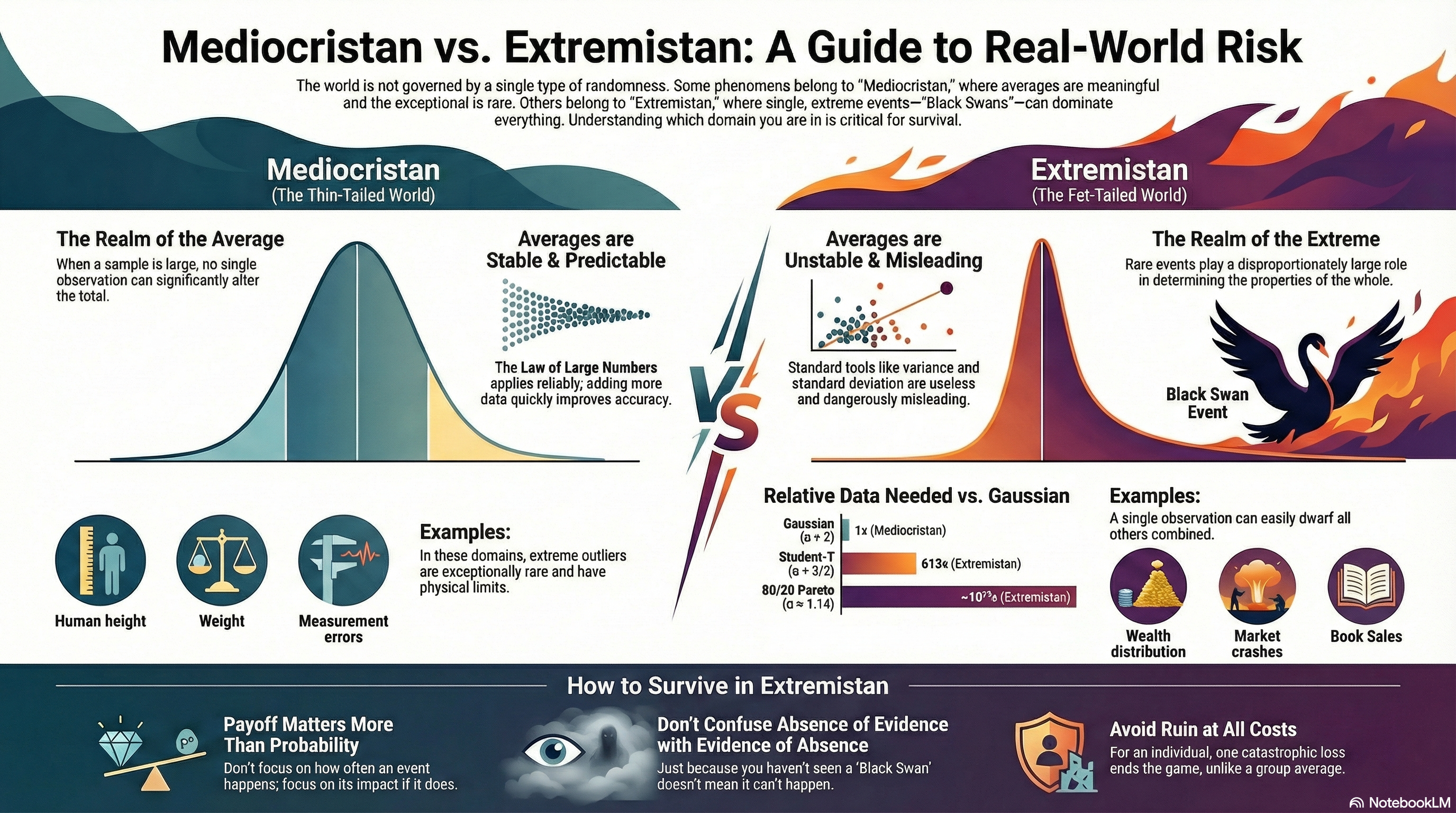
We don’t live in “Mediocristan” anymore.

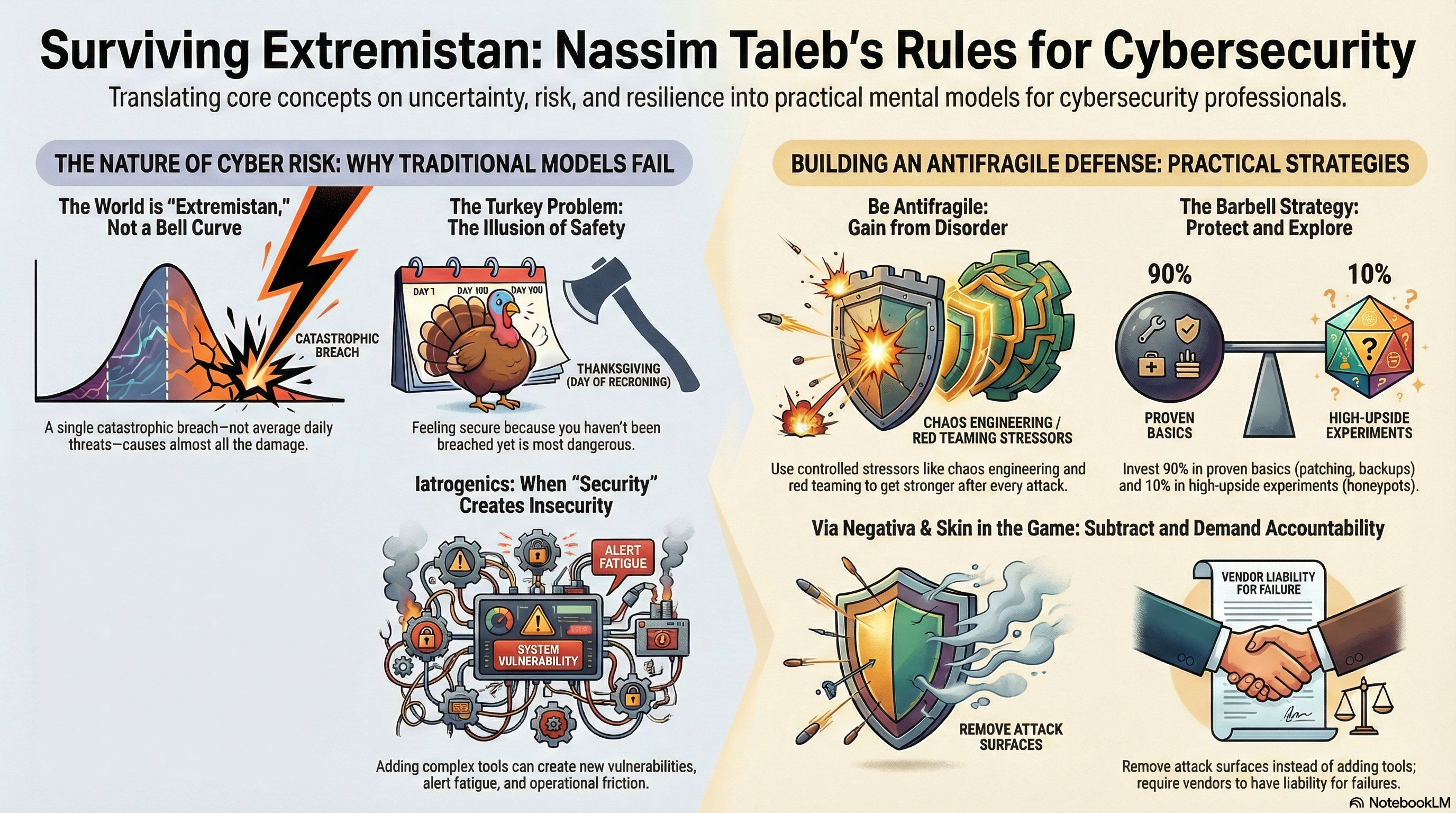
In the controlled world of Gaussian curves and predictable outcomes, most security strategies make sense—if you’re still living in the realm where human height and blood pressure are your biggest threats. But for cybersecurity practitioners, the real world looks more like “Extremistan”—the place where Black Swan events dominate, where a single breach can wipe out decades of effort, and where average behavior is not just irrelevant, it’s dangerously misleading.

That’s the world Nassim Taleb described in The Black Swan, and it’s the reality we live in every day as defenders of digital infrastructure.

And if you’re using traditional models to manage cyber risk in this world, you’re probably optimizing for failure.


From Robust to Antifragile: Why Survival Isn’t Enough

Taleb coined the term antifragile to describe systems that don’t just resist chaos—they improve because of it. It’s the difference between a glass that doesn’t break and a muscle that gets stronger after lifting heavy weight. Most security programs are designed to be robust—resilient under stress. But that’s not enough. Resilience still assumes a limit. Once you pass the red line, you break.

To thrive in Extremistan, we need to design systems that learn from stress, that benefit from volatility, and that get stronger every time they get punched in the face.


1. Security by Subtraction (Via Negativa)

In medicine, there’s a term called iatrogenics—harm caused by the treatment itself. Sound familiar? That’s what happens when a security stack becomes so bloated with overlapping agents, dashboards, and tools that it becomes its own attack surface.

Antifragile security starts with subtraction:

  • Decommission Legacy: Every unmonitored web server from 2009 you forgot about is a potential ruin event.

  • Minimize Privilege: If your domain admin group has more people than your bowling team, you’re in trouble.

  • Simplify, Aggressively: Complexity is fragility disguised as maturity.

Less isn’t just more—it’s safer.


2. Controlled Stressors: Hormesis for Systems

An immune system kept in a bubble weakens. One that’s constantly challenged becomes elite. The same goes for cyber defenses.

  • Red Teams as Immune Response Training: Stop treating red teams as adversaries. They’re your vaccine.

  • Chaos Engineering: Don’t just test recovery—induce failure. Intentionally break things. Break them often. Learn faster than your adversaries.

  • Study the Misses: Every alert that almost mattered is gold dust. Train on it.

This isn’t about drills. It’s about muscle memory.


3. The Barbell Strategy: Secure Boring + Wild Bets

One of Taleb’s more underappreciated ideas is the barbell strategy: extreme conservatism on one end, high-risk/high-reward exploration on the other. Nothing in the middle.

  • 90%: Lock down the basics. IG1 controls. Patching. Backups. Privilege minimization. The boring stuff that wins wars.

  • 10%: Invest in weird, bleeding-edge experiments. Behavioral traps. Decoy data. Offensive ML. This is your lab.

Never bet on “average” security tools. That’s how you end up with a little risk everywhere—and a big hole somewhere you didn’t expect.


4. Skin in the Game: Incentives That Matter

When the people making decisions don’t bear the cost of failure, systems rot from within.

  • Vendors Must Own Risk: If your EDR vendor can disclaim all liability for failure, they’ve got no skin in your game.

  • On-Call Developers: If they wrote the code, they stay up with it. The best SLAs are fear and pride.

  • Risk-Based Compensation: CISOs must have financial incentives tied to post-incident impact, not checkbox compliance.

Fragility flourishes in environments where blame is diffuse and consequences are someone else’s problem.


5. Tail Risk and the Absorbing Barrier

Most CIS frameworks are built to mitigate average risk. But in Extremistan, ruin is what you plan for. The difference? A thousand phishing attempts don’t matter if one spear phish opens the gates.

  • Design for Blast Radius: Assume breach. Isolate domains. Install circuit breakers in your architecture.

  • Plan for the Unseen: Run tabletop exercises where the scenario doesn’t exist in your IR plan. If that makes your team uncomfortable, you’re doing it right.

  • Offline Backups Are Sacred: If they touch the internet, they’re not a backup—they’re bait.

There are no do-overs after ruin.


6. Beware the Turkey Problem

A turkey fed every day believes the butcher loves him—until Thanksgiving. A network with zero incidents for three years might just be a turkey.

  • Continuous Validation, Not Annual Audits: Trust your controls as much as you test them.

  • Negative Empiricism: Don’t learn from the shiny success story. Learn from the company that got wrecked.

You are not safe because nothing has happened. You are safe when you have survived what should have killed you.


Unnamed 6

Closing Thought: Security as Immune System, Not Armor

If you’re still thinking of your security stack as armor—hard shell, resist all—you’re already brittle. Instead, think biology. Think immune system. Think antifragility.

Expose your system to small, survivable threats. Learn from every wound. Build muscle. Be lean, not large. Be hard to kill, not hard to touch.

In a world governed by Extremistan, the best cybersecurity strategy isn’t to avoid failure—it’s to get stronger every time you fail.

Because someday, something will break through. The question is—will you be better afterward, or gone completely?


* AI tools were used as a research assistant for this content, but human moderation and writing are also included. The included images are AI-generated.
Identity Security Is Now the #1 Attack Vector — and Most Organizations Are Not Architected for It

How identity became the new perimeter

In 2025, identity is no longer simply a control at the edge of your network — it is the perimeter. As organizations adopt SaaS‑first strategies, hybrid work, remote access, and cloud identity federation, the traditional notion of network perimeter has collapsed. What remains is the identity layer — and attackers know it.

Today’s breaches often don’t involve malware, brute‑force password cracking, or noisy exploits. Instead, adversaries leverage stolen tokens, hijacked sessions, and compromised identity‑provider (IdP) infrastructure — all while appearing as legitimate users.

SyntheticID

That shift makes identity security not just another checkbox — but the foundation of enterprise defense.


Failure points of modern identity stacks

Even organizations that have deployed defenses like multi‑factor authentication (MFA), single sign‑on (SSO), and conditional access policies often remain vulnerable. Why? Because many identity architectures are:

  • Overly permissive — long‑lived tokens, excessive scopes, and flat permissioning.

  • Fragmented — identity data is scattered across IdPs, directories, cloud apps, and shadow IT.

  • Blind to session risk — session tokens are often unmonitored, allowing token theft and session hijacking to go unnoticed.

  • Incompatible with modern infrastructure — legacy IAMs often can’t handle dynamic, cloud-native, or hybrid environments.

In short: you can check off MFA, SSO, and PAM, and still be wide open to identity‑based compromise.


Token‑based attack: A walkthrough

Consider this realistic scenario:

  1. An employee logs in using SSO. The browser receives a token (OAuth or session cookie).

  2. A phishing attack — or adversary-in-the-middle (AiTM) — captures that token after the user completes MFA.

  3. The attacker imports the token into their browser and now impersonates the user — bypassing MFA.

  4. The attacker explores internal SaaS tools, installs backdoor OAuth apps, and escalates privileges — all without tripping alarms.

A single stolen token can unlock everything.


Building identity security from first principles

The modern identity stack must be redesigned around the realities of today’s attacks:

  • Identity is the perimeter — access should flow through hardened, monitored, and policy-enforced IdPs.

  • Session analytics is a must — don’t just authenticate at login. Monitor behavior continuously throughout the session.

  • Token lifecycle control — enforce short token lifetimes, minimize scopes, and revoke unused sessions immediately.

  • Unify the view — consolidate visibility across all human and machine identities, across SaaS and cloud.


How to secure identity for SaaS-first orgs

For SaaS-heavy and hybrid-cloud organizations, these practices are key:

  • Use a secure, enterprise-grade IdP

  • Implement phishing-resistant MFA (e.g., hardware keys, passkeys)

  • Enforce context-aware access policies

  • Monitor and analyze every identity session in real time

  • Treat machine identities as equal in risk and value to human users


Blueprint: continuous identity hygiene

Use systems thinking to model identity as an interconnected ecosystem:

  • Pareto principle — 20% of misconfigurations lead to 80% of breaches.

  • Inversion — map how you would attack your identity infrastructure.

  • Compounding — small permissions or weak tokens can escalate rapidly.

Core practices:

  • Short-lived tokens and ephemeral access

  • Just-in-time and least privilege permissions

  • Session monitoring and token revocation pipelines

  • OAuth and SSO app inventory and control

  • Unified identity visibility across environments


30‑Day Identity Rationalization Action Plan

Day Action
1–3 Inventory all identities — human, machine, and service.
4–7 Harden your IdP; audit key management.
8–14 Enforce phishing-resistant MFA organization-wide.
15–18 Apply risk-based access policies.
19–22 Revoke stale or long-lived tokens.
23–26 Deploy session monitoring and anomaly detection.
27–30 Audit and rationalize privileges and unused accounts.

More Information

If you’re unsure where to start, ask these questions:

  • How many active OAuth grants are in our environment?

  • Are we monitoring session behavior after login?

  • When was the last identity privilege audit performed?

  • Can we detect token theft in real time?

If any of those are difficult to answer — you’re not alone. Most organizations aren’t architected to handle identity as the new perimeter. But the gap between today’s risks and tomorrow’s solutions is closing fast — and the time to address it is now.


Help from MicroSolved, Inc.

At MicroSolved, Inc., we’ve helped organizations evolve their identity security models for more than 30 years. Our experts can:

  • Audit your current identity architecture and token hygiene

  • Map identity-related escalation paths

  • Deploy behavioral identity monitoring and continuous session analytics

  • Coach your team on modern IAM design principles

  • Build a 90-day roadmap for secure, unified identity operations

Let’s work together to harden identity before it becomes your organization’s softest target. Contact us at microsolved.com to start your identity security assessment.


References

  1. BankInfoSecurity – “Identity Under Siege: Enterprises Are Feeling It”

  2. SecurityReviewMag – “Identity Security in 2025”

  3. CyberArk – “Lurking Threats in Post-Authentication Sessions”

  4. Kaseya – “What Is Token Theft?”

  5. CrowdStrike – “Identity Attacks in the Wild”

  6. Wing Security – “How to Minimize Identity-Based Attacks in SaaS”

  7. SentinelOne – “Identity Provider Security”

  8. Thales Group – “What Is Identity Security?”

  9. System4u – “Identity Security in 2025: What’s Evolving?”

  10. DoControl – “How to Stop Compromised Account Attacks in SaaS”


* AI tools were used as a research assistant for this content, but human moderation and writing are also included. The included images are AI-generated.

Non-Human Identities & Agentic Risk:

The Security Implications of Autonomous AI Agents in the Enterprise

Over the last year, we’ve watched autonomous AI agents — not the chatbots everyone experimented with in 2023, but actual agentic systems capable of chaining tasks, managing workflows, and making decisions without a human in the loop — move from experimental toys into enterprise production. Quietly, and often without much governance, they’re being wired into pipelines, automation stacks, customer-facing systems, and even security operations.

And we’re treating them like they’re just another tool.

They’re not.

These systems represent a new class of non-human identity: entities that act with intent, hold credentials, make requests, trigger processes, and influence outcomes in ways we previously only associated with humans or tightly-scoped service accounts. But unlike a cron job or a daemon, today’s AI agents are capable of learning, improvising, escalating tasks, and — in some cases — creating new agents on their own.

That means our security model, which is still overwhelmingly human-centric, is about to be stress-tested in a very real way.

Let’s unpack what that means for organizations.

WorkingWithRobot1


Why AI Agents Must Be Treated as Identities

Historically, enterprises have understood identity in human terms: employees, contractors, customers. Then we added service accounts, bots, workloads, and machine identities. Each expansion required a shift in thinking.

Agentic AI forces the next shift.

These systems:

  • Authenticate to APIs and services

  • Consume and produce sensitive data

  • Modify cloud or on-prem environments

  • Take autonomous action based on internal logic or model inference

  • Operate 24/7 without oversight

If that doesn’t describe an “identity,” nothing does.

But unlike service accounts, agentic systems have:

  • Adaptive autonomy – they make novel decisions, not just predictable ones

  • Stateful memory – they remember and leverage data over time

  • Dynamic scope – their “job description” can expand as they chain tasks

  • Creation abilities – some agents can spawn additional agents or processes

This creates an identity that behaves more like an intern with root access than a script with scoped permissions.

That’s where the trouble starts.


What Could Go Wrong? (Spoiler: A Lot)

Most organizations don’t yet have guardrails for agentic behavior. When these systems fail — or are manipulated — the impacts can be immediate and severe.

1. Credential Misuse

Agents often need API keys, tokens, or delegated access.
Developers tend to over-provision them “just to get things working,” and suddenly you’ve got a non-human identity with enough privilege to move laterally or access sensitive datasets.

2. Data Leakage

Many agents interact with third-party models or hosted pipelines.
If prompts or context windows inadvertently contain sensitive data, that information can be exposed, logged externally, or retained in ways the enterprise can’t control.

3. Shadow-Agent Proliferation

We’ve already seen teams quietly spin up ChatGPT agents, GitHub Copilot agents, workflow bots, or LangChain automations.

In 2025, shadow IT has a new frontier:
Shadow agents — autonomous systems no one approved, no one monitors, and no one even knows exist.

4. Supply-Chain Manipulation

Agents pulling from package repositories or external APIs can be tricked into consuming malicious components. Worse, an autonomous agent that “helpfully” recommends or installs updates can unintentionally introduce compromised dependencies.

5. Runaway Autonomy

While “rogue AI” sounds sci-fi, in practice it looks like:

  • An agent looping transactions

  • Creating new processes to complete a misinterpreted task

  • Auto-retrying in ways that amplify an error

  • Overwriting human input because the policy didn’t explicitly forbid it

Think of it as automation behaving badly — only faster, more creatively, and at scale.


A Framework for Agentic Hygiene

Organizations need a structured approach to securing autonomous agents. Here’s a practical baseline:

1. Identity Management

Treat agents as first-class citizens in your IAM strategy:

  • Unique identities

  • Managed lifecycle

  • Documented ownership

  • Distinct authentication mechanisms

2. Access Control

Least privilege isn’t optional — it’s survival.
And it must be dynamic, since agents can change tasks rapidly.

3. Audit Trails

Every agent action must be:

  • Traceable

  • Logged

  • Attributable

Otherwise incident response becomes guesswork.

4. Privilege Segregation

Separate agents by:

  • Sensitivity of operations

  • Data domains

  • Functional responsibilities

An agent that reads sales reports shouldn’t also modify Kubernetes manifests.

5. Continuous Monitoring

Agents don’t sleep.
Your monitoring can’t either.

Watch for:

  • Unexpected behaviors

  • Novel API call patterns

  • Rapid-fire task creation

  • Changes to permissions

  • Self-modifying workflows

6. Kill-Switches

Every agent must have a:

  • Disable flag

  • Credential revocation mechanism

  • Circuit breaker for runaway execution

If you can’t stop it instantly, you don’t control it.

7. Governance

Define:

  • Approval processes for new agents

  • Documentation expectations

  • Testing and sandboxing requirements

  • Security validation prior to deployment

Governance is what prevents “developer convenience” from becoming “enterprise catastrophe.”


Who Owns Agent Security?

This is one of the emerging fault lines inside organizations. Agentic AI crosses traditional silos:

  • Dev teams build them

  • Ops teams run them

  • Security teams are expected to secure them

  • Compliance teams have no framework to govern them

The most successful organizations will assign ownership to a cross-functional group — a hybrid of DevSecOps, architecture, and governance.

Someone must be accountable for every agent’s creation, operation, and retirement.
Otherwise, you’ll have a thousand autonomous processes wandering around your enterprise by 2026, and you’ll only know about a few dozen of them.


A Roadmap for Enterprise Readiness

Short-Term (0–6 months)

  • Inventory existing agents (you have more than you think).

  • Assign identity profiles and owners.

  • Implement basic least-privilege controls.

  • Create kill-switches for all agents in production.

Medium-Term (6–18 months)

  • Formalize agent governance processes.

  • Build centralized logging and monitoring.

  • Standardize onboarding/offboarding workflows for agents.

  • Assess all AI-related supply-chain dependencies.

Long-Term (18+ months)

  • Integrate agentic security into enterprise IAM.

  • Establish continuous red-team testing for agentic behavior.

  • Harden infrastructure for autonomous decision-making systems.

  • Prepare for regulatory obligations around non-human identities.

Agentic AI is not a fad — it’s a structural shift in how automation works.
Enterprises that prepare now will weather the change. Those that don’t will be chasing agents they never knew existed.


More Info & Help

If your organization is beginning to deploy AI agents — or if you suspect shadow agents are already proliferating inside your environment — now is the time to get ahead of the risk.

MicroSolved can help.
From enterprise AI governance to agentic threat modeling, identity management, and red-team evaluations of AI-driven workflows, MSI is already working with organizations to secure autonomous systems before they become tomorrow’s incident reports.

For more information or to talk through your environment, reach out to MicroSolved.
We’re here to help you build a safer, more resilient future.


* AI tools were used as a research assistant for this content, but human moderation and writing are also included. The included images are AI-generated.

The Zero Trust Scorecard: Tracking Culture, Compliance & KPIs

The Plateau: A CISO’s Zero Trust Dilemma

I met with a CISO last month who was stuck halfway up the Zero Trust mountain. Their team had invested in microsegmentation, MFA was everywhere, and cloud entitlements were tightened to the bone. Yet, adoption was stalling. Phishing clicks still happened. Developers were bypassing controls to “get things done.” And the board wanted proof their multi-million-dollar program was working.

This is the Zero Trust Plateau. Many organizations hit it. Deploying technologies is only the first leg of the journey. Sustaining Zero Trust requires cultural change, ongoing measurement, and the ability to course-correct quickly. Otherwise, you end up with a static architecture instead of a dynamic security posture.

This is where the Zero Trust Scorecard comes in.

ZeroTrustScorecard


Why Metrics Change the Game

Zero Trust isn’t a product. It’s a philosophy—and like any philosophy, its success depends on how people internalize and practice it over time. The challenge is that most organizations treat Zero Trust as a deployment project, not a continuous process.

Here’s what usually happens:

  • Post-deployment neglect – Once tools are live, metrics vanish. Nobody tracks if users adopt new patterns or if controls are working as intended.

  • Cultural resistance – Teams find workarounds. Admins disable controls in dev environments. Business units complain that “security is slowing us down.”

  • Invisible drift – Cloud configurations mutate. Entitlements creep back in. Suddenly, your Zero Trust posture isn’t so zero anymore.

This isn’t about buying more dashboards. It’s about designing a feedback loop that measures technical effectiveness, cultural adoption, and compliance drift—so you can see where to tune and improve. That’s the promise of the Scorecard.


The Zero Trust Scorecard Framework

A good Zero Trust Scorecard balances three domains:

  1. Cultural KPIs

  2. Technical KPIs

  3. Compliance KPIs

Let’s break them down.


🧠 Cultural KPIs: Measuring Adoption and Resistance

  • Stakeholder Adoption Rates
    Track how quickly and completely different business units adopt Zero Trust practices. For example:

    • % of developers using secure APIs instead of legacy connections.

    • % of employees logging in via SSO/MFA.

  • Training Completion & Engagement
    Zero Trust requires a mindset shift. Measure:

    • Security training completion rates (mandatory and voluntary).

    • Behavioral change: number of reported phishing emails per user.

  • Phishing Resistance
    Run regular phishing simulations. Watch for:

    • % of users clicking on simulated phishing emails.

    • Time to report suspicious messages.

Culture is the leading indicator. If people aren’t on board, your tech KPIs won’t matter for long.


⚙️ Technical KPIs: Verifying Your Architecture Works

  • Authentication Success Rates
    Monitor login success/failure patterns:

    • Are MFA denials increasing because of misconfiguration?

    • Are users attempting legacy protocols (e.g., NTLM, basic auth)?

  • Lateral Movement Detection
    Test whether microsegmentation and identity controls block lateral movement:

    • % of simulated attacker movement attempts blocked.

    • Number of policy violations detected in network flows.

  • Device Posture Compliance
    Check device health before granting access:

    • % of devices meeting patching and configuration baselines.

    • Remediation times for out-of-compliance devices.

These KPIs help answer: “Are our controls operating as designed?”


📜 Compliance KPIs: Staying Aligned and Audit-Ready

  • Audit Pass Rates
    Track the % of internal and external audits passed without exceptions.

  • Cloud Posture Drift
    Use tools like CSPM (Cloud Security Posture Management) to measure:

    • Number of critical misconfigurations over time.

    • Mean time to remediate drift.

  • Policy Exception Requests
    Monitor requests for policy exceptions. A high rate could signal usability issues or cultural resistance.

Compliance metrics keep regulators and leadership confident that Zero Trust isn’t just a slogan.


Building Your Zero Trust Scorecard

So how do you actually build and operationalize this?


🎯 1. Define Goals and Data Sources

Start with clear objectives for each domain:

  • Cultural: “Reduce phishing click rate by 50% in 6 months.”

  • Technical: “Block 90% of lateral movement attempts in purple team exercises.”

  • Compliance: “Achieve zero critical cloud misconfigurations within 90 days.”

Identify data sources: SIEM, identity providers (Okta, Azure AD), endpoint managers (Intune, JAMF), and security awareness platforms.


📊 2. Set Up Dashboards with Examples

Create dashboards that are consumable by non-technical audiences:

  • For executives: High-level trends—“Are we moving in the right direction?”

  • For security teams: Granular data—failed authentications, policy violations, device compliance.

Example Dashboard Widgets:

  • % of devices compliant with Zero Trust posture.

  • Phishing click rates by department.

  • Audit exceptions over time.

Visuals matter. Use red/yellow/green indicators to show where attention is needed.


📅 3. Establish Cadence and Communication

A Scorecard is useless if nobody sees it. Embed it into your organizational rhythm:

  • Weekly: Security team reviews technical KPIs.

  • Monthly: Present Scorecard to business unit leads.

  • Quarterly: Share executive summary with the board.

Use these touchpoints to celebrate wins, address resistance, and prioritize remediation.


Why It Works

Zero Trust isn’t static. Threats evolve, and so do people. The Scorecard gives you a living view of your Zero Trust program—cultural, technical, and compliance health in one place.

It keeps you from becoming the CISO stuck halfway up the mountain.

Because in Zero Trust, there’s no summit. Only the climb.

Questions and Getting Help

Want to discuss ways to progress and overcome the plateau? Need help with planning, building, managing, or monitoring Zero Trust environments? 

Just reach out to MicroSolved for a no-hassle, no-pressure discussion of your needs and our capabilities. 

Phone: +1.614.351.1237 or Email: info@microsolved.com


* AI tools were used as a research assistant for this content, but human moderation and writing are also included. The included images are AI-generated.

How to Secure Your SOC’s AI Agents: A Practical Guide to Orchestration and Trust

Automation Gone Awry: Can We Trust Our AI Agents?

Picture this: it’s 2 AM, and your SOC’s AI triage agent confidently flags a critical vulnerability in your core application stack. It even auto-generates a remediation script to patch the issue. The team—running lean during the night shift—trusts the agent’s output and pushes the change. Moments later, key services go dark. Customers start calling. Revenue grinds to a halt.

AITeamMember

This isn’t science fiction. We’ve seen AI agents in SOCs produce flawed methodologies, hallucinate mitigation steps, or run outdated tools. Bad scripts, incomplete fixes, and overly confident recommendations can create as much risk as the threats they’re meant to contain.

As SOCs lean harder on agentic AI for triage, enrichment, and automation, we face a pressing question: how much trust should we place in these systems, and how do we secure them before they secure us?


Why This Matters Now

SOCs are caught in a perfect storm: rising attack volumes, an acute cybersecurity talent shortage, and ever-tightening budgets. Enter AI agents—promising to scale triage, correlate threat data, enrich findings, and even generate mitigation scripts at machine speed. It’s no wonder so many SOCs are leaning into agentic AI to do more with less.

But there’s a catch. These systems are far from infallible. We’ve already seen agents hallucinate mitigation steps, recommend outdated tools, or produce complex scripts that completely miss the mark. The biggest risk isn’t the AI itself—it’s the temptation to treat its advice as gospel. Too often, overburdened analysts assume “the machine knows best” and push changes without proper validation.

To be clear, AI agents are remarkably capable—far more so than many realize. But even as they grow more autonomous, human vigilance remains critical. The question is: how do we structure our SOCs to safely orchestrate these agents without letting efficiency undermine security?


Securing AI-SOC Orchestration: A Practical Framework

1. Trust Boundaries: Start Low, Build Slowly

Treat your SOC’s AI agents like junior analysts—or interns on their first day. Just because they’re fast and confident doesn’t mean they’re trustworthy. Start with low privileges and limited autonomy, then expand access only as they demonstrate reliability under supervision.

Establish a graduated trust model:

  • New AI use cases should default to read-only or recommendation mode.

  • Require human validation for all changes affecting production systems or critical workflows.

  • Slowly introduce automation only for tasks that are well-understood, extensively tested, and easily reversible.

This isn’t about mistrusting AI—it’s about understanding its limits. Even the most advanced agent can hallucinate or misinterpret context. SOC leaders must create clear orchestration policies defining where automation ends and human oversight begins.

2. Failure Modes: Expect Mistakes, Contain the Blast Radius

AI agents in SOCs can—and will—fail. The question isn’t if, but how badly. Among the most common failure modes:

  • Incorrect or incomplete automation that doesn’t fully mitigate the issue.

  • Buggy or broken code generated by the AI, particularly in complex scripts.

  • Overconfidence in recommendations due to lack of QA or testing pipelines.

To mitigate these risks, design your AI workflows with failure in mind:

  • Sandbox all AI-generated actions before they touch production.

  • Build in human QA gates, where analysts review and approve code, configurations, or remediation steps.

  • Employ ensemble validation, where multiple AI agents (or models) cross-check each other’s outputs to assess trustworthiness and completeness.

  • Adopt the mindset of “assume the AI is wrong until proven otherwise” and enforce risk management controls accordingly.

Fail-safe orchestration isn’t about stopping mistakes—it’s about limiting their scope and catching them before they cause damage.

3. Governance & Monitoring: Watch the Watchers

Securing your SOC’s AI isn’t just about technical controls—it’s about governance. To orchestrate AI agents safely, you need robust oversight mechanisms that hold them accountable:

  • Audit Trails: Log every AI action, decision, and recommendation. If an agent produces bad advice or buggy code, you need the ability to trace it back, understand why it failed, and refine future prompts or models.

  • Escalation Policies: Define clear thresholds for when AI can act autonomously and when it must escalate to a human analyst. Critical applications and high-risk workflows should always require manual intervention.

  • Continuous Monitoring: Use observability tools to monitor AI pipelines in real time. Treat AI agents as living systems—they need to be tuned, updated, and occasionally reined in as they interact with evolving environments.

Governance ensures your AI doesn’t just work—it works within the parameters your SOC defines. In the end, oversight isn’t optional. It’s the foundation of trust.


Harden Your AI-SOC Today: An Implementation Guide

Ready to secure your AI agents? Start here.

✅ Workflow Risk Assessment Checklist

  • Inventory all current AI use cases and map their access levels.

  • Identify workflows where automation touches production systems—flag these as high risk.

  • Review permissions and enforce least privilege for every agent.

✅ Observability Tools for AI Pipelines

  • Deploy monitoring systems that track AI inputs, outputs, and decision paths in real time.

  • Set up alerts for anomalies, such as sudden shifts in recommendations or output patterns.

✅ Tabletop AI-Failure Simulations

  • Run tabletop exercises simulating AI hallucinations, buggy code deployments, and prompt injection attacks.

  • Carefully inspect all AI inputs and outputs during these drills—look for edge cases and unexpected behaviors.

  • Involve your entire SOC team to stress-test oversight processes and escalation paths.

✅ Build a Trust Ladder

  • Treat AI agents as interns: start them with zero trust, then grant privileges only as they prove themselves through validation and rigorous QA.

  • Beware the sunk cost fallacy. If an agent consistently fails to deliver safe, reliable outcomes, pull the plug. It’s better to lose automation than compromise your environment.

Securing your AI isn’t about slowing down innovation—it’s about building the foundations to scale safely.


Failures and Fixes: Lessons from the Field

Failures

  • Naïve Legacy Protocol Removal: An AI-based remediation agent identifies insecure Telnet usage and “remediates” it by deleting the Telnet reference but ignores dependencies across the codebase—breaking upstream systems and halting deployments.

  • Buggy AI-Generated Scripts: A code-assist AI generates remediation code for a complex vulnerability. When executed untested, the script crashes services and exposes insecure configurations.

Successes

  • Rapid Investigation Acceleration: One enterprise SOC introduced agentic workflows that automated repetitive tasks like data gathering and correlation. Investigations that once took 30 minutes now complete in under 5 minutes, with increased analyst confidence.

  • Intelligent Response at Scale: A global security team deployed AI-assisted systems that provided high-quality recommendations and significantly reduced time-to-response during active incidents.


Final Thoughts: Orchestrate With Caution, Scale With Confidence

AI agents are here to stay, and their potential in SOCs is undeniable. But trust in these systems isn’t a given—it’s earned. With careful orchestration, robust governance, and relentless vigilance, you can build an AI-enabled SOC that augments your team without introducing new risks.

In the end, securing your AI agents isn’t about holding them back. It’s about giving them the guardrails they need to scale your defenses safely.

For more info and help, contact MicroSolved, Inc. 

We’ve been working with SOCs and automation for several years, including AI solutions. Call +1.614.351.1237 or send us a message at info@microsolved.com for a stress-free discussion of our capabilities and your needs. 


* AI tools were used as a research assistant for this content, but human moderation and writing are also included. The included images are AI-generated.

How and Why to Use ChatGPT for Vendor Risk Management

Vendor risk management (VRM) is critical for organizations relying on third-party vendors. As businesses increasingly depend on external partners, ensuring these vendors maintain high security standards is vital. ChatGPT can enhance and streamline various aspects of VRM. Here’s how and why you should integrate ChatGPT into your vendor risk management process:

1. Automating Vendor Communications

ChatGPT can serve as a virtual assistant, automating repetitive communication tasks such as gathering information or following up on security policies.

Sample Prompt: “Draft an email requesting updated security documentation from Vendor A, specifically about their encryption practices.”
 
Example: ChatGPT can draft emails requesting updated security documentation from vendors, saving your team hours of manual labor.


2. Standardizing Vendor Questionnaires

ChatGPT can quickly generate standardized, consistent questionnaires tailored to your specific requirements, focusing on areas like cybersecurity, data privacy, and regulatory compliance.

Sample Prompt: “Create a vendor risk assessment questionnaire focusing on cybersecurity, data privacy, and regulatory compliance.”
 
Example: ChatGPT can create questionnaires that ensure all vendors are evaluated on the same criteria, maintaining consistency across your vendor portfolio.


3. Analyzing Vendor Responses

ChatGPT can process vendor responses quickly, summarizing risks, identifying gaps, and flagging compliance issues.

Sample Prompt: “Analyze the following vendor response to our cybersecurity questionnaire and summarize any potential risks.”
 
Example: ChatGPT can parse vendor responses and highlight key risks, saving your team from manually sifting through pages of documents.


4. Assessing Contract Terms and SLA Risks

ChatGPT can help identify gaps and vulnerabilities in vendor contracts, such as inadequate security terms or unclear penalties for non-compliance.

Sample Prompt: “Analyze the following vendor contract for any risks related to data security or regulatory compliance.”
 
Example: ChatGPT can analyze contracts for risks related to data security or regulatory compliance, ensuring your agreements adequately protect your organization.

5. Vendor Risk Management Reporting

ChatGPT can generate comprehensive risk reports, summarizing the status of key vendors, compliance issues, and potential risks in an easy-to-understand format.

Sample Prompt: “Create a vendor risk management report for Q3, focusing on our top 5 vendors and any recent compliance or security issues.”
 
Example: ChatGPT can create detailed quarterly reports on your top vendors’ risk profiles, providing decision-makers with quick insights.


More Info or Assistance?

While ChatGPT can drastically improve your VRM workflow, it’s just one piece of the puzzle. For a tailored, comprehensive VRM strategy, consider seeking expert guidance to build a robust program designed to protect your organization from third-party risks.

Incorporating ChatGPT into your VRM process helps you save time, increase accuracy, and proactively manage vendor risks. However, the right strategy and expert guidance are key to maximizing these benefits.


* AI tools were used as a research assistant for this content.

MicroSolved’s vCISO Services: A Smart Way to Boost Your Cybersecurity

Cybersecurity is always changing. Organizations need more than just security tools. They also need expert advice to deal with complex threats and weaknesses. This is where MSI’s vCISO services can help. MSI has a long history of being great at information security. Their vCISO services are made just for your organization to make your cybersecurity better and keep you safe from new threats.

Why MSI’s vCISO Services are a Good Choice:

  • Expert Advice: MSI’s vCISO services provide high-level guidance, helping align your cybersecurity plans with your business goals. MSI’s team has many years of experience, making sure your security policies follow industry standards and actually work against real threats.
  • Custom Risk Management: Every organization has different risks and needs. MSI customizes its vCISO services to fit your exact situation. Their services cover risk reviews, policy making, and compliance.
  • Proactive Threat Intelligence: MSI has advanced threat intelligence tools, like its HoneyPoint™ Security Server. vCISO services use real-time threat data in your security operations, helping you find, respond to, and reduce attacks.
  • Full Incident Response: If a security incident occurs, MSI’s vCISO services ensure that you respond quickly and effectively. They help plan incident response, hunt threats, and conduct practice exercises. This prepares your team for potential breaches and limits disruption to your work.
  • Long-term Partnership: MSI wants to build long relationships with clients. vCISO services are made to change as your organization changes. They provide constant improvement and adapt to new security challenges. MSI is committed to helping your security team do well over time.

Take Action

MSI’s vCISO services can improve your organization’s cybersecurity. You can get expert advice, proactive threat intelligence, and full risk management tailored to your needs.

Email info@microsolved.com to get started.

Using MSI’s vCISO services, you strengthen your cybersecurity and get a strategic partner to help you succeed long-term in the always-changing digital world. Reach out today and let MSI help guide your cybersecurity journey with confidence.


* AI tools were used as a research assistant for this content.